EasyManua.ls Logo

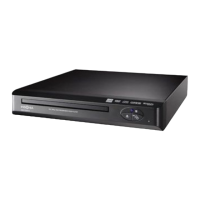
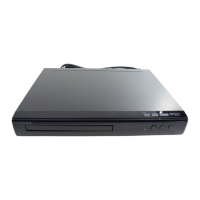
Insignia NS-D160A14 - User Manual

Insignia NS-D160A14
18 pages
Print Icon
To Next Page IconTo Next Page
Loading...
NS-D160A14
User Guide
DVD Player
Before using your new product, please read these instructions to prevent any damage.
12-1123_NS_D160A14_MAN_V1_EN .book Page i Wednesday, April 3, 2013 2:54 PM

Other manuals for Insignia NS-D160A14

Questions and Answers

  • C
    Corey MooreAug 18, 2025
    Why doesn't the resume function work on my Insignia NS-D160A14 DVD Player?
    • M
      Michael RiversAug 18, 2025
      The resume function might not work because if you press the STOP button twice, the resume information is erased. Also, some discs may not support the resume function.
  • J
    johnsonkevinAug 20, 2025
    Why does my Insignia NS-D160A14 DVD Player remote control not work?
    • J
      Jennifer WadeAug 21, 2025
      First, make sure you've removed the plastic sheet protecting the battery. Then, ensure you're pointing the remote at the sensor on the front of the DVD player, with no obstructions in between. If it still doesn't work, replace the battery. Also, avoid direct sunlight or bright light on the sensor.
  • D
    Dylan CarrilloAug 23, 2025
    Why is my Insignia NS-D160A14 DVD Player not turning on?
    • S
      Sean HuntAug 23, 2025
      Ensure the power cord is securely connected to the power outlet and that the power outlet is supplying power. Test the outlet by plugging in another device, like a lamp.
  • D
    David WillisAug 26, 2025
    What to do if there is no sound from Insignia NS-D160A14?
    • B
      Brian MooreAug 26, 2025
      First, make sure that your TV or home theater system is turned on and the sound isn't muted. Then, check that the volume is turned up and that your Insignia DVD player is correctly connected to the TV or home theater system.
  • M
    Melvin CruzAug 28, 2025
    How to fix no picture on Insignia NS-D160A14 DVD Player?
    • J
      jacksoncrystalAug 28, 2025
      Make sure that your TV is turned on and set to the correct video input for your Insignia DVD player. Also, ensure that your DVD player is correctly connected to the TV.
  • A
    Anna BurnsAug 30, 2025
    What to do if Insignia NS-D160A14 DVD Player playback does not start?
    • B
      bwolfAug 30, 2025
      Make sure the disc is face up in the disc tray and is not dirty. If it is dirty, see “Cleaning discs” on page13. Also, ensure the disc is not warped; try another disc to check.
  • M
    Marvin MuellerSep 1, 2025
    Why is the picture distorted on my Insignia DVD Player?
    • A
      Ashley AndersonSep 1, 2025
      Ensure the disc is clean and not scratched or warped. Try another DVD. Check that the TV is connected to the correct jacks on the DVD player and is set to the correct video input source. Interference from nearby devices may be the cause; try turning them off one at a time or moving them farther apart. As a last resort, turn off your DVD player, wait 10 seconds, then turn it back on.
  • K
    Kristen LewisSep 3, 2025
    Why does my Insignia NS-D160A14 DVD Player switch to standby mode?
    • S
      Susan SmithSep 3, 2025
      After a period of inactivity, your Insignia DVD player switches to standby mode automatically as a power-saving feature. If it switches unexpectedly, a safety device may have been activated. Press the (Standby/On) button on the front of your DVD player.
  • H
    Heather MossSep 6, 2025
    What to do if my Insignia NS-D160A14 DVD Player freezes when reading a disc?
    • S
      Stephanie HensleySep 6, 2025
      Make sure that the disc is not dirty. If your DVD player freezes again, the disc may contain some content that is not compatible with your DVD player. Do not try playing the disc with your DVD player. Reset your DVD player. For instructions, see “Resetting your DVD player” on page 13.
  • S
    Stephen MarksSep 8, 2025
    Why does my Insignia NS-D160A14 DVD Player open the disc tray when reading?
    • W
      wayne99Sep 8, 2025
      Make sure that the disc is not dirty. The disc may be incompatible with your DVD player, so try another disc. You can also try resetting your DVD player; see “Resetting your DVD player” on page 13 for instructions.

Summary

Important Safety Instructions

Detailed Warnings and Precautions

Covers specific hazards such as electric shock, lightning, replacement parts, safety checks, and power sources.

Remote Control Operation

Button Functions

Detailed explanation of each button's function on the DVD player remote control.

Connecting the DVD Player

Component Video Connection (Best)

Detailed steps for connecting the DVD player to a TV using component video cables for optimal quality.

Audio Connections and Player Operation

Disc Playback and Image Viewing

Details on playable disc types, playing discs, and viewing JPEG pictures on the DVD player.

DVD Player Operations

On-Screen Menu and Disc Information

Guide to accessing the on-screen menu and displaying disc information.

Player Setup Menus

Maintenance and Troubleshooting

Resetting and Problem Solving

Steps to reset the player and resolve common issues with power, picture, and sound.

Operation and Specifications

Warranty Information

90-Day Limited Warranty

Covers the terms, duration, and limitations of the product's 90-day limited warranty.

Insignia NS-D160A14 Specifications

General IconGeneral
BrandInsignia
ModelNS-D160A14
TypeDVD Player
Remote ControlYes
Progressive ScanYes
Power SupplyAC 120V, 60Hz
Disc Formats SupportedDVD, CD, CD-R, CD-RW
Video OutputComposite, Component
Audio OutputStereo

Related product manuals