EasyManua.ls Logo

Insignia NS-DH50WH9-C - User Manual

Insignia NS-DH50WH9-C
12 pages
Print Icon
To Next Page IconTo Next Page
Loading...
Before using your new product, please read these instructions to prevent any damage.
USER GUIDE
50 or 70 Pint
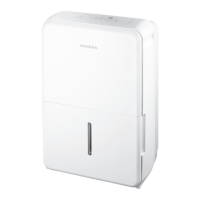
White Dehumidifier
NS-DH50WH9 / NS-DH70WH9 / NS-DH50WH9-C
NS-DH50WH9_NS-DH70WH9_NS-DH50WH9-C_17-0857_MAN_V1_EN.fm Page 1 Monday, December 18, 2017 3:01 PM

Questions and Answers

  • C
    Catherine RoachAug 14, 2025
    What to do if the bucket is full on Insignia Dehumidifier?
    • S
      Stephanie BrennanAug 14, 2025
      If your Insignia Dehumidifier displays a message indicating that the bucket is full or not correctly positioned, the solution is simple: empty the bucket and ensure it is placed back into the correct position.
  • A
    April SandersAug 17, 2025
    What to do if Insignia Dehumidifier says bucket is not in the correct position?
    • K
      Katie BurtonAug 17, 2025
      If your Insignia Dehumidifier shows an error code indicating that the bucket is removed or not in the correct position, make sure to replace the bucket in the correct position. Note that this code is displayed only on units that are equipped with the pump feature.
  • D
    david80Aug 20, 2025
    What to do if my Insignia Dehumidifier shows a humidity sensor error?
    • V
      Victoria MortonAug 21, 2025
      To address the humidity sensor error on your Insignia Dehumidifier, unplug the unit and then plug it back in. If the error continues after doing this, you should contact Customer Service for further assistance.
  • S
    Sandra RobertsAug 25, 2025
    What to do if my Insignia Dehumidifier shows evaporator tube temperature sensor error?
    • C
      christopher16Aug 25, 2025
      To fix the evaporator tube temperature sensor error on your Insignia Dehumidifier, unplug it, and then plug it back in. If the error message still appears, contact Customer Service.
  • J
    juliewallaceAug 27, 2025
    Why is my Insignia dehumidifier not drying the air properly?
    • J
      Jerry RamseyAug 27, 2025
      Your Insignia dehumidifier may not be drying the air adequately for several reasons. Ensure the unit has enough time to remove moisture. Check that curtains, blinds, or furniture aren't blocking the front or back. Try lowering the humidity level setting. Confirm all doors, windows, and openings are closed. The room temperature should be above 41º F (5º C), and there should not be a water vapor source present.
  • A
    Amy EvansAug 30, 2025
    What to do if my Insignia dehumidifier does not start?
    • G
      George MorrisonAug 30, 2025
      If your Insignia dehumidifier isn't starting, first ensure it's properly plugged in. Next, check that the water bucket is correctly positioned. Also, verify if the water bucket is full and empty it if needed. Confirm the set humidity level hasn't been reached. Finally, inspect the house fuse or circuit breaker box.
  • T
    trogersSep 3, 2025
    Why does my Insignia dehumidifier make a loud noise?
    • L
      Lisa CoxSep 3, 2025
      An Insignia dehumidifier might make a loud noise for a few reasons. Ensure the air filter is clean; if dirty, clean it. Also, check that the dehumidifier is upright on a level floor. Note that the dehumidifier may sound loud for the first few minutes as the compressor starts.
  • S
    Steven BarnesSep 6, 2025
    What to do if there is water on the floor from my Insignia dehumidifier?
    • J
      John WhiteSep 6, 2025
      If you find water on the floor near your Insignia dehumidifier, and you're using the water bucket, ensure the back drain plug is securely in place. If you're using a drain hose, verify that the hose is properly and securely connected to the dehumidifier.
  • D
    Dawn LopezSep 9, 2025
    Why does my Insignia dehumidifier make a gurgling noise?
    • J
      Joan BellSep 10, 2025
      If your Insignia dehumidifier is making a gurgling noise, make sure that it is upright and placed on a level floor.

Summary

IMPORTANT SAFETY INSTRUCTIONS

General Safety Precautions

Essential safety guidelines to prevent electric shock, fire, and product damage.

Grounding Requirement

Control Panel

Control Panel Overview

Explains the function of each button and LED indicator on the control panel.

Before Using Your Dehumidifier

Using Your Dehumidifier

Maintaining Your Dehumidifier

Troubleshooting

Common Problems and Solutions

Addresses issues like unit not starting, poor performance, or noise.

Understanding LED Display Codes

Explains the meaning of error and status codes shown on the LED display.

Specifications

Insignia NS-DH50WH9-C Specifications

General IconGeneral
BrandInsignia
ModelNS-DH50WH9-C
TypeDehumidifier
Water Tank Capacity1.6 Gallons
Energy Star CertifiedYes
Noise Level51 dB
Coverage AreaUp to 4500 sq. ft.
Power SourceCorded Electric
Voltage115 volts
ColorWhite
Capacity50 pints

Related product manuals