Getting Started
F/C Light
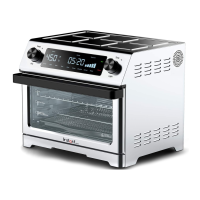
Control Panel
The Omni Toaster Oven control panel features intuitive touch screen controls
in an LED display, as well as a left dial that controls the Temperature and
Fahrenheit/ Celsius, and a right dial that controls the cooking time and the
cooking chamber light.
1 Display
• Cooking status indicators – Preheating/Cooking/Keep Warm
• Temperature
• # of toast/bagel slices
• Cooking time
• Toasting level
• Smart Programs – select from 7 Smart Programs that provide preset
• Start
• Cancel
2 Temp -/+ dial
• Fahrenheit/Celsius dial
3 Time -/+ dial
• Light dial
3
2
1
10

 To Next Page
 Loading...