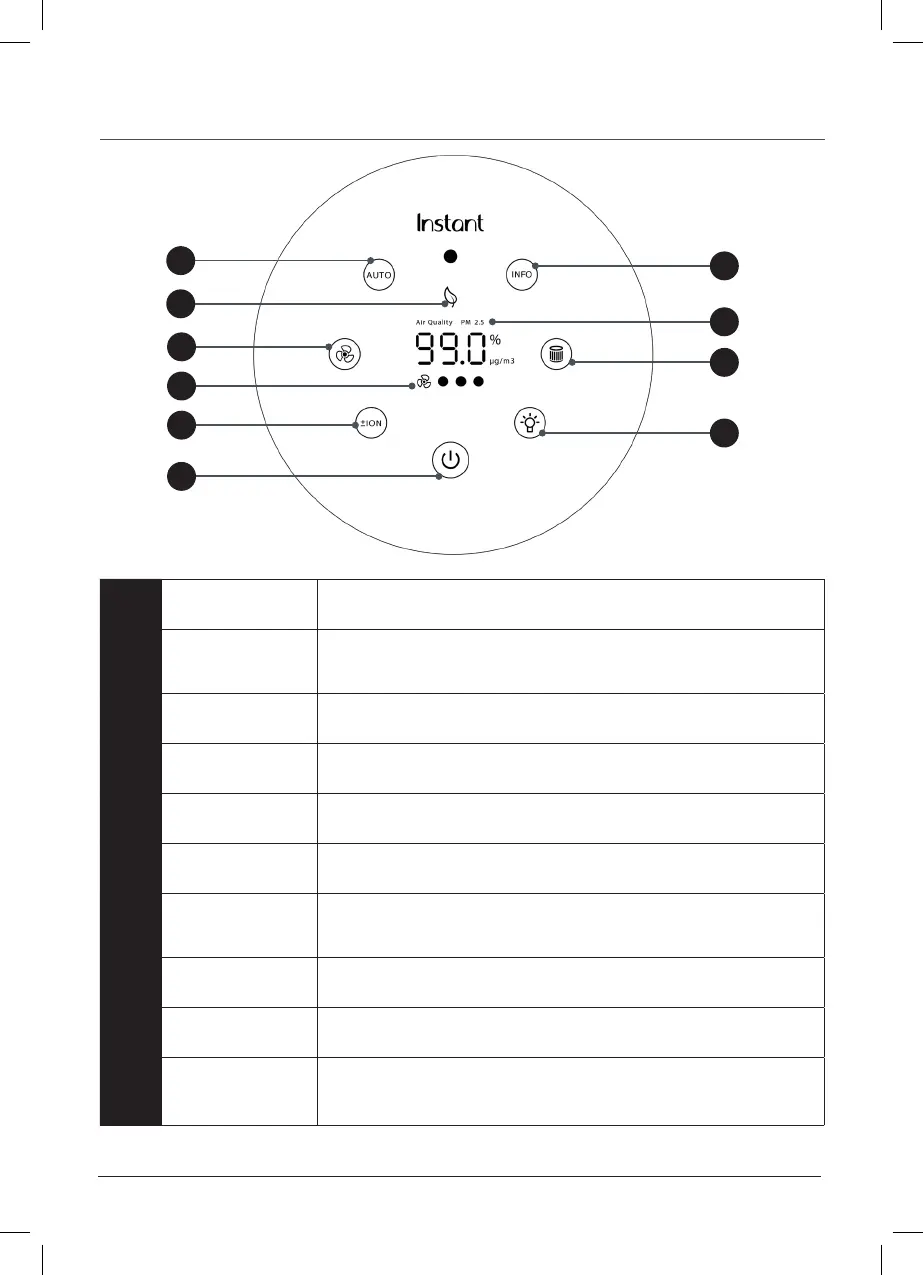
Control panel
instantbrands.co.uk | 5
1 Power
Touch to turn unit ON or OFF
2 Auto
When lit, unit is in Auto operation
Touch to turn Auto operation ON and OFF
3 Eco
When lit, unit is in energy-saving Economy or Eco mode
4 Light
Touchtoswitchbetweenlightlevels(0%,20%,60%,100%)
5 Fan
Touch to switch between fan levels - overrides Auto operation
6 Fan Speed
Indicates fan level (low, medium, high)
7 Filter
Whenthelightblinksorange,lterneedsreplacement
Touchandholdfor3secondstoresetafteryou’vereplacedlter
8 Plasma Ion
Touch to turn plasma ion operation ON or OFF
9 AQ Info*
Touch to switch between Air Quality displays
10
Air Quality
Indicator*
Displays either Air Quality or Particulate Matter (PM2.5) ratings
*Not available on AP100 models.
4
7
9
10
3
5
2
8
6
1



 To Next Page