2
I. Quick Start Guide
Congratulations! You have acquired a high quality cooling unit. Your INTARBLOCK and INTARTOP
units are specially designed to equip positive temperatura cold romos in the range from -5ºC (23ºF) to
+10 ºC (50ºF), and from -15ºC (5ºF) to -25ºC (13ºF), depending on the range.
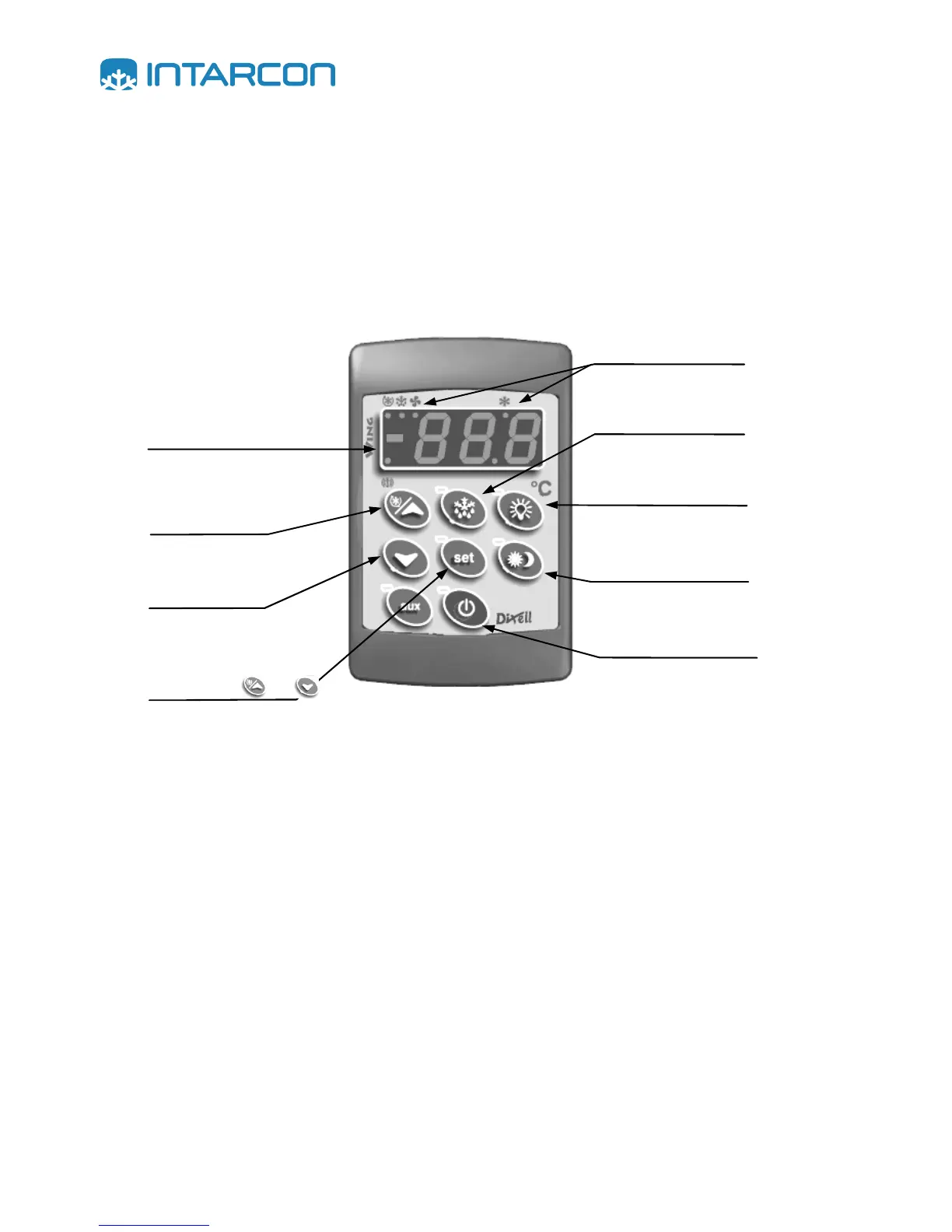
Once installed, your INTARSPLIT unit can be fully operated from the remote keyboard. The control
keyboard has the following functions and characteristics.
The unit has four operation modes:
Refrigeration mode.- this is the normal operation mode. The display shows the room temperature
and by pressing the set key the target temperature is shown. During the operation the electronic
control keeps a record of the maximum and minimum room temperature ever measured, which can be
consulted at any time.
Defrost mode.- the time on time your unit will switch to the defrost mode to eliminate the frost that has
formed on the evaporator. You can also force a defrost cycle by pressing the corresponding key.
Fast cooling mode.- If you like you can activate this operation mode during the start-up of the cold
room. The unit will run continuously for the preset time in parameter “CCt”, even beyond the target
temperature.
Energy saving mode.- If you like you can activate or deactivate this operation mode to save energy
during the night or when the room will stay closed for a long time. By activating this function the target
temperature is increased according to preset value in parameter “HES”.
Press for 3 seconds
to



 To Next Page