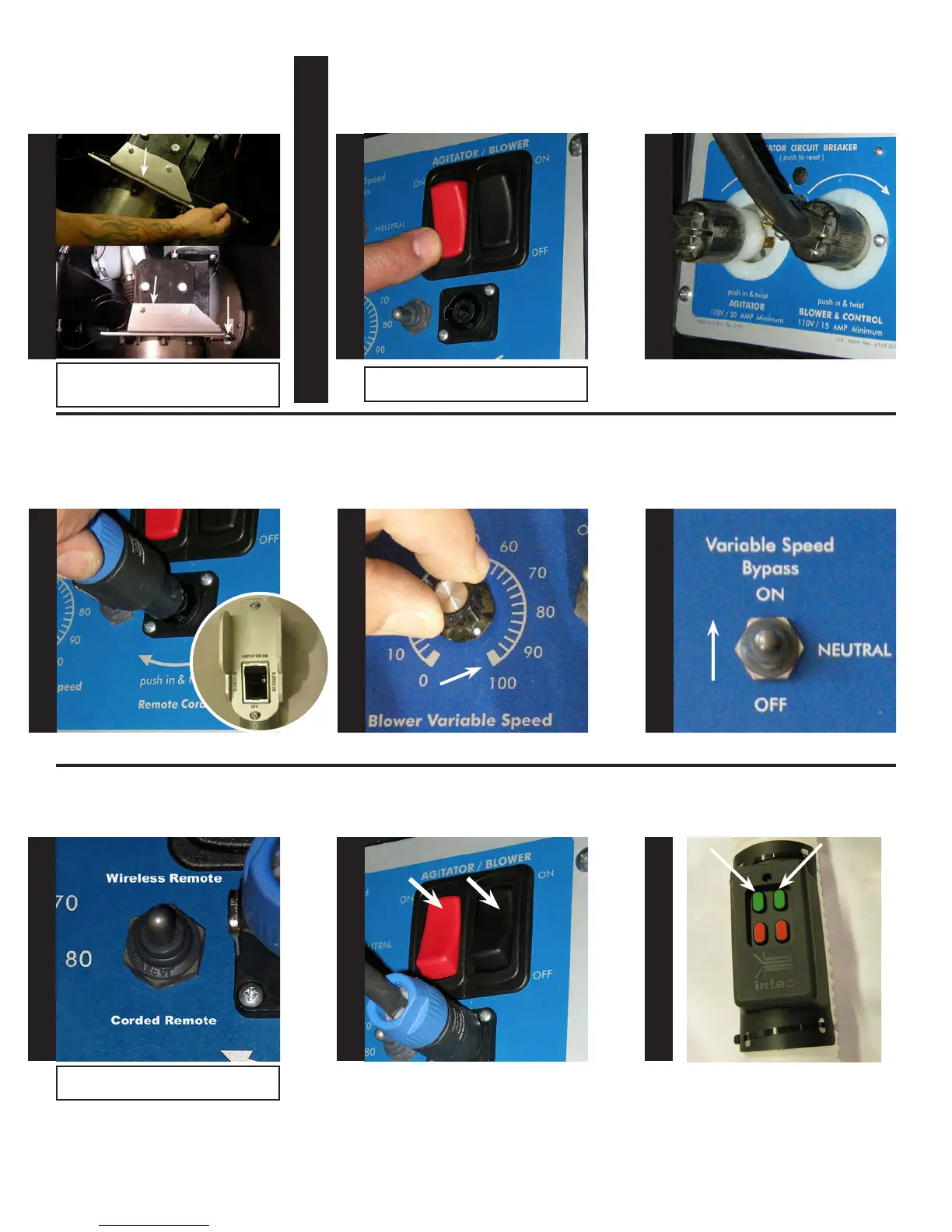
Route cable underneath the agitator
mounting bracket, attach the other
end of the cable to the antenna, as
shown.
Plug in both the agitator and blower
power cords to the anged recep-
tacles on electrical panel.
Turn off the main agitator and
blower switches on the control
panel.
Push the (newly mounted) remote
selector switch up to activate the
wireless remote.
Push the main agitator and blower
switches to the on position.
Before attaching remote cord,
check to make sure that the remote
switch is in the off position, attach
remote cord.
Set the variable speed bypass
switch to on.
Turn the variable speed control to
100%.
To START machine, depress the
GREEN, blower and agitator
switches.
A
G
I
T
A
T
O
R
B
L
O
W
E
R
Note: When attaching cable, you will need
to align the connector, push in and turn
clockwise.
Note: The down position of the switch
activates the corded remote.
S
T
E
P
58
S
T
E
P
59
S
T
E
P
60
S
T
E
P
61
S
T
E
P
62
S
T
E
P
63
S
T
E
P
64
S
T
E
P
65
S
T
E
P
66
Wireless Remote Testing Section
Note: Steps 59-65 are intentionally right
side up for ease of viewing.
Agitator Mounting Bracket
Agitator Mounting Bracket
Antenna


 To Next Page