38
Playing discs—Continued
Various track, chapter and title information, as well as
the video transmission rate for DVD discs, can be dis-
played on-screen while a disc is playing.
Note:
•You can see disc information (number of titles/chap-
ters, tracks, folders and so on) from the Disc Navigator
screen. See “Using the Disc Navigator to browse the
contents of a disc” on page 28.
Displaying disc information
To show/switch the information
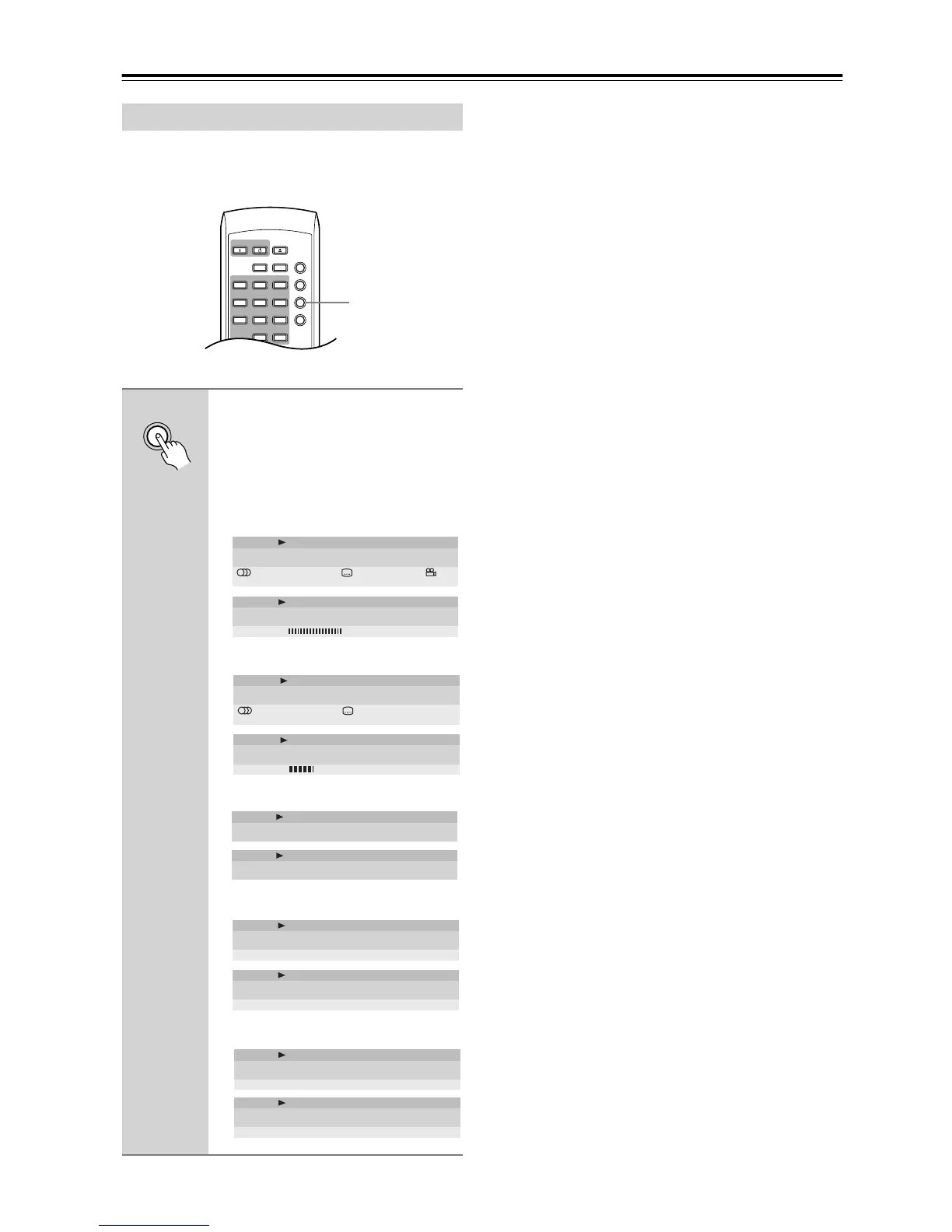
displayed, press Display.
When a disc is playing, the information
appears at the top of the screen. Keep
pressing Display to change the displayed
information.
•DVD displays
• VR format DVD-RW displays
• CD and Video CD displays
• WMA/MP3 disc displays
• JPEG disc displays
Clear
123
645
Repeat A
-
B
Random
Play Mode
Display
Dimmer
Menu
Top Menu
Open/
Close
On Standby
78
9
0
Display
Display
Audio
1. French
Dolby Digital 3/2.1CH AngleSubtitle
1. English 1
Title
Play DVD
2.0511/38
Current / Total Elapsed
4.57
Remain
7.02
Total
Tr. Rate 8.6Mbps
Chapter
Play DVD
2.0511/38
Current / Total Elapsed
4.57
Remain
7.02
Total
Audio Dolby Digital 2/0CH
1
Subtitle
- -
Title
Play DVD-RW Original
0.081/32
Current / Total Elapsed
30.22
Remain
30.30
Total
Tr. Rate 4.3Mbps
Chapter
Play DVD-RW Original
1/1
Current / Total
Track
Play CD
1.072/16
Current / Total Elapsed
4.40
Remain
5.47
Total
Disc
Play CD
28.00
Elapsed
30.20
Remain
58.20
Total
Play MP3
Track
Track Name Outernational
0.181/17
Current / Total Elapsed
12.42
Remain
13.00
Total
Play MP3
Folder
Folder Name ACP
2/7
Current / Total
Play JPEG
File
File Name FL000001
1/40
Current / Total
Play JPEG
Folder
Folder Name Holiday
1/40
Current / Total



 To Next Page