73
Front Panel≫ Rear Panel≫ Remote≫
Contents
≫
Connections
≫
Playback
≫
Setup
≫
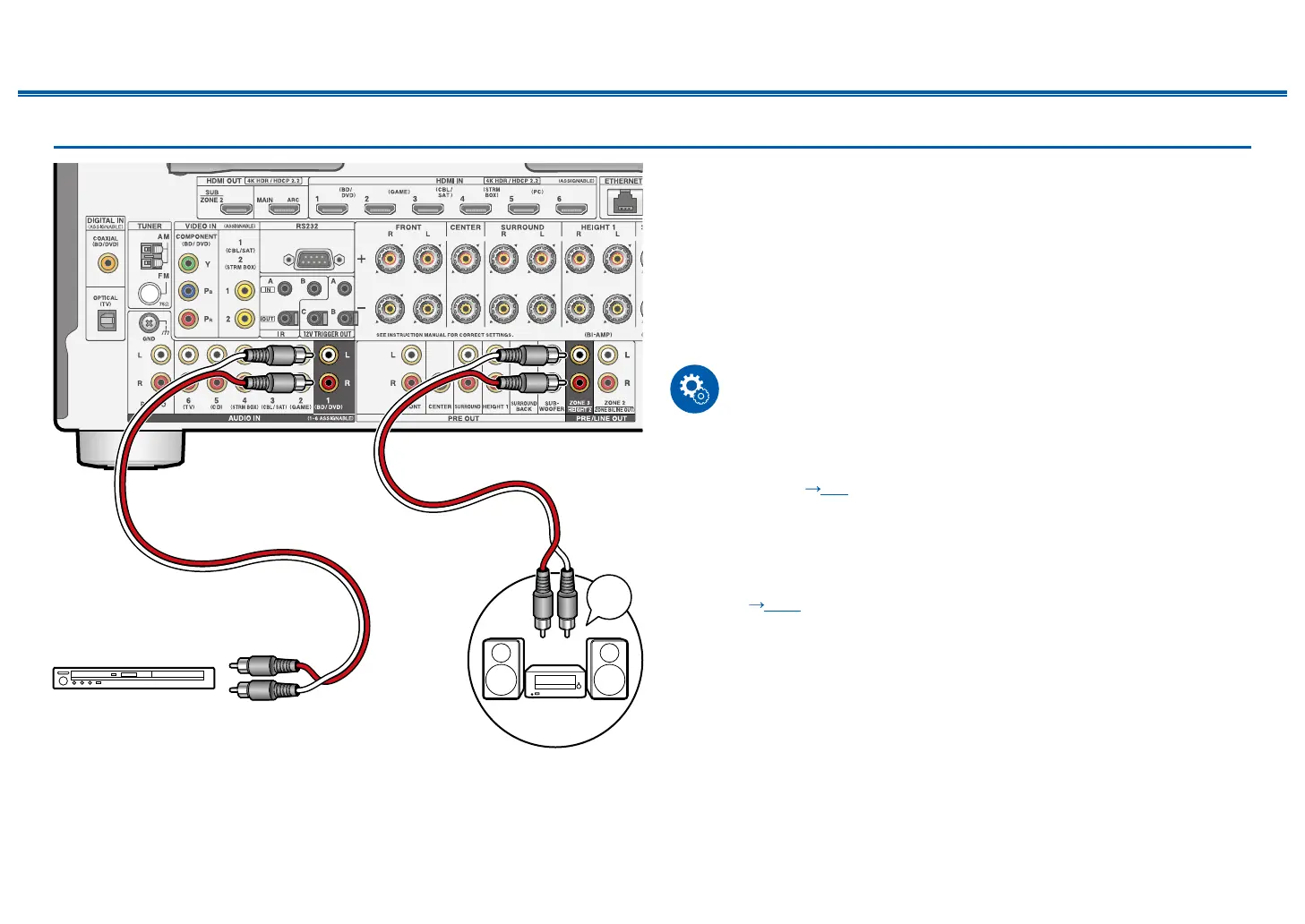
Connecting a Pre-main Amplier (ZONE 3)
You can enjoy 2-ch audio in the separate room (ZONE 3) while performing
playback in the main room (where this unit is located). Use an analog cable to
connect the ZONE 3 PRE/LINE OUT jack of this unit and the LINE IN jack of the
pre-main amplier or power amplier in the separate room. The same source
can be played back in the main room and ZONE 3 simultaneously. Also, dierent
sources can be played back in both rooms.
• To output audio from an externally connected AV component to ZONE 3, use
an analog audio cable for connection. Note that ZONE 3 output is not possible
with the connection using a HDMI cable, digital coaxial cable, or digital optical
cable.
Setup
• This function can be used when any of the combinations among 2.1 ch,
3.1 ch, 4.1 ch, 5.1 ch, 2.1.2 ch*, 3.1.2 ch*, 4.1.2 ch* and 5.1.2 ch* in "Speaker
combinations" ( p63) is used.
Note this function cannot be used if Bi-AMP or ZONE 2 (ZONE SPEAKER) is
used in speaker combinations with "*" mark. Note that if a power amplier is
connected to the ZONE 3 PRE/LINE OUT jacks, ZONE 2 (ZONE SPEAKER)
and ZONE 3 (ZONE SPEAKER) can be used.
• When connecting the power amplier, set "7. Multi Zone" - "Zone 3" - "Output
Level" (
p180) to "Variable" on the Setup menu. If it is not set, a large
volume is output and the power amplier, speakers, etc. may be damaged.
a Analog audio cable
a
LINE
IN
a
BD/DVD
Premain Amp.



 To Next Page