- 6 -
English
Battery Installation
Battery Installation
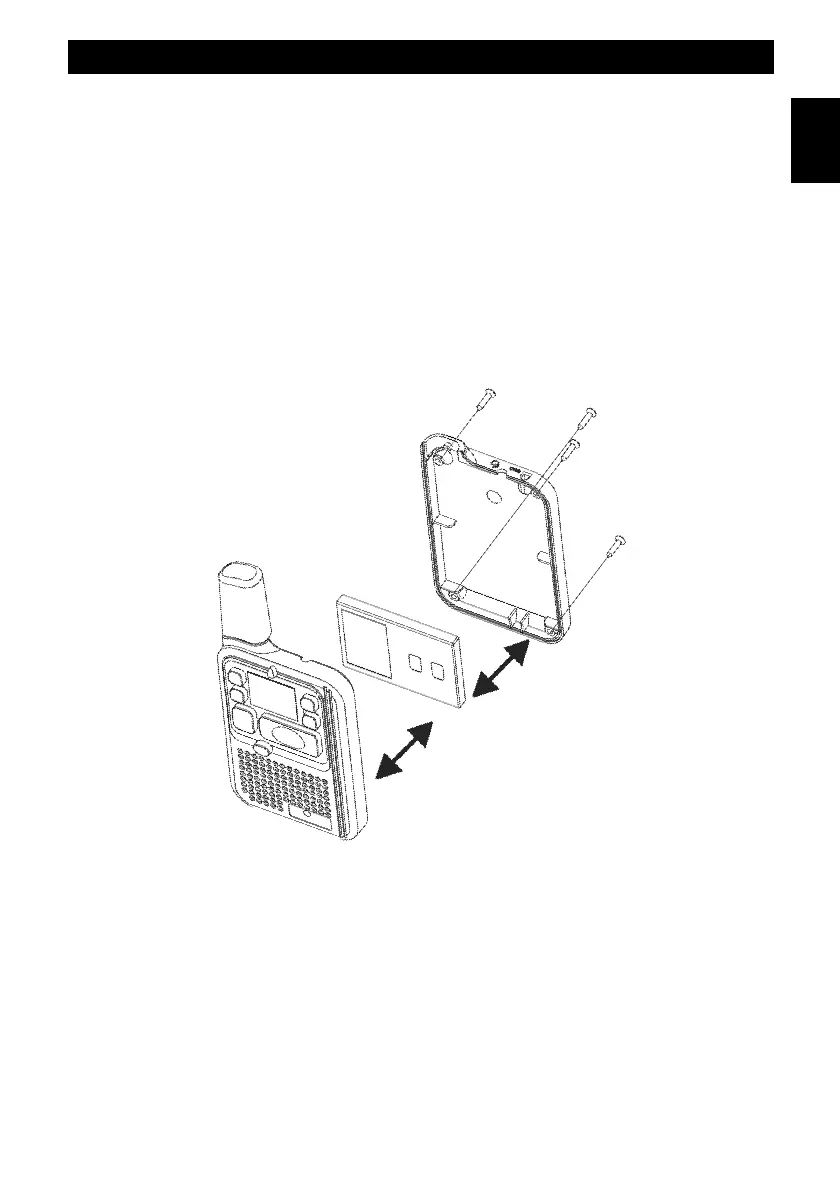
The radio is powered by a Lithium-Ion Battery. The battery is already installed in the unit, but, if replacement is
needed, please refer to the following procedure :
1. Release the Cabinet Back Cover located on the rear side of the unit, by removing four (4) pieces of Screws and
remove the Battery Pack from the Battery Compartment.
2. Install the new Lithium-Ion Battery into the Battery Compartment. Be certain to follow the correct battery
orientation in the compartment. Installing the batteries incorrectly will prevent the unit from operating. Use only
the original Battery Pack.
3. Replace the Cabinet Back Cover and lock it into position, by replacing the four (4) Screws removed previously.
Do not overtighten the screws to avoid damaging the plastic cabinet.
CAUTION :
To reduce the risk of fire or personal injury, use only the battery listed in this user manual. The radio has a built in
Power Saver feature for maximum battery life. Anyway, when the radio is not being used, conserve battery power by
pressing the ON/OFF Key (8) to OFF.



 To Next Page