40
Wireless signal from the following devices may be displayed:
» Sensors: devices registered in the alarm center at 01 to 64 addresses. To view the
signal of the sensors with the marker on it press
Enter
and then, with the arrow
keys, switch between the sensors.
» Keyboards: devices registered in the alarm center at 01 to 16 addresses. To view
the signal of the keyboards with the marker on it press
Enter
and then, with the
arrow keys, switch between the keyboards.
» Sirens: devices registered in the alarm center at 01 to 16 addresses. To view the
signal of the sirens with the marker on it press
Enter
and then, with the arrow keys,
switch between the sirens.
» Repeaters: devices registered in the alarm center at 01 to 04 addresses. To view
the signal of the repeaters with the marker on it, press Enter and then, with the
arrow keys, switch between the repeaters.
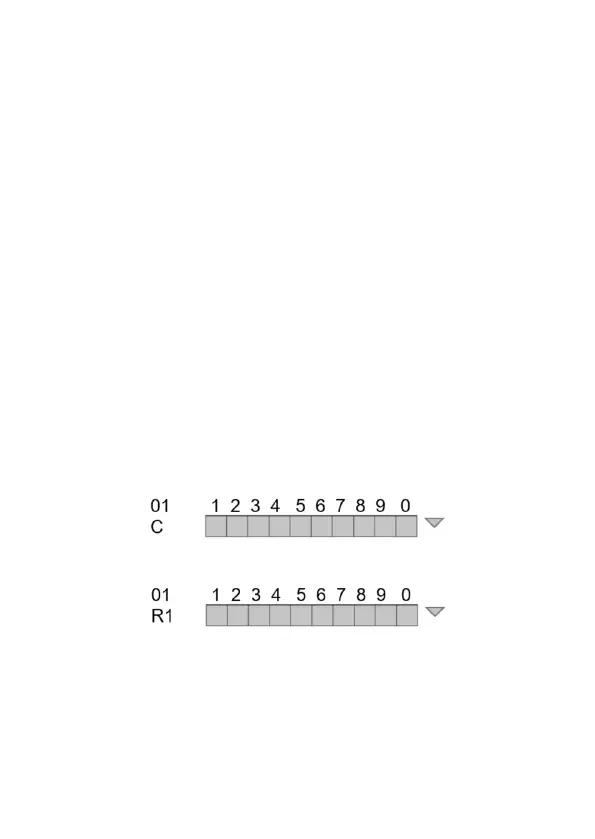
Signal level will be displayed in percentage, where the number 1 represents level
less than or equal to 10% and the square 0 represents 100%. The lled mark
corresponds to the active sign and the empty mark to the one without sign,
referring to the level in 10 divisions.
Wireless device that is communicating directly with the center will be identied
with the letter C and the device that is passing the range RF amplier (REP 8000
repeater) will be identied with the letter R.
Ex: sensor 01 communicating directly with the alarm center:
Ex: sensor 01 communicating with the repeater 01:
Note:
repeaters will be identied from R1 (repeater 1) to R4 (repeater 4).
To return the
Wireless Signal
option and check the signal from other devices press
the
Back
or
Exit
key to direct to the home screen.
Note:
the signal level that appears on the keyboard for each of the devices refers
to the last communication it made.


 To Next Page
 Loading...



