43
Note: » If you wish to cancel the typing of a sequence before nishing, keep the
Back
key pressed until receiving the conrmation beep or press the
Exit
key
and start typing again from the beginning of the sequence indicated in the
manual.
»
To cancel the typing of a password, press the
Exit
key or press and hold the
Back
key.
»
To exit programming mode, enter the
master password
or
installer password
(same password used to access programming mode).
»
If the keyboard is left unoperated for three minutes, the alarm center exits
programming mode and when accessed the keyboard is directed to the home
screen.
»
There is no need to exit the programming mode to execute the next command
allowed by the password.
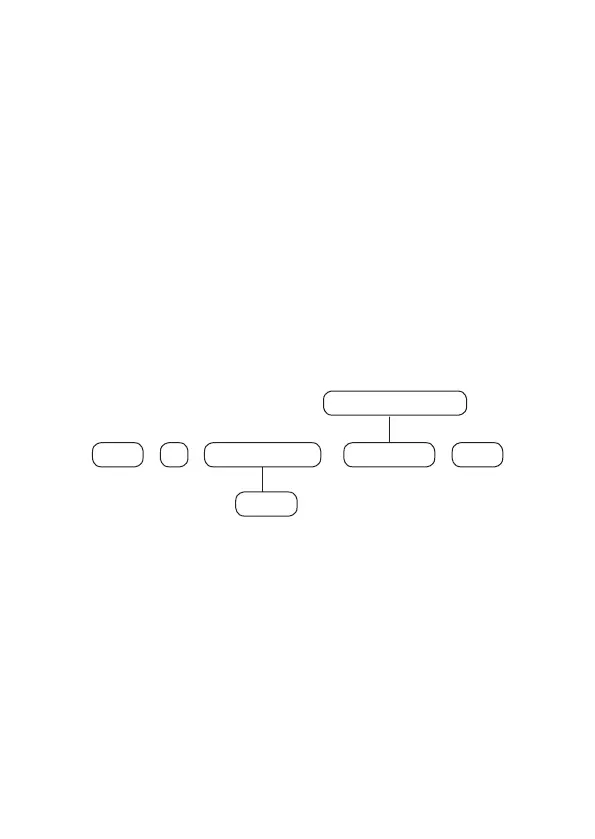
Direct editing/programming command
In programming mode, the command will be inserted by directly typing its entire
extension and at the end pressing
Enter
to save the command and proceed to
another, for example:
+ +
10 Memory N° Phone N°
+
Enter
+
Enter
1 to 8
Maximum 20 digits
Note:
Some commands can be entered either by the direct editing/programming
mode or by the editing/programming mode with display.
Editing/programming command with display
In programming mode, some commands can be inserted in parts, so the rst part
of the command will be inserted rst and shown on the rst line of the display and
the value to be edited/viewed will be shown on the second line of the display. If
the memory of the unit for the entered command is empty, the second line will be
deleted. To edit, for example, the phone number using the LCD keyboard, place the
cursor in the desired position using the arrow keys and enter the phone number,
then press
Enter
to save the command and proceed to another.



 To Next Page