84
Partitioning the zone
When the system is partitioned, the zones can be divided as follows:
» Common zone (default): the zone does not belong to any of the partitions. It
is only activated when all partitions are activated (activation by master password
or full password) and deactivated whenever one of them receives the command
to deactivate.
» Zone set to one of the partitions: The zones so set will be activated/
deactivated when the desired partition (01 to 16) is activated/deactivated or when
the system is activated in
Partial
mode (stay).
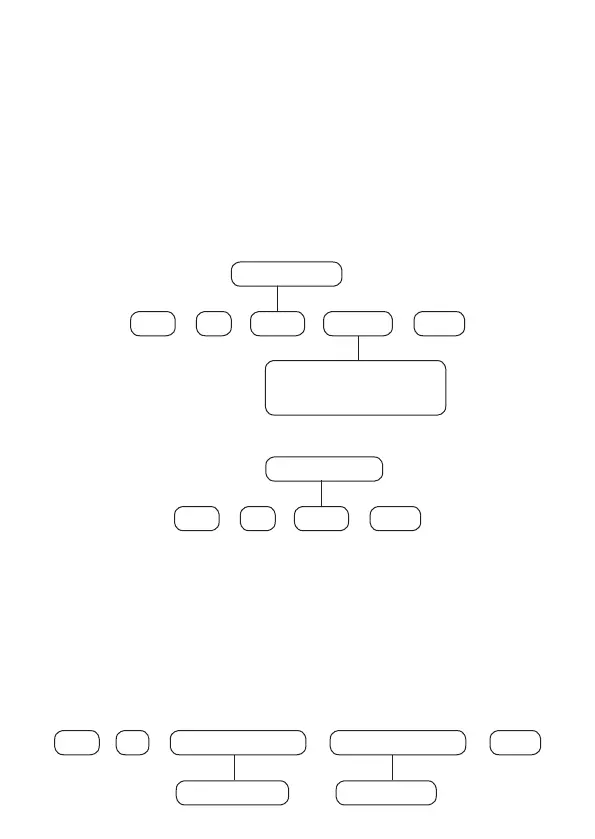
To choose which partition a particular zone (sensor) should belong to, program:
01
+
Enter Enter
+
Zone
From 01 to 64
+
00 = Common zone
01 to 16 = Dened
Partition
Partition
+
To edit/view the programmed zone partition, enter:
01
+
Enter Enter
+
Zone
From 01 to 64
+
After changing the congured value, press the
Enter
key. If you only want to view
the setting, press the
Back/Exit
and no programming will be changed.
Note: If no zones are dened to the partition, it will be inactive.
Password Partitions
Secondary passwords that are created (01 to 96) leave the factory without
permission to operate partitions. When enabling partitioning you must select which
partitions you will be allowed to Enable/Disable using the following command.
21
+
Enter Group of partitions
+
User number
+
Enter
+
From 0 to 1From 01 to 96



 To Next Page