5
MVF-2132
MULTI-VOICE FILE
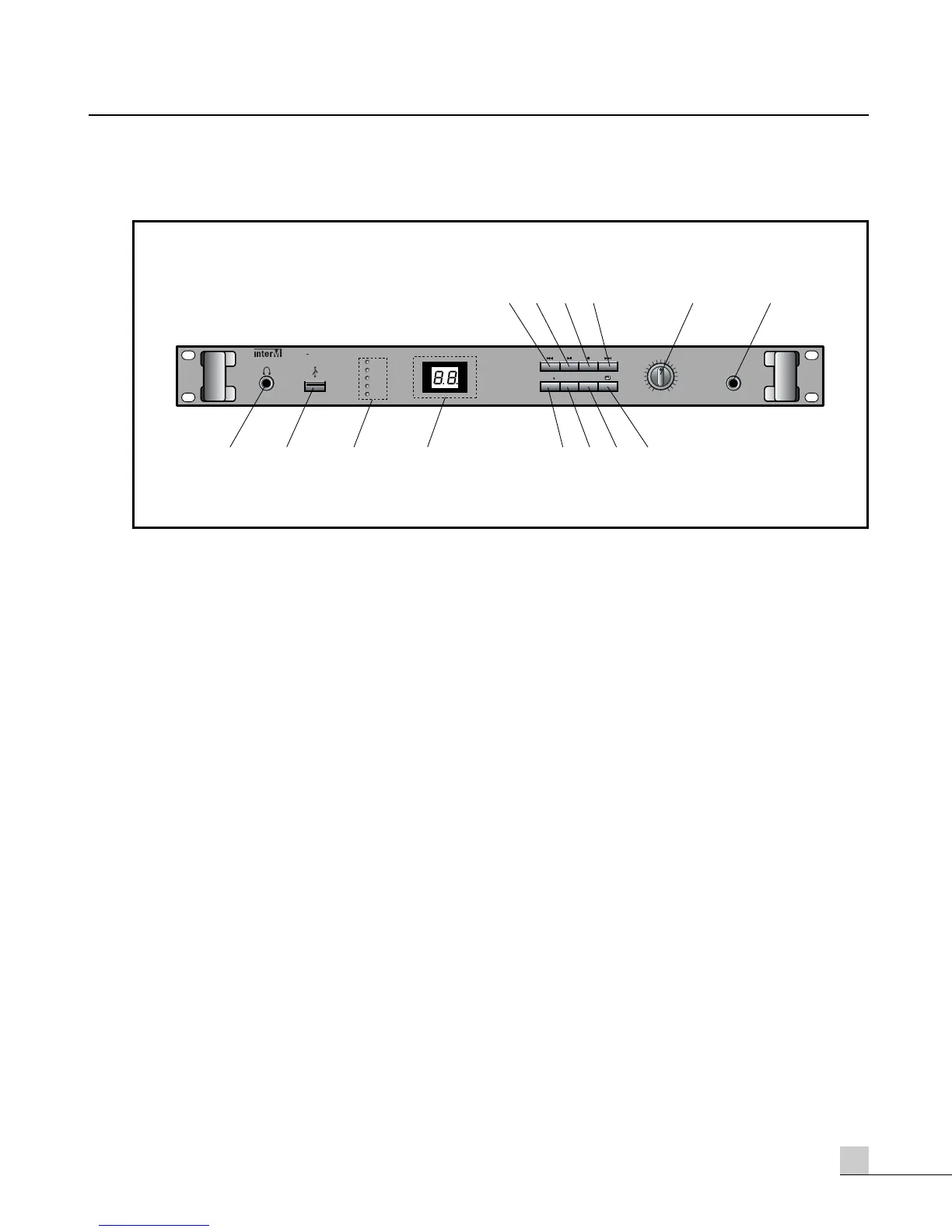
Front Panel
Front Panel
1. HEADPHONE OUTPUT JACK
Headphones can be connected to this jack to monitor the sound during record or playback modes.
2. USB PORT
This provides a convenient interface with computers to facilitate MP3 file transfers. Windows 2000 ready,
Windows 98 compatible by downloading software from Inter-M.com (Length of USB Cable: MAX 2m)
3. DUAL FUNCTION LEVEL INDICATOR
While recording the meter shows the Input signal level. During Playback the meter shows the Output signal
level.
4. DISPLAY SCREEN
This displays the status of operational modes and selection numbers of the recorded audio in real-time.
5. REWIND BUTTON
Depressing this button decrements the file selection number (selects a file with a lower number).
6. PLAY BUTTON
Depressing this button one time will cause the unit to PLAY the voice or music selection. Depressing this button
a second time will PAUSE the unit.
7. STOP BUTTON
Depressing this button will cause the unit to discontinue Play or Record operations.
8. FAST FORWARD BUTTON
Depressing this button increments the file selection number (selects a file with a higher number).



 To Next Page