SYSTEM REMOTE MIC STATION/12KEY MIC STATION KEYPAD
4
RM-6024/RM-6012KP
Equipment Setting and Checking
Equipment Setting and Checking
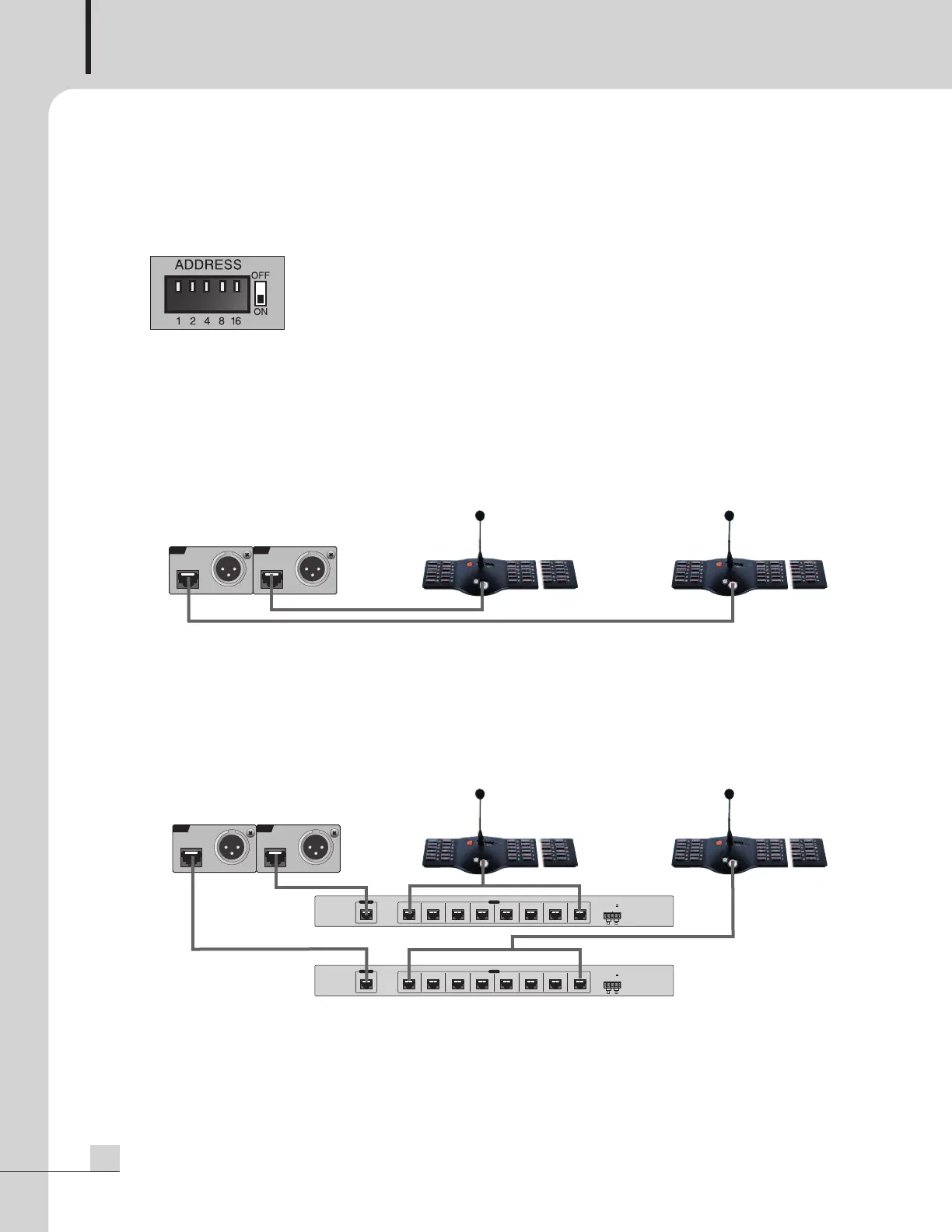
1. Address Switch Setting
1) Set the equipment number utilizing the rear panel DIP switch.
- If the equipment number is not set-up or is incorrect, all Zone Indicator LEDs will blink.
- If the number is already in-use, the FAULT LED will blink.
Please check the equipment number set-up status.
2) When connecting an RM-6024 directly to an ECS-6216P:
- The equipment number for the RM-6024 which is connected to RM1 terminal is labeled as “1”.
- The equipment number for the RM-6024 which is connected to RM2 terminal is labeled as “9”.
3) When connecting remote mics through an RME-6108 to an ECS-6216P:
- Choose numbers 1~8 for those remote mics which are connected to an RME-6108 using the RM1
terminal.
- Choose numbers 9~16 for those remote mics which are connected to an RME-6108 using the RM2
terminal.
If the above conditions are not followed or any number is used more than once, warning LEDs will blink.
RM1
I
NPU
T
AUDIO
OU
T
AUDIO
OUT
RM2
I
NPU
T
ECS-6216P
RM-1 RM-2
RM-6024 RM-6024
Set-up to No.9 for
equipment number
Set-up to No.1 for
equipment number
RM1
INPUT
AUDIO
OU
T
AUDIO
OUT
RM2
INPUT
ECS-6216P
RME-6108
RME-6108
RM-1 RM-2
RM-6024 RM-6024
Select equipment
number among 9~16.
Select equipment
number among 1~8.
ϊۑ@Ţ۩م@ێԟێ@ۘڽ@Ĉڐ@Ê۾@ɜট۩ۉ@کێ@ۘںɩ@
࠭ҿșڽ@ّçǦ@ǷҜθ@ϊݖݖ@ψֲ֫٤N
܆Ͽࠤ@Z@REMOTE MIC EXTENDER
ЂʠϿ@Z
RME 6108
܄ÿۖͶ@Z
DC 24V, 150mA
܆
ܖۜϿ@
Z
ď
Öݖڜࣶ
TEL : 1588 7074
RM 1 RM 2 RM 3 RM 4 RM 5 RM 6 RM 7 RM 8
INPUT
OUTPUT
DC 24V
ϊۑ@Ţ۩م@ێԟێ@ۘڽ@Ĉڐ@Ê۾@ɜট۩ۉ@کێ@ۘںɩ@
࠭ҿșڽ@ّçǦ@ǷҜθ@ϊݖݖ@ψֲ֫٤N
܆Ͽࠤ@Z@REMOTE MIC EXTENDER
ЂʠϿ@Z
RME 6108
܄
ÿۖͶ@Z
D
C 24V, 150mA
܆ܖۜϿ@Z
ď
Öݖڜࣶ
TEL : 1588 7074
R
M 1 RM 2 RM 3 RM 4 RM 5 RM 6 RM 7
R
M 8
INPUT
OUTPUT
DC 24V


 To Next Page