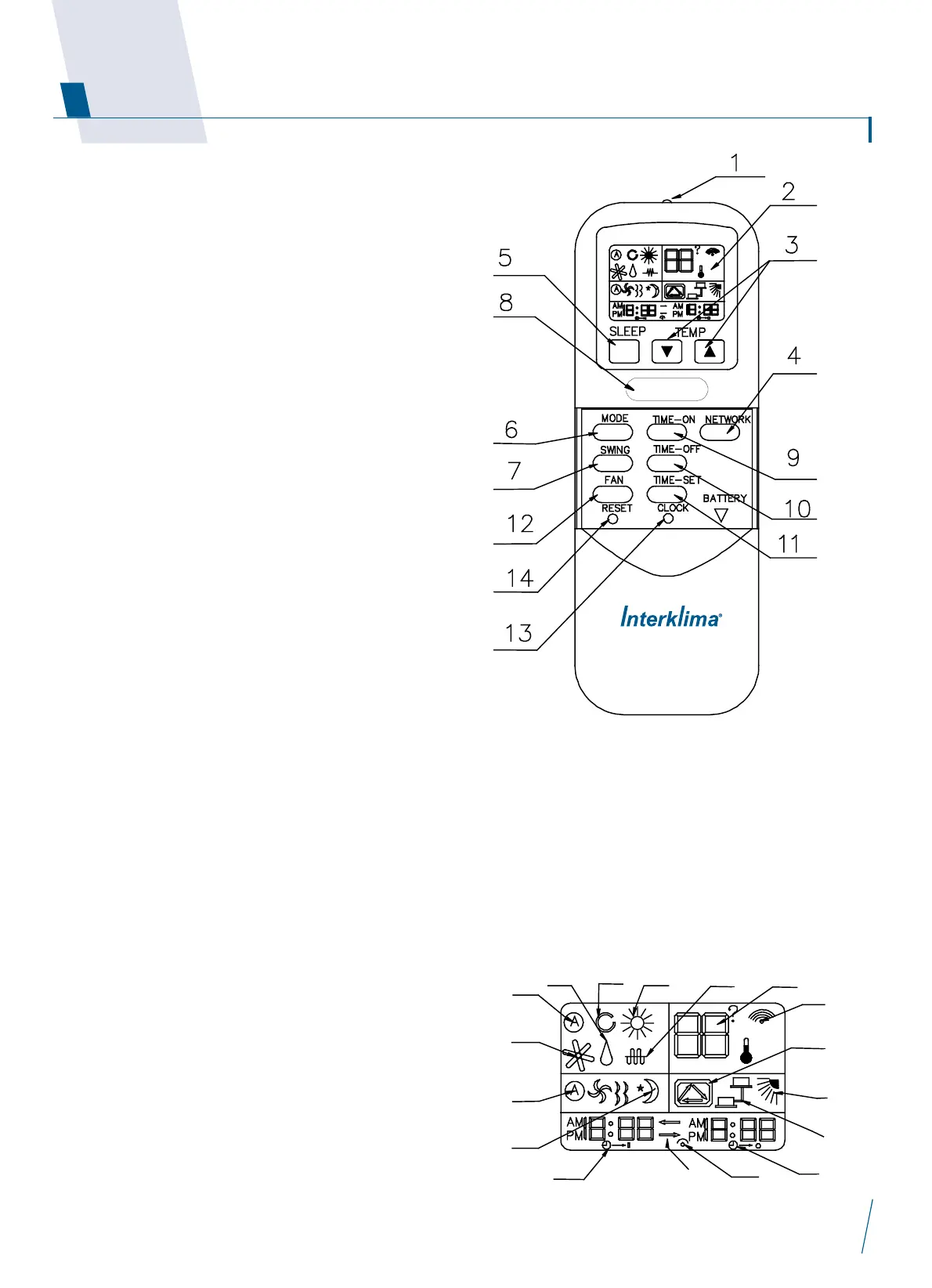
1. Transmission source used for sending control signal to the
air-conditioning unit
2. LCD DISPLAY
3. Up/Down Button
Press Up Button to increase TEMP. 1¢J step.(MAX:30¢J)
Press Down Button to decrease TEMP.1¢J step.(MIN:16¢J)
4. Sleep Button
No function
5. Network Button
Sleep mode will automatically adjust TEMP. and save energy
when you are sleeping.
6. Mode Button
Press it to select Auto,cool,dehumidify,fan and heat mode.
7. Swing Button
Air distributor in all mode.
8. ON/OFF Button
Press it to turn the unit ON or OFF.
Note: ON/OFF button will not work when continuous daily
operation is set.
9. Timer-on Button
Press it once, the timer-on icon will blink, then press TIME-
SET button to set timer-on time by 10m step.
Press it second, timer-on is set, press it third, timer-on mode
is cancelled.
10. Timer-off Button
Press it once, the timer-off icon will blink, then press TIME-
SET button to set timer-off time by 10m step.
Press it second, timer-off is set, press it third, timer-off
mode is cancelled.
11. Time-set Button
When you set the time clock ,press button to increase by 1
minute step. When you set the timer-on and timer-off,press
button to increase by 10 minute step;
Continuous Daily Timer ON and OFF Setting. Press button for
3s, the set cycle timer-on/off icon will appear. Press button
again for 3 seconds, the cycle timer-on/off continuous daily
operation mode is cancelled.
12. Fan Button
Press it to select Auto,low,medium and high speed.
13. Clock Button
If you install the new batteries,you must reset clock time.
After you install the new batteries, the clock will blink. Then,
press the clock button, the clock time will not blink. Press
the TIME-SET to increase the time by 1 minute step. At last,
press the Clock Button again.
14. Reset Button
Press it to restart remote
A. Heating
B. Fan
C. Dehumidify
D. Auto
E. Cooling
F. Auxiliary heating
G. Set TEMP.
H. Singal sending
I. Fan speed Auto, low,
medium and high
J. Sleep
K. Cycle timer-on/off
L. Swing
M. Network
N. Timer-off
O. Timer-on
P. Arrow direction is shown
from the first function to
the second function.
Q. Clock icon


 To Next Page
 Loading...