24 TruVision Series 3 IP Camera FW3.1 Configuration Manual
User Name: The user name to log in to the server where the images are
uploaded.
Password: Enter the password.
Confirm: Confirm the password.
Receiver1: The name of the first user to be notified.
Receiver’s Address1: The email address of user to be notified.
Receiver2: The name of the second user to be notified.
Receiver’s Address2: The email address of user to be notified.
Receiver3: The name of the third user to be notified.
Receiver’s Address3: The email address of user to be notified.
3. Click Test to test the email parameters set up.
4. Click Save to save changes.
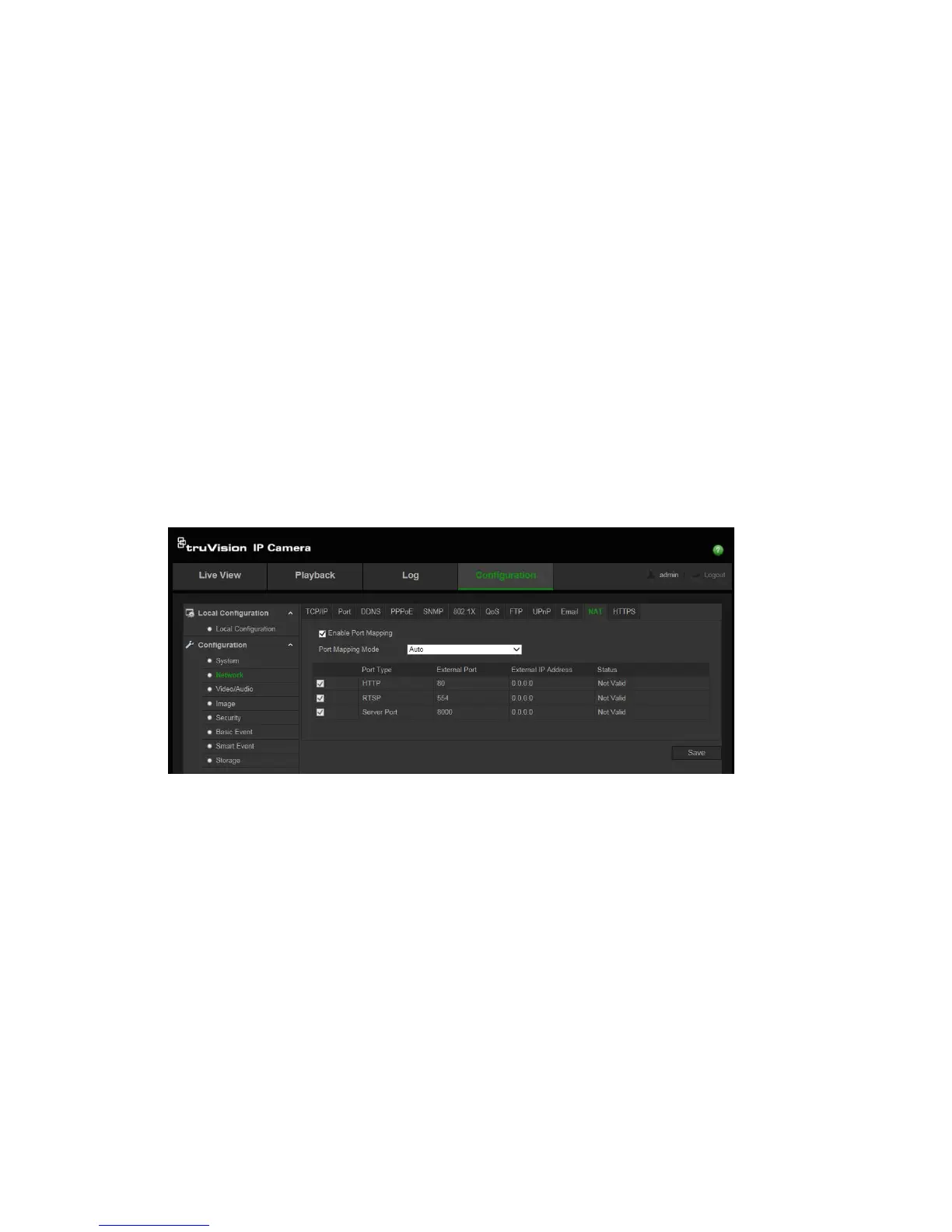
To set up the NAT parameters:
1. Click Configuration > Network > NAT.
2. Check the Enable Port Mapping check box to enable the NAT function.
3. Select Port Mapping Mode to be Auto or Manual. If you choose “Manual”
mode, set the desired external port.
4. Click Save to save changes.
To set up the HTTPS parameters:
1. 1. Click Configuration > Network > HTTPS.




 To Next Page