EasyManua.ls Logo

Intermatic PE700 Series - User Manual

Intermatic PE700 Series
7 pages
Print Icon
To Next Page IconTo Next Page
Loading...
INITIAL SETUP- CREATING AN INTERMATIC
CONNECT ACCOUNT
Follow these instructions to download, open and register the Intermatic Connect app.
1. Download the Intermatic Connect App from the Apple Store or Google Play Store.
2. Open the app and select “Create Account”.
3. Enter your email and password, select agree to terms and then select “Continue”.
4. Check your email for the 6 digit access code and input in the app when prompted.
ADDING A DEVICE
Follow these instructions to install the timer switch.
1. From Home screen, select the “+” symbol in the upper right of the home
screen then select the “Pool Timer” icon on the Device Setup screen/
page.
2. Displayed will be the timer name, type of timer and the type of connection.
Within Bluetooth range of the timer, verify communication by selecting the
Wink button on the app and the Mode light will briefly flash yellow.
(typically around 20 - 30 feet)
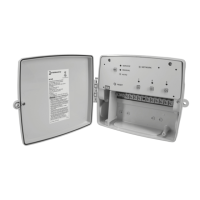
PE700 Series
Smart Wi-Fi Timer
Programming Guide
Models PE723P, PE733P
INTERMATIC INCORPORATED | 1950 Innovation Way, Suite 300 | Libertyville, Illinois 60048 | www.intermatic.com 1
Question and Answer IconNeed help?

Do you have a question about the Intermatic PE700 Series and is the answer not in the manual?

Overview

The Intermatic PE700 Series Smart Wi-Fi Timer is a sophisticated device designed for controlling various electrical loads, particularly in pool applications, through a user-friendly mobile application. This timer offers a blend of basic and advanced scheduling capabilities, remote control, and system monitoring, making it a versatile solution for managing your home's electrical devices.

Function Description

The PE700 Series timer primarily functions as a smart Wi-Fi enabled switch, allowing users to program and control electrical circuits remotely via the Intermatic Connect app. It supports both 240V and 120V applications, with configurations for multiple circuits (C1, C2, C3). The device can manage up to 256 ON or OFF events, with an additional 64 holiday exceptions, providing extensive control over connected loads.

Key functionalities include:

  • Scheduling: The timer offers both basic and advanced scheduling options. Basic scheduling allows for typical 24-hour, 7-day, or 7-day astronomic programming. Advanced scheduling caters to more complex needs, enabling relative and specific date programming, as well as holiday schedules.
  • Override Capabilities: Users can manually override scheduled events through various inputs, including physical buttons on the device, discrete digital inputs (switch, presence sensor, photocontrol), the mobile app, or voice assistants (Alexa or Google). Overrides can be configured as "Normal" (temporary) or "Extended" (with specific duration and schedule evaluation).
  • Wi-Fi and Cloud Connectivity: The device connects to your home Wi-Fi network, enabling cloud-based control and monitoring from anywhere. This connectivity is crucial for remote programming, firmware updates, and integration with smart home ecosystems.
  • Device Modes: The timer operates in three distinct modes: Manual, Auto, and Service.
    • Manual Mode: This is the default mode after a factory reset. In Manual mode, schedule events are ignored, and circuit override buttons are enabled. Mobile app and voice UI overrides are also active when connected to the cloud.
    • Auto Mode: The device follows programmed schedule events. To enter Auto mode, at least one schedule event must be configured. Overrides in Auto mode temporarily alter the scheduled state.
    • Service Mode: Designed for service technicians, this mode allows for local configuration via Bluetooth. In Service mode, all outputs are commanded Off, schedule events are ignored, and sensor override inputs are disabled. The device automatically reverts to the previous mode (Auto or Manual) after the service timer expires.
  • Firmware Updates (OTA): The timer supports Over-The-Air (OTA) firmware upgrades, which can be initiated by the user locally or remotely, or automatically scheduled by the cloud based on user preferences and specific conditions (e.g., all relays de-energized or after 24 hours of continuous operation within a specific time window).

Usage Features

The PE700 Series timer is designed for ease of use, from initial setup to daily operation.

  • App-Based Control: The Intermatic Connect app is the primary interface for managing the timer. Users can download the app from the Apple App Store or Google Play Store, create an account, and then add their device.
  • Intuitive Setup Process: The app guides users through the setup, including connecting to Wi-Fi, naming the device, configuring outputs (e.g., combining circuits for 240V applications), and setting up inputs (switch, photo control, presence sensor).
  • Scheduling Flexibility:
    • Event Actions: Users can define events to turn circuits "On" or "Off."
    • Days of Week: Easily select specific days for events or use the default 7-day selection.
    • Time Options: Program events at specific times of day, or use astronomic options like "Sunrise" and "Sunset" with adjustable offsets.
    • Output Selection: Choose which specific circuits (C1, C2, C3) are affected by each scheduled event.
    • Saved Schedules: The app allows users to save, recall, and apply multiple schedules, making it easy to switch between different configurations (e.g., "M-F Default," "Parking Lot Lighting").
  • Override Management:
    • Circuit Overrides: Each circuit can be individually overridden, with options for "Normal" or "Extended" override types.
    • Input Configuration: Discrete inputs can be configured as switches, photo controls, or presence sensors, each with specific override behaviors.
    • Blink Warn: For outputs, a "Blink Warn" feature can be set (0-255 minutes), which momentarily flashes the circuit off once the set value is reached, providing a visual alert.
  • Schedule Sharing: Schedules can be shared via text or email directly from the app, allowing for easy replication or distribution of configurations.
  • Time/Date/Location Settings: These settings are automatically populated once the device is connected to Wi-Fi and the cloud, ensuring accurate astronomic calculations and timekeeping.
  • Input Override Time: Users can set an "Input Override Time" to define how long an override remains active before returning to the scheduled state. Options include "Infinite" (output stays overridden) or a specific duration (1 minute to 23 hours and 59 minutes).

Maintenance Features

The PE700 Series timer incorporates features to ensure reliable operation and facilitate troubleshooting.

  • Firmware Auto Update: The device can be configured for automatic firmware updates, ensuring it always runs the latest software with new features and bug fixes. Users can also manually initiate updates.
  • Wi-Fi Reset: If Wi-Fi connectivity issues arise, users can perform a Wi-Fi reset by simultaneously pressing and holding circuit buttons 1 and 2 on the unit for 3 seconds. This causes the circuit LEDs to flash, indicating the reset.
  • Full Unit Reset: A dedicated "Reset" button on the unit allows for a full factory default reset. Pressing and holding this button until the Mode LED flashes red will return the unit to its original factory settings.
  • Device Info: The app provides access to device information, including current firmware version, hardware version, and date code, which can be useful for support and troubleshooting.
  • Help/FAQ: The Intermatic Connect app includes sections like "Not seeing your timer?" and "Help/FAQ" to assist users with common issues and questions.
  • Service Mode for Technicians: The dedicated Service mode allows technicians to perform local configurations and diagnostics without interfering with cloud-based operations, ensuring efficient maintenance.
  • Mode LED Indicators: The device uses LED indicators (Network, Mode) to communicate its status, such as pairing mode (Network light flashes green) or reset initiation (Mode LED flashes red).

Intermatic PE700 Series Specifications

General IconGeneral
BrandIntermatic
ModelPE700 Series
CategoryTimer
LanguageEnglish

Related product manuals