24
NOTE: IF THE HUD INDICATES LOW BATTERY WHEN NOT PRESSURIZED THERE COULD BE LESS THAN 2 HOURS
OPERATION LEFT.
Shutdown
Shutdown of the HUD occurs automatically when the SCBA is switched off. The HUD
will shut down with all six LEDs simultaneously ashing 2 times and then shutting off.
If the HUD shuts down during use, the user must leave the contaminated area.
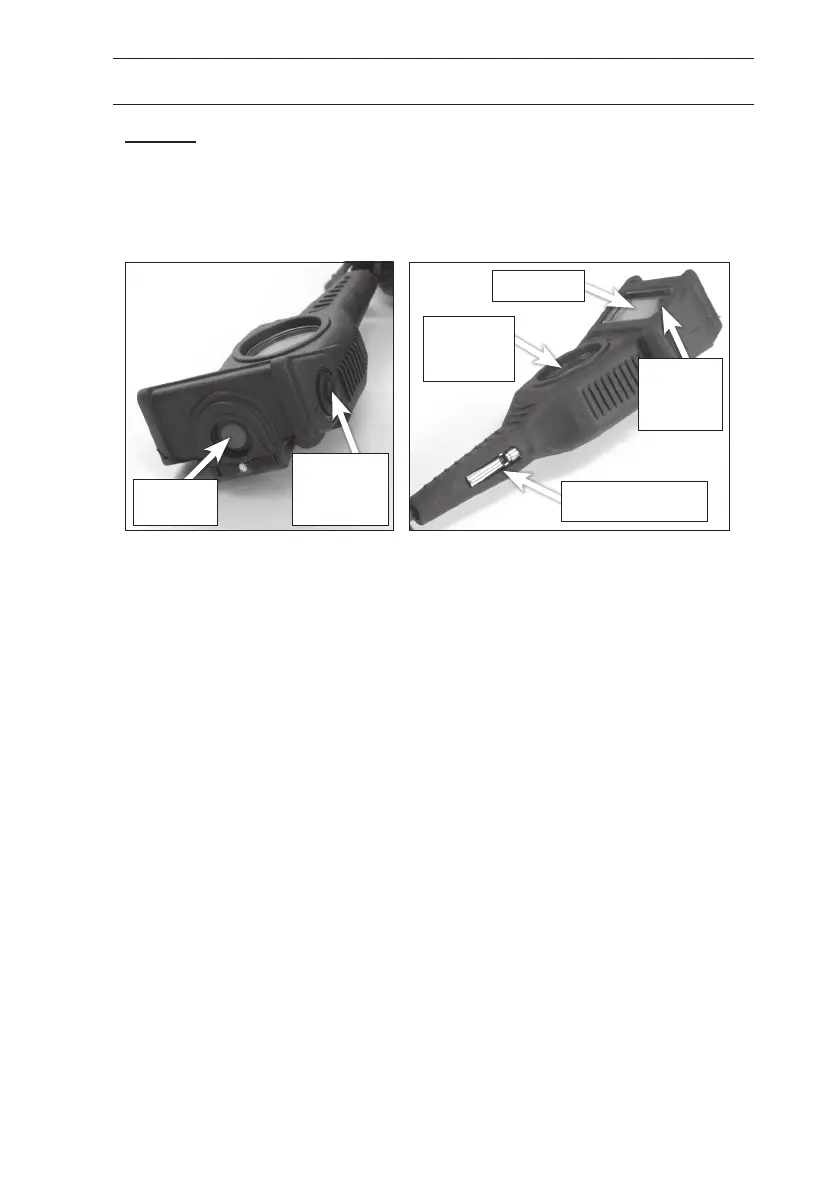
3.2 UNDERSTANDING THE DIGITAL DISPLAY
Alarm but-
ton (Red)
Backlight
and scroll
button
(Black)
Mechanical
pressure
gauge
LCD Digital
display
Mechanical warning
whistle
Location
and PASS
mode LED
indicators
The LCD Digital display can show four different values:
Priority 1: Cylinder pressure symbol
Priority 2: Cylinder pressure in psi
Priority 3: Remaining time
Priority 4: Absorbed temperature
The Priority 1 information is visible on the Display at all times. To activate the
backlight press the black backlight button once. The Display is now illuminated for 10
seconds.
To change to Priority 2, Priority 3 and Priority 4 values press the black backlight
repeatedly when the backlight is activated, this will toggle between values. When the
backlight is switched off after 10 seconds the display returns to show Priority 1 value.
The settings of the Display unit are optional. The priorities may be different or the
display may show only one or two different values depending on the settings.
The backlight is automatically illuminated in red for 10 seconds at 50% cylinder
pressure or at the “Dynamic Turn Back signal” level (see section 6.4). This is the “Turn
Back signal” to the re ghter during use (see section 6.4). At cylinder pressures
above the “Turn Back signal”, the backlight is illuminated in the color yellow when the
backlight button is pressed. At cylinder pressures below the “Turn Back signal”, the
backlight color is red when the backlight button is pressed.
The cylinder pressure symbol is displayed as a graphical symbol in four steps, “Full”,
“3/4”, “1/2” and “1/3”.
A battery symbol is always shown on top right corner of the display. The symbol show


 To Next Page