37
8 TELEMETRY FUNCTIONS - CONFIGURATION
The S9 and S9 Incurve can be equipped with an optional SpiroLink Telemetry
system. To enable the telemetry functions the SCBA telemetry unit is mounted into the
backplate of the SCBA and connected to the BAC. It is required to have a version of
the S9 having the telemetry cable installed in the BAC.
8.1 INSTALLATION OF SPIROLINK SCBA TELEMETRY UNIT
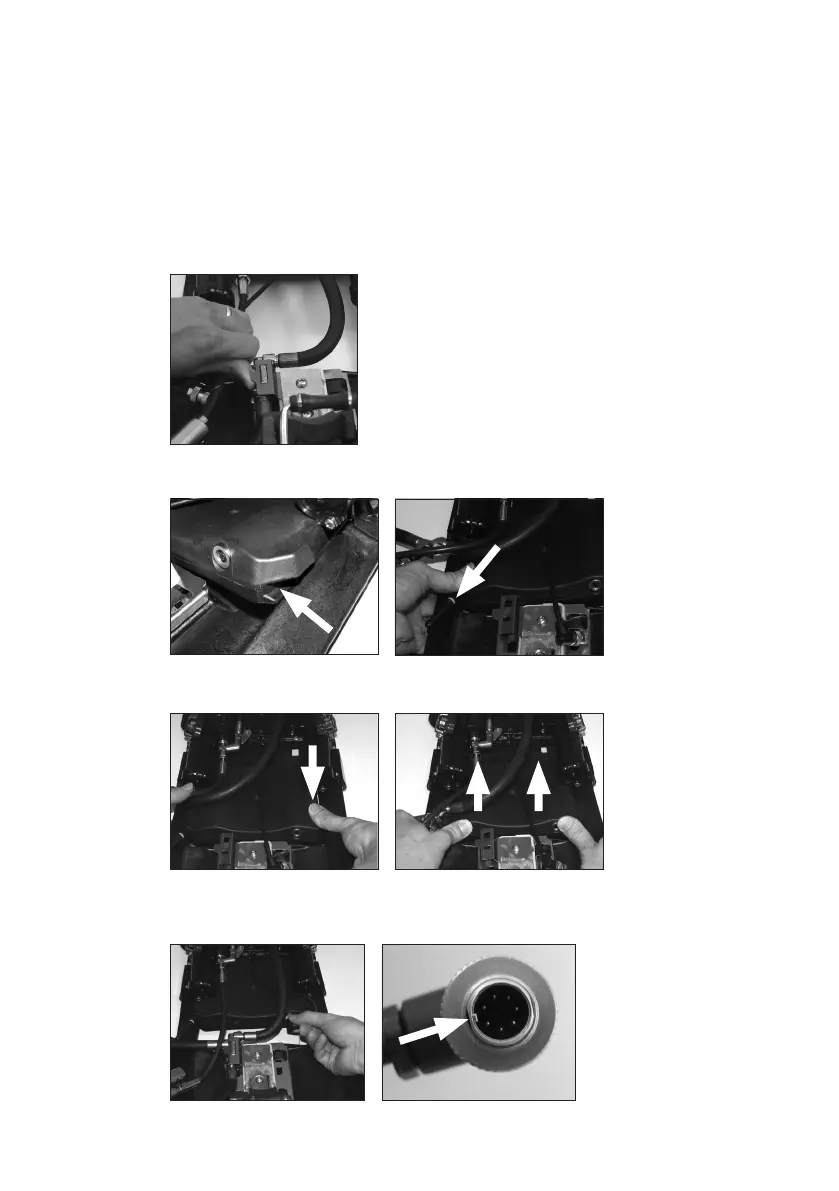
1. Loosen the screw and release the hose connector from the locking clip located at
the cylinder docking device.
2. Insert the telemetry unit into the backframe. Fit the slot on one side of the telemetry
unit into the backframe.
3. With one side in position press the other side down until it snaps into position and
push the telemetry unit upwards between the backframe and the BAC.
4. Connect the cable from the BAC. Make sure to align the index before pushing it
into the connector on the SCBA telemetry unit. Secure the connector by screwing it
together by hand.


 To Next Page