23
3 UNDERSTANDING THE S9 HUD, DDU AND BAC
3.1 UNDERSTANDING THE HEADS-UP DISPLAY (HUD)
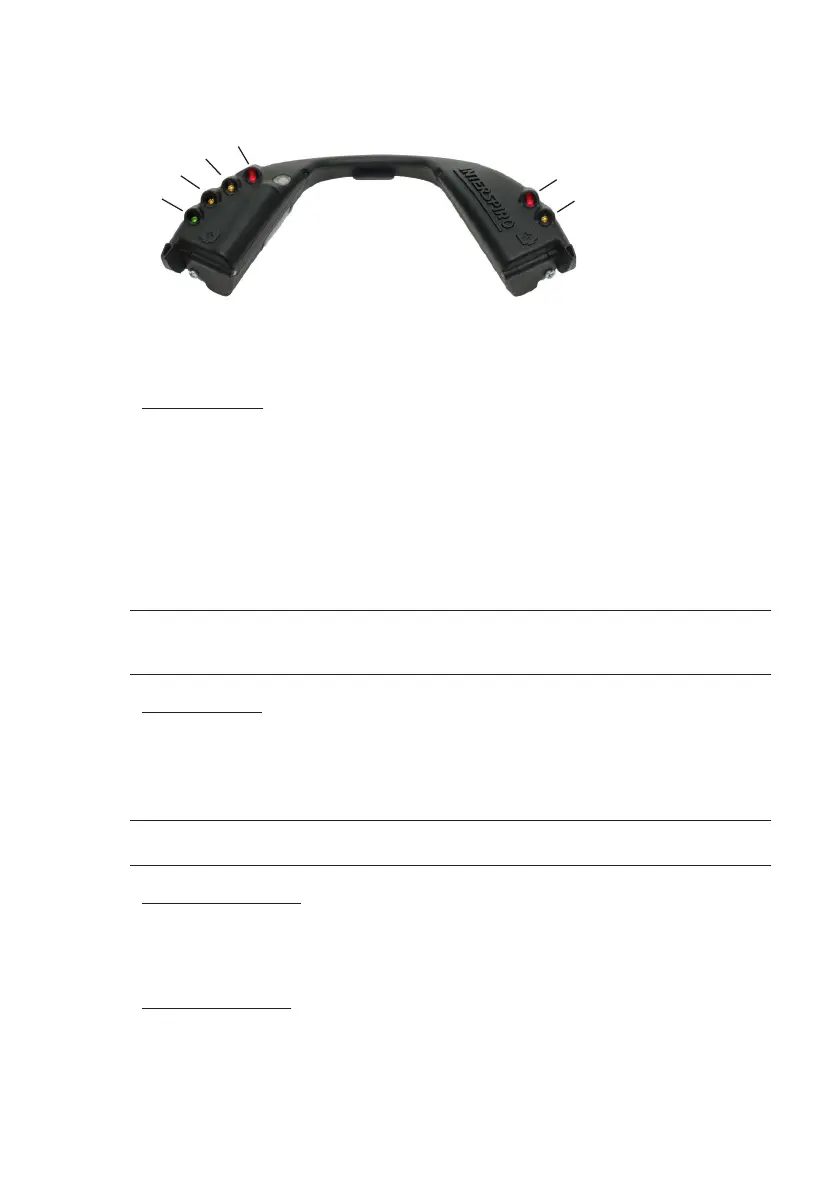
#1
#3
#2
#4
#5
#6
The wireless HUD contains six LED indicators for user information. The four LED indicators
Green (1), Yellow (2), Yellow (3), and Red (4) on the left side (as worn) are for cylinder
pressure. The Red (5) and yellow (6) LED on the right side are status indicators.
Pressure reading
The HUD starts automatically when the SCBA is pressurised and presents the cylinder
pressure.
Cylinder pressure: Indicated by HUD LEDs:
Full to 3/4 Green (1), Yellow (2), Yellow (3), and Red (4) ON
3/4 to 1/2 Yellow (2), Yellow (3), and Red (4) ON
1/2 to 1/3 Yellow (3) and Red (4) Flashing
1/3 to Empty Red (4) Flashing
NOTE: IF THE HUD HAS FLASHING LIGHTS EVEN THOUGH IT IS NOT PRESSURIZED, IT WAS PROBABLY SHUT OFF
(BATTERIES REMOVED) WITH PRESSURE STILL PRESENT. RESET THIS BY LEAVING THE DEPRESSURIZED HUD ON FOR
A MINUTE.
Low Air warning
Flashing yellow and red LEDs will activate when the primary air supply pressure has
dropped to approximately 50 % and the ashing red LED only at approximately
33 %. The visual ashing red LED will continue to ash until the cylinder content is
depleted and the unit is switched off.
NOTE: TO MEET THE NIOSH 42 CFR PART 84 AND NFPA 1981-2019 REQUIREMENTS FOR SET POINT ACTIVATION
OF THE EOSTI’S, THE S9 EOSTI 33% (LOW AIR ALARM WHISTLE) AND THE HUD EOSTI 33% ARE SET AT 35% +/- 2%.
PASS status indication
The red (5) LED in the right side indicates PASS status:
Flashing: PASS pre-alert
ON: PASS alarm
Low battery warning
When the battery capacity has fallen to a remaining service time of two hours the
Yellow (6) LED on the right side of the HUD starts to ash. This indicates low battery
in the HUD or in the BAC.
When not pressurized, low battery in the HUD is indicated by the ashing yellow (6)
LED.


 To Next Page