22
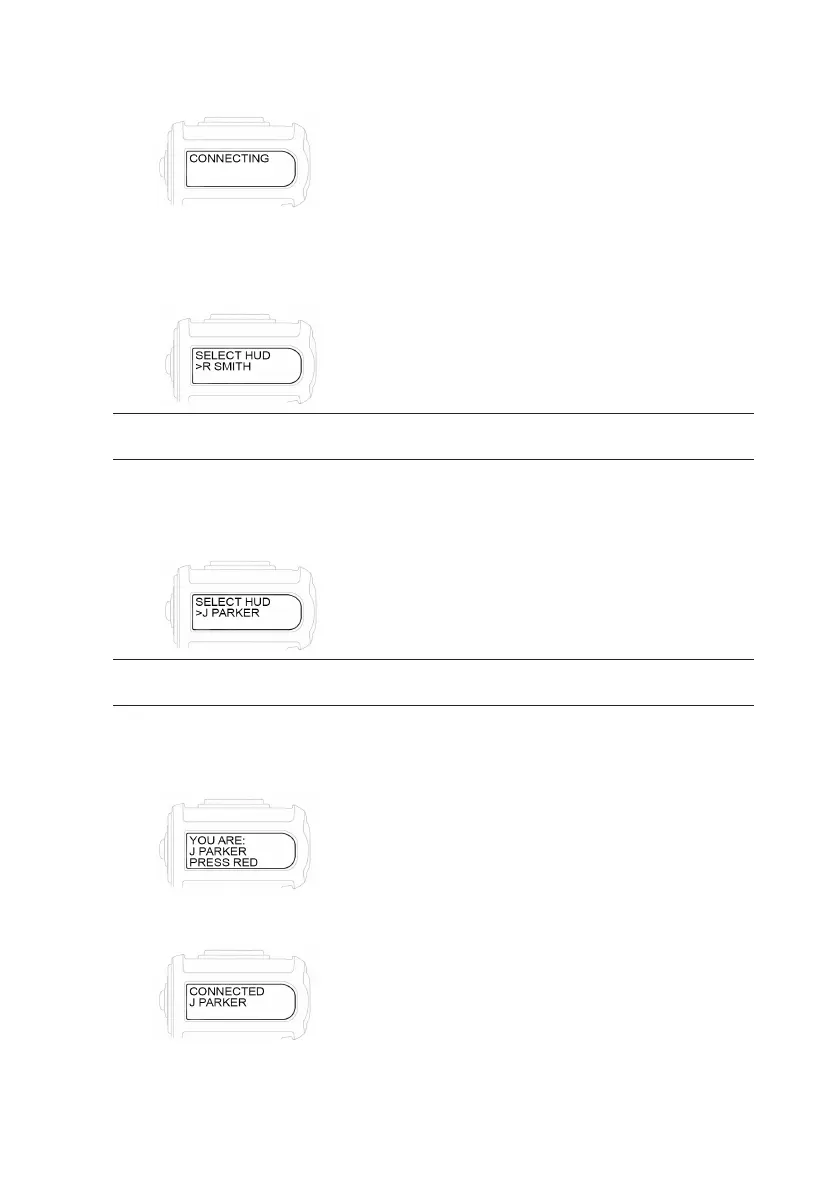
1. Press and release the black button on the Digital Display Unit. The backlight of the
display lights up in yellow and the display reads “CONNECTING”.
2. The BAC will begin searching for any HUDs in the approximate area.
After approximately 8 seconds the display will read:
“SELECT HUD” and the “NAME” of the rst HUD the BAC has located will begin
ashing on the display.
NOTE: THE FIRST HUD THAT IS DISPLAYED IS NOT NECESSARILY THE CLOSEST HUD TO THE BAC, IT IS JUST THE
FIRST HUD THE BAC HAS LOCATED.
3. If your “NAME” is not displayed, scroll by pressing the black button to display the
next HUD reghter’s “NAME”. Once you nd your”NAME”, i.e “J PARKER”, on
the display, press the red button.
NOTE: THE BAC CAN “CONNECT” TO ANY HUD WITHIN APPROXIMATELY 10 FEET AND CAN DISPLAY UP TO 12
HUDS ON THE DDU (ONE AT A TIME) TO SCROLL THROUGH TO FIND THE INDIVIDUAL FIREFIGHTER’S “NAME”.
4. The display will ask you to conrm: “YOU ARE: J PARKER PRESS RED”.
If this is not your “NAME”, press the black button. It will take you back to the list
to scroll until you nd your “NAME”.
5. Press the red button. The display will read “CONNECTED” and your “NAME” i.e.
“J PARKER”.
6. After the HUD is “CONNECTED”, the electronics will shut off automatically within
a few seconds.


 To Next Page