SECTION 5—WHEELCHAIR OPERATION
At’m 24 Part No. 1125035
Using the Joystick to Drive the Chair
The joystick is located at the front of the joystick housing and provides smooth control of
speed and direction. It is equipped with 360 degrees of mobility for ease of operation. The
joystick is spring-loaded, and automatically returns to the upright (neutral) position
when released. Pushing the joystick in a given direction causes the chair to move in that
direction.
The joystick has proportional drive control, meaning that the further it is pushed from the
upright (neutral) position, the faster the wheelchair moves. The maximum speed,
however, is limited by the setting of the speed-control knob.
To slow the wheelchair to a stop, simply release the joystick. The wheelchair has
automatic speed and direction compensation to minimize corrections.
When first learning to drive, select a slow speed and try to drive the wheelchair as slowly
as possible by pushing the joystick slightly forward. This exercise will help you learn to
utilize the full potential of the proportional control and allow you to start and stop
smoothly.
To drive the wheelchair, perform the following:
1. Adjust speed control switch to the appropriate setting.
2. Turn the power on. Refer to Turning the Power On/Off on page 23.
3. Move the joystick in the following manner:
Using the Horn
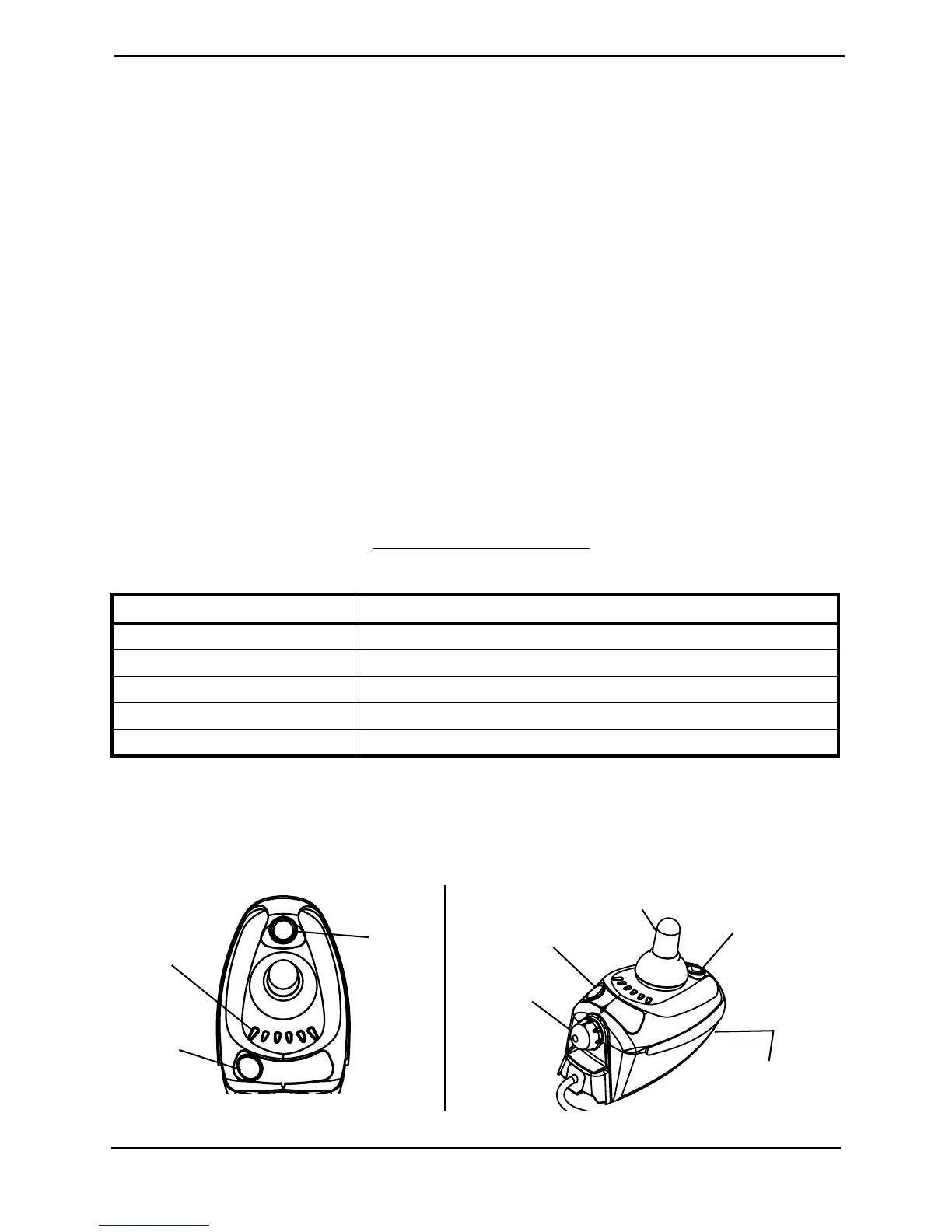
NOTE: For this procedure, refer to FIGURE 5.1.
1. Press the horn button located on the joystick housing.
FIGURE 5.1 Operating the Wheelchair
MOVEMENT ACTION
FORWARD Push forward on the joystick.
REVERSE Pull back on the joystick.
Turn RIGHT Move the joystick RIGHT.
Turn LEFT Move the joystick LEFT.
STOP Release the joystick and the wheelchair will quickly slow down.
Information
Gauge
On/Off
Switch
Horn
Joystick
Speed Control
Knob
Multi-Function
Charger Port
Horn
On/Off
Switch
Top
View



 To Next Page