SECTION 8—BATTERIES
Part No. 1125035 37 At’m
4. Connect the joystick. Refer to Disconnecting/Connecting the Joystick on page 32.
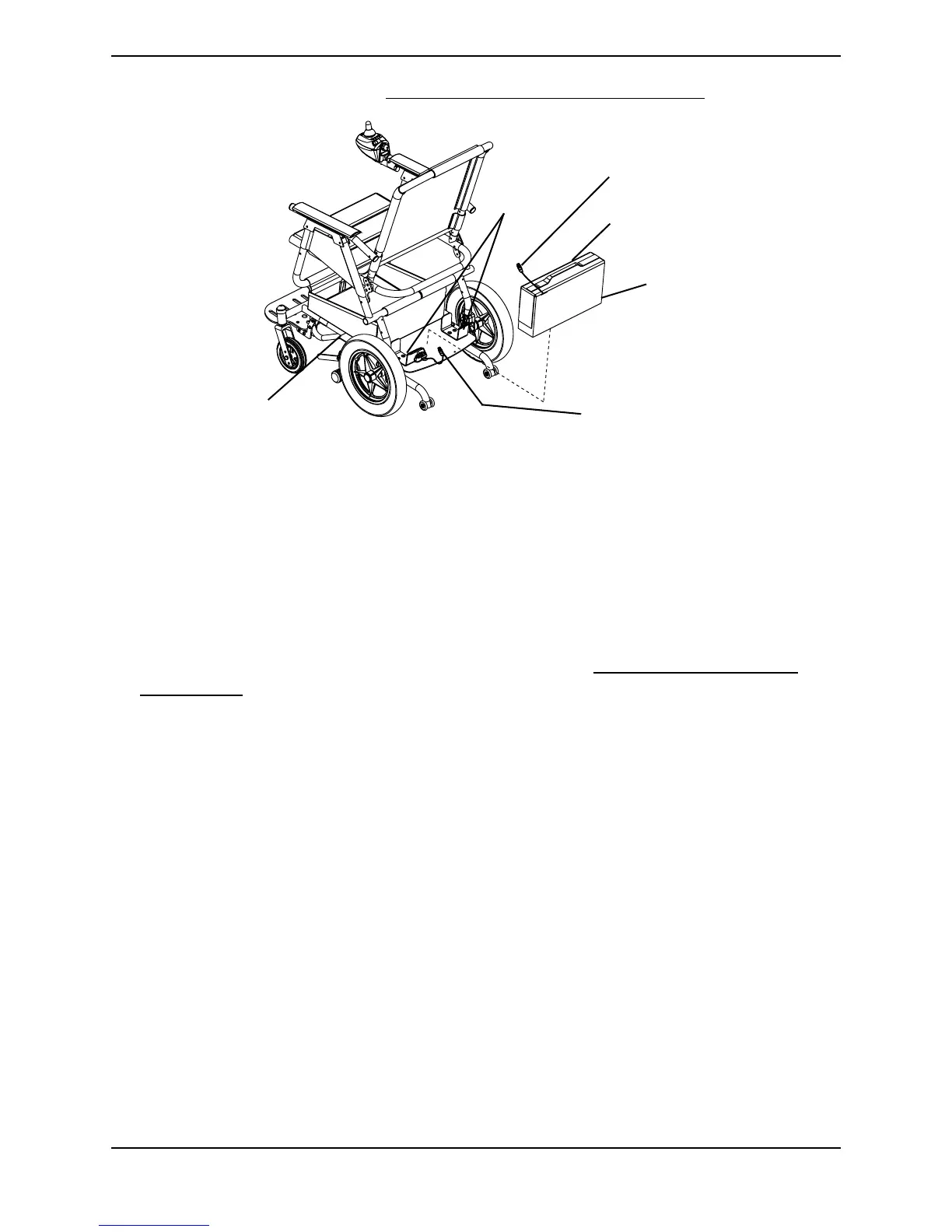
FIGURE 8.2 Removing/Installing the Battery Pack
Removing/Installing the Batteries From/Into the
Battery Pack
NOTE: For this procedure, refer to FIGURE 8.3.
Removing
1. Remove the battery pack from the wheelchair. Refer to Removing/Installing the
Battery Pack on page 36.
2. Open the battery pack by performing the following -
A. Grasp the side flaps and pull up.
B. Grasp the front flap and pull up.
3. Disconnect the wiring harness from the batteries in the following order -
A. NEGATIVE (-) BLACK battery cable from the NEGATIVE (-) battery terminal on
the left battery.
B. POSITIVE (+) RED battery cable from POSITIVE (+) battery terminal/post on the
right battery.
C. WHITE battery cable (jumper) from the POSITIVE (+) battery terminal/post on the
left battery and the NEGATIVE (-) battery terminal/post on the right battery.
4. Remove the batteries from the battery pack.
Battery Pack
Handle
Battery Pack
RED and BLACK
Battery Connector
Brackets
RED and BLACK
Controller Connector
Wheelchair Base




 To Next Page