7
INSTALLING & REMOVING FILTERS
FILTER REPLACE INDICATOR
The FILTER RESET light indicates that it is time to check your filter and
replace if necessary. We recommend changing the filter when the inside of the
filter turns a grayish color. The time frame of when this happens can vary
greatly depending on usage and environment. After checking or replacing the
filter according to the directions below, press the POWER button or 5 seconds
to reset indicator. The light will turn off.
*The filter will last approximately 6 - 12 months depending on environment.
Please replace with only genuine InvisiClean filter model: IC-3012-FILTER
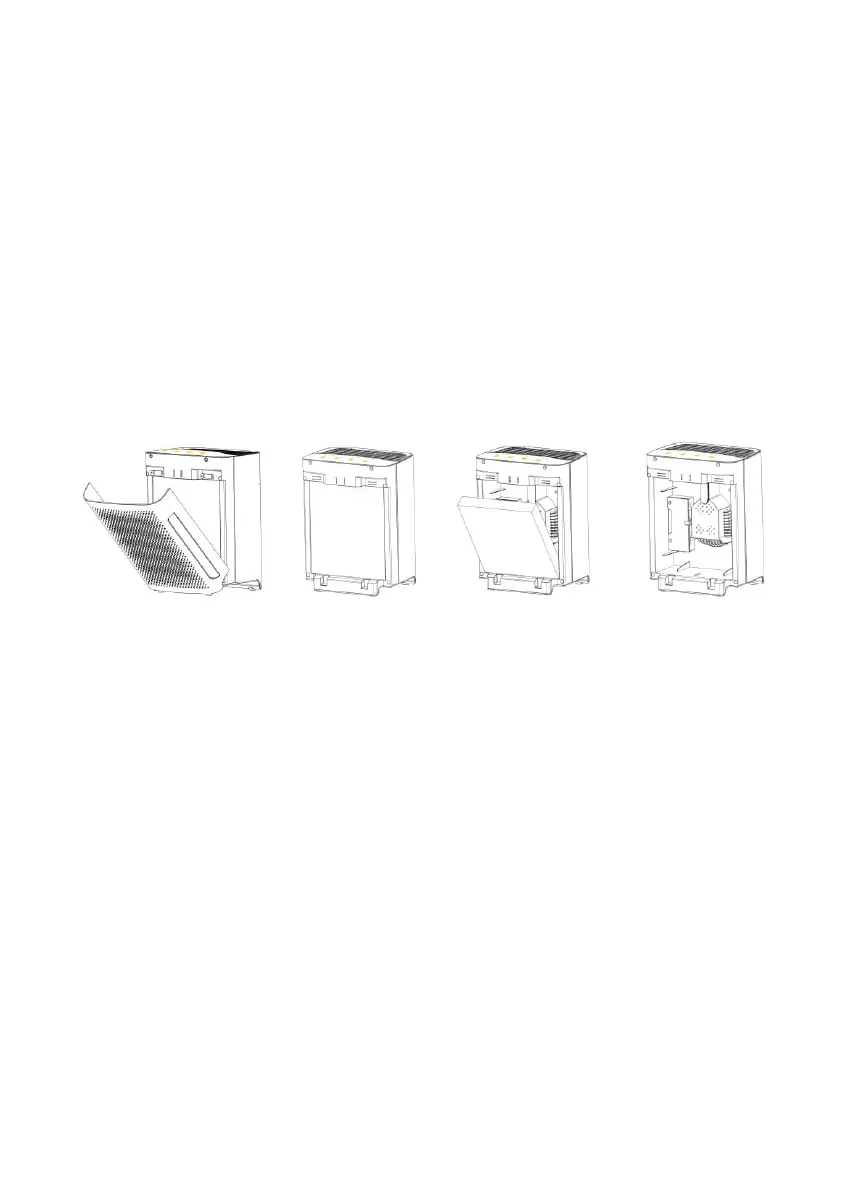
1. Open the front cover buy pulling on the cover from the top.
2. Remove the filter by pulling on the two strips.
3. Insert a new filter with the prefilter attached into the unit ensuring the strips
are facing out.
4. Reattach the front cover of the unit by placing the bottom 2 hooks first then
placing the top of the door into place.
5. Press and hold POWER Button for 5 seconds to reset the light.


 To Next Page