4 5
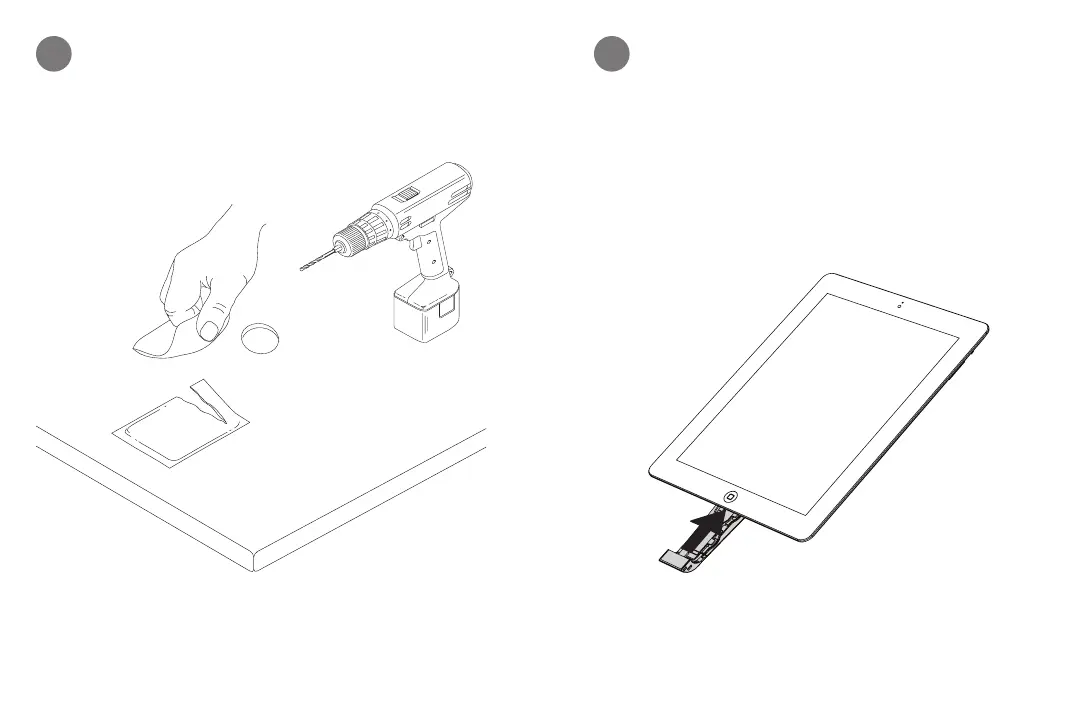
Drill a 19 mm (0.75”) hole in display counter. Wipe
display counter with alcohol wipe provided. Let it dry
completely.
1
CONTENTS: One pad saturated in 75%
Isopropyl Alcohol
DIRECTIONS: Apply topically as
needed to cleanse surface mounting area.
FOR EXTERNAL USE ONLY
KEEP OUT OF REACH OF
CHILDREN
KEEP AWAY FROM EYES
AND FIRE
CONTENTS: One pad saturated in 75%
Isopropyl Alcohol
DIRECTIONS: Apply topically as
needed to cleanse surface mounting area.
FOR EXTERNAL USE ONLY
KEEP OUT OF REACH OF
CHILDREN
KEEP AWAY FROM EYES
AND FIRE
2
Plug power connector into merchandise.


 To Next Page