14 15
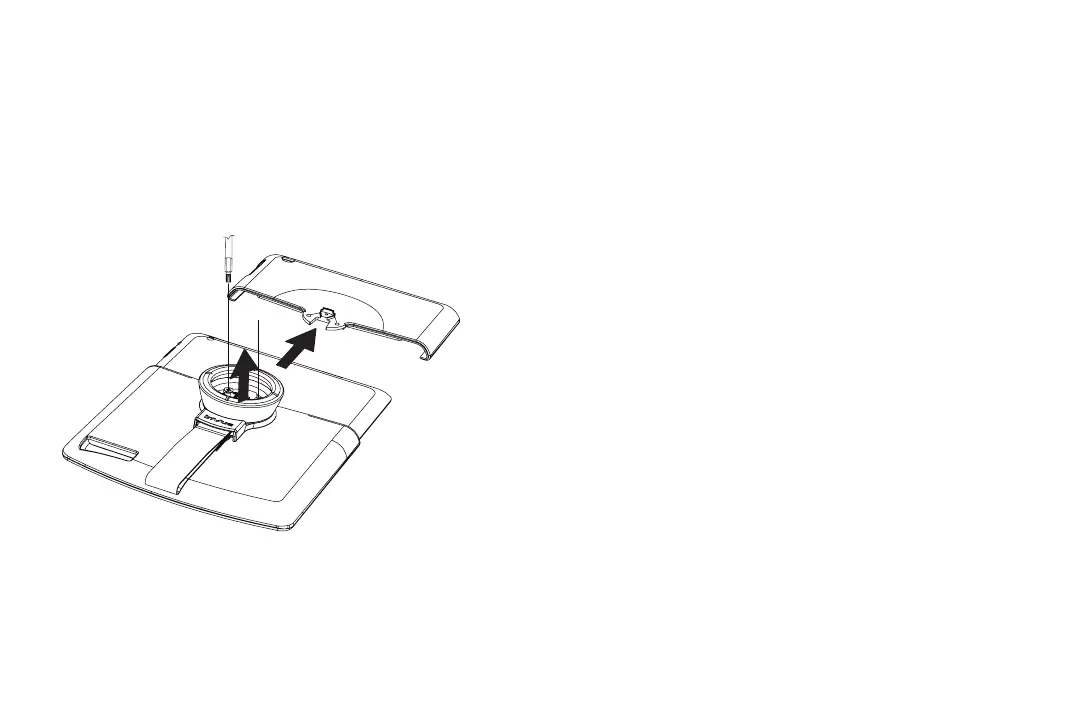
Removing Merchandise
Remove both screws with TT15 bit. Lift up on handle to slide
shroud off and remove merchandise.
Frequently Asked Questions & Tips
Q My merchandise is not powering up.
A 1) Conrm correct power connector is being used for mer-
chandise model. 2) Conrm power connector is completely
plugged into merchandise (page 2). 3) Conrm power supply
is plugged into stand cord and outlet (page 11).
Q Lock is not engaging.
A 1) Conrm power supply is plugged into stand cord and
outlet (page 11).
Q My stand is loose or not stable.
A Conrm clear lm on adhesive has been removed (page 7)
and wingnut below counter is fully tightened (page 10).
T Once IR Key is used to remove shroud from stand, you have
10 seconds before stand re-locks (page 13).
T Conrm all sides of shroud are fully engaged with stand
(page 9).
T Conrm correct power connector and shroud are being
used for merchandise model.


 To Next Page