Virtual Drive Function
Mode Manager
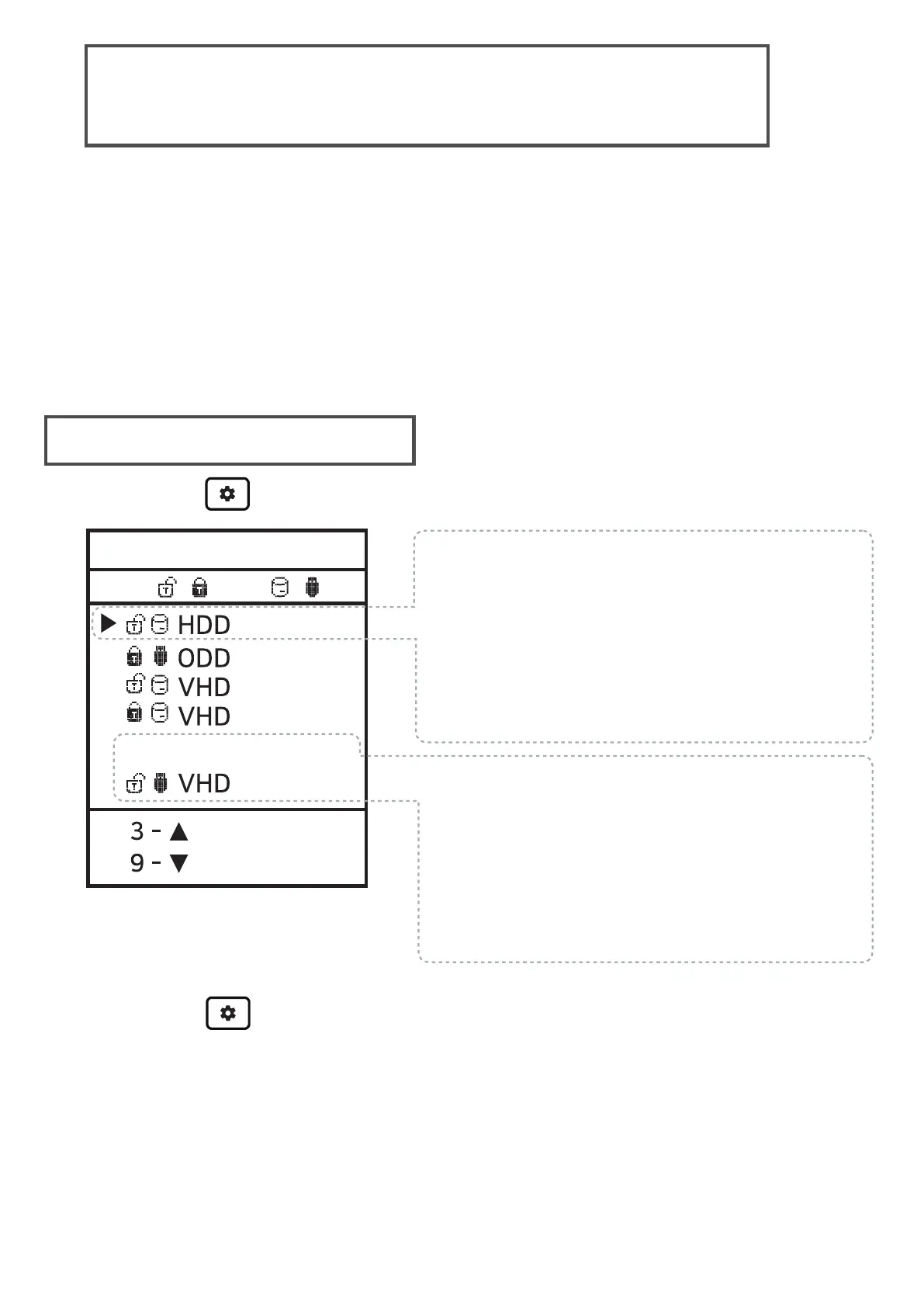
Press the button and select the 'MODE SELECT' Menu.
● One virtual ODD / three VHDs (or RMDs) can be mounted
at the same time.
● At the first time, automatically finds mountable files on the
largest partition (GPT / MBR, NTFS / exFAT / FAT32)
You can select default partition (button 4 in the file list area)
● The advanced mode manager handles the settings
of individual virtual drives.
Mode select
To exit menu mode,
press the button and the settings is saved.
※ If any options change in the Mode Manager, the device reboot
all currently mounted virtual drives are unmounted (ISO/VHD/RMD)
※ The drive order in menu may be same the
Virtual Drives Information Area of IODD.
//
5 - ,6-
---inactive area---
set the options of the selected (▶) drive.
Use the 5 button to enable / disable
the write protection function.
Use the 6 button to toggle
removable disk / fixed disk
You can change the order with the 3/9
buttons.The inactive bar can be moved.
Drives that are below the inactive bar
are inactived.
1.Configure options for the selected
2. Configure the number of drives
and drive's order.


 To Next Page