l
Do not connect more than two USB devices to a single computer. (More than two USB devices will
significantly reduce performance rate.)
| top of page |
Upgrading Windows Software
Upgrading Windows 98
If a previous version of IomegaWare software is installed on your system, we recommend removing it before
installing Windows Me or Windows 2000. Use
Add/Remove Programs
in Control Panel, uninstall all the
IomegaWare software, then restart Windows. Install Windows Me or Windows 2000 according to the
instructions included with the Windows Me or Windows 2000 package. Install the IomegaWare software
included with your Iomega drive system after the Windows Me or Windows 2000 installation is complete. See
Installing IomegaWare Software for instructions.
FireWire
®
Guidelines
You can use this section to verify that you have the necessary system requirements to support the FireWire
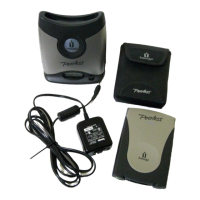
Peerless Drive System and to familiarize yourself with the do's and dont's for FireWire devices.
System Requirements: Windows or Macintosh
Your system must meet the minimum requirements below to support the FireWire Peerless Drive System.
PC Users:
l
Pentium
®
100 or higher with an SBP-2 compliant 1394 controller(tt)
l
Microsoft
®
Windows 98SE/2000/Me
l
Recommended RAM requirements for your operating system (see your OS manual for details)
l
4X CD-ROM drive (for software installation)
l
10MB hard drive space recommended, software suite applications will require additional hard drive
space
l
Microsoft Internet Explorer 4.01 or higher or Netscape
®
Navigator
®
4.5 or higher (to view user’s
manual)
Mac
®
OS Users:










 To Next Page