
 Need help?
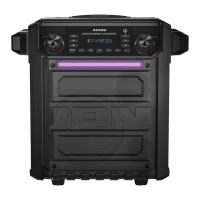
Do you have a question about the ION EXPLORER EXTREME and is the answer not in the manual?
Provides a welcome message and explains the product's design philosophy for user entertainment and convenience.
Lists all the items included in the Explorer Extreme package, ensuring users have everything.
Directs users to the website for the latest product information, technical specifications, and registration.
Offers essential recommendations for proper use, storage, and maintenance of the internal lead-acid battery for optimal lifespan.
Guides users through the initial steps required to set up and start using the Explorer Extreme for the first time.
Visually illustrates how to connect various audio sources and accessories to the front and rear panels of the unit.
Explains the operation of the Power button, Bluetooth button, and Lights button.
Details the Treble, Bass, Radio Selector, and AM/FM Presets controls on the front panel.
Covers the Qi Button and Play/Pause/Link button functionalities for charging and speaker linking.
Describes the Tune/Track buttons, Display information, and Master Volume control.
Details the Microphone Input, Auxiliary Input, Speaker Link, and USB Charging Port for connectivity.
Highlights the cup holders and the Qi wireless charging pad located on the top surface.
Identifies the Power input for charging and the Bottle Opener on the rear panel.
Explains how to use the Qi wireless charging pad, including connection indicators and best practices.
Provides instructions on selecting, saving, and recalling radio stations using the built-in tuner.
Guides users through the process of connecting a Bluetooth-enabled device to the Explorer Extreme.
Details the steps for stereo linking two Explorer Extreme speakers for an enhanced audio experience.
Addresses common problems related to unit charging and audio distortion or bass levels.
Offers solutions for poor radio reception and feedback noise when using microphones.
Helps resolve issues with Bluetooth pairing, connection, and audio playback interruptions.
Lists detailed technical data including power, frequency response, drivers, Bluetooth, radio range, and dimensions.
Mentions ION Audio's trademarks and licensing agreements with Bluetooth SIG, Inc.
 General
| Power Output | 100W |
|---|---|
| Bluetooth | Yes |
| USB Charging Port | Yes |
| Wheels and Handle | Yes |
| Type | Portable Bluetooth Speaker |
| Inputs | 3.5mm AUX |
| Bluetooth Range | 100 feet |
| Frequency Response | 55 Hz – 20 kHz |



 To Next Page
