EasyManua.ls Logo

ION Total PA Supreme - User Manual

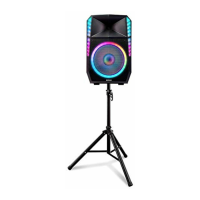
ION Total PA Supreme
28 pages
Print Icon
To Next Page IconTo Next Page
Loading...
User Guide English ( 3 – 9 )
Guía del usuario Español ( 10 – 17 )
Guide d’utilisation Français ( 18 – 24 )
Appendix English ( 25 – 26 )

Other manuals for ION Total PA Supreme

Question and Answer IconNeed help?

Do you have a question about the ION Total PA Supreme and is the answer not in the manual?

Summary

User Guide

Introduction

Welcome and overview of the product.

Box Contents

Lists all items included in the product packaging.

Support Information

How to get help and find more information.

Quick Setup Guide

Connection Diagram

Visual guide for connecting devices to the speaker.

Speaker Stand Installation

Step-by-step instructions for setting up the speaker stand.

Product Features

Rear Panel Controls

Description of buttons and inputs on the rear panel.

Media Panel Functions

Explanation of audio source selection and playback controls.

Product Operation

Automatic Power Shut-Off

How the speaker conserves energy automatically.

App Control Setup

Instructions for controlling the speaker with a mobile app.

Bluetooth Device Pairing

Steps to connect Bluetooth audio devices.

Linking Speakers

Wireless Speaker Linking

Guide for wirelessly connecting two speakers.

Cable Speaker Linking

Guide for connecting two speakers using audio cables.

Troubleshooting Common Issues

Appendix

Technical Specifications

Detailed specs for output, frequency, dimensions, and more.

Trademarks and Licenses

Legal information and registered trademarks.

Summary

User Guide

Introduction

Welcome and overview of the product.

Box Contents

Lists all items included in the product packaging.

Support Information

How to get help and find more information.

Quick Setup Guide

Connection Diagram

Visual guide for connecting devices to the speaker.

Speaker Stand Installation

Step-by-step instructions for setting up the speaker stand.

Product Features

Rear Panel Controls

Description of buttons and inputs on the rear panel.

Media Panel Functions

Explanation of audio source selection and playback controls.

Product Operation

Automatic Power Shut-Off

How the speaker conserves energy automatically.

App Control Setup

Instructions for controlling the speaker with a mobile app.

Bluetooth Device Pairing

Steps to connect Bluetooth audio devices.

Linking Speakers

Wireless Speaker Linking

Guide for wirelessly connecting two speakers.

Cable Speaker Linking

Guide for connecting two speakers using audio cables.

Troubleshooting Common Issues

Appendix

Technical Specifications

Detailed specs for output, frequency, dimensions, and more.

Trademarks and Licenses

Legal information and registered trademarks.

ION Total PA Supreme Specifications

General IconGeneral
Tweeter1 inch
Tweeter TypeCompression Driver
BluetoothYes
USBYes
SD CardYes
FM RadioYes
Microphone Inputs2
Remote ControlYes
Built-in MixerYes
EQ ControlsYes
Light EffectsYes
HandleYes
WheelsYes
Battery Life50 hours
TypePA System
Woofer Size15 inches
Inputs1/4 inch
Outputs1/4 inch
MicrophoneIncluded
Weight39.7 lbs. (18 kg)

Related product manuals