EasyManua.ls Logo

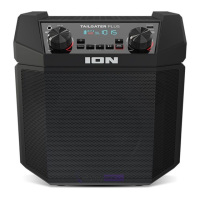
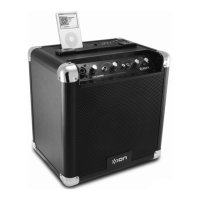
ION TAILGATER - User Manual

ION TAILGATER
32 pages
Print Icon
To Next Page IconTo Next Page
Loading...
Tailgater
iPA77
Quickstart Guide English ( 2 – 6 )
Guía de inicio rápido Español ( 7 – 11 )
Guide d'utilisation rapide Français ( 12 – 16 )
Guida rapida Italiano ( 17 – 21 )
Schnellstart-Anleitung Deutsch ( 22 – 26 )
Snelstartgids Nederlands ( 27 – 30 )
Appendix English ( 31 )

Other manuals for ION TAILGATER

Questions and Answers

  • J
    Jessica MooreJul 30, 2025
    How to fix distorted sound on ION TAILGATER?
    • K
      Katherine BrownJul 30, 2025
      If the sound from your ION speakers is distorted, try the following: * Lower the volume control of your sound source, musical instrument, or microphone. * Reduce the overall volume of the speakers using the Master Volume knob.
  • A
    Alan ThomasAug 4, 2025
    Why do my ION TAILGATER make a high-pitched whistling noise when using microphones?
    • E
      Eric ShieldsAug 4, 2025
      To prevent high-pitched whistling noise when using microphones with your ION speakers, ensure that the microphone is pointed away from the speaker. This issue is likely due to feedback.
  • R
    Ronald BatesAug 9, 2025
    What to do if I can't hear the microphone over the music volume on my ION TAILGATER Speakers?
    • A
      Angela ScottAug 9, 2025
      If you can't hear the microphone over the music volume on your ION speakers, try turning down the music volume from your source.
  • R
    Rachel HolmesAug 13, 2025
    Why is there too much bass coming from my ION TAILGATER Speakers?
    • M
      Madison SantosAug 14, 2025
      If there is too much bass coming from your ION speakers, try adjusting the tone or EQ control on your sound source to lower the bass level. You can also control EQ using the free ION Block Rocker app for iOS and Android devices.
  • R
    Rebecca GarciaAug 18, 2025
    What to do if my ION Speakers have poor AM reception?
    • D
      Debra KimAug 19, 2025
      To improve poor AM reception on your ION speakers, disconnect AC power for optimal AM radio reception. To further adjust AM reception, move the entire unit.
  • J
    jonathan55Aug 25, 2025
    Why can't I play music from a flash drive on my ION Speakers?
    • S
      Steven SnyderAug 25, 2025
      The USB port on ION speakers is only for charging USB devices. It cannot be used to play music from a flash drive.

Summary

Quickstart Guide

Introduction

Step-by-step guide for initial setup and product usage.

Box Contents

List of all items included in the product packaging.

Support and Registration

Information on obtaining product support and registering your device.

Rechargeable Batteries

Guidelines for maximizing the lifespan of the lead-acid battery.

Quick Setup

Connection Diagram

Visual overview of all ports and connections on the Tailgater.

Device Controls and Indicators

Explanation of buttons, knobs, and display indicators on the unit.

Bluetooth Connectivity

Pairing a Bluetooth Device

Instructions for connecting audio sources via Bluetooth.

Pairing via NFC

Steps for connecting audio sources using NFC technology.

Troubleshooting

Audio and Sound Issues

Solutions for distortion, bass, feedback, and volume balancing problems.

Reception and Playback Problems

Troubleshooting tips for AM reception and USB playback limitations.

Technical Specifications

Physical and Performance Details

Specifications for dimensions, weight, Bluetooth range, and frequency response.

Power, Battery, and Radio Specs

Details on power input, charge port, battery life, and radio frequency ranges.

ION TAILGATER Specifications

General IconGeneral
Impedance4 Ω
RMS rated power16 W
Audio output channels2.0 channels
BluetoothNo
Microphone inYes
Headphone connectivity-
Product colorBlack
Battery life (max)8 h
Power requirements100-120VAC@60Hz; 220-240VAC@50Hz
Apple docking compatibilityiPod
Weight and Dimensions IconWeight and Dimensions
Depth241.3 mm
Width317.5 mm
Height355.6 mm
Weight9163 g

Related product manuals