System Requirements
For Windows:
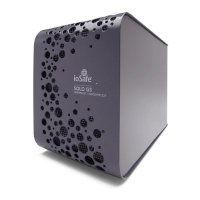
The ioSafe Solo G3 USB 3.0 version not specifically “for Mac” is formatted with the
“NTFS” drive format, the default for all Windows operating systems.
The ioSafe Solo G3 not specifically “for Mac” can easily be reformatted to work with a
Mac. “Solo G3 for Mac” are ready out of the box to work with Mac computers.
See page 17 - Formatting the USB 3.0 ioSafe Solo G3 for Mac OS if you require reformatting.
Please read the precautions listed below. Failure to do so may result in damage to the device
and loss of data. All drives covered under ioSafe’s Data Recovery Service (DRS) would qualify for
data recovery for any reason under our general terms and conditions for the service. See our
website for more details.
•
THE TERM “BACKUP” MEANS TO MAKE A REDUNDANT “COPY” OF YOUR DATA – NOT
TO SIMPLY “MOVE” YOUR DATA FROM ONE DEVICE TO ANOTHER.
Read the latest discussions on backup and data protection at: www.iosafe.com/faq
or www.iosafe.com/blog


 To Next Page