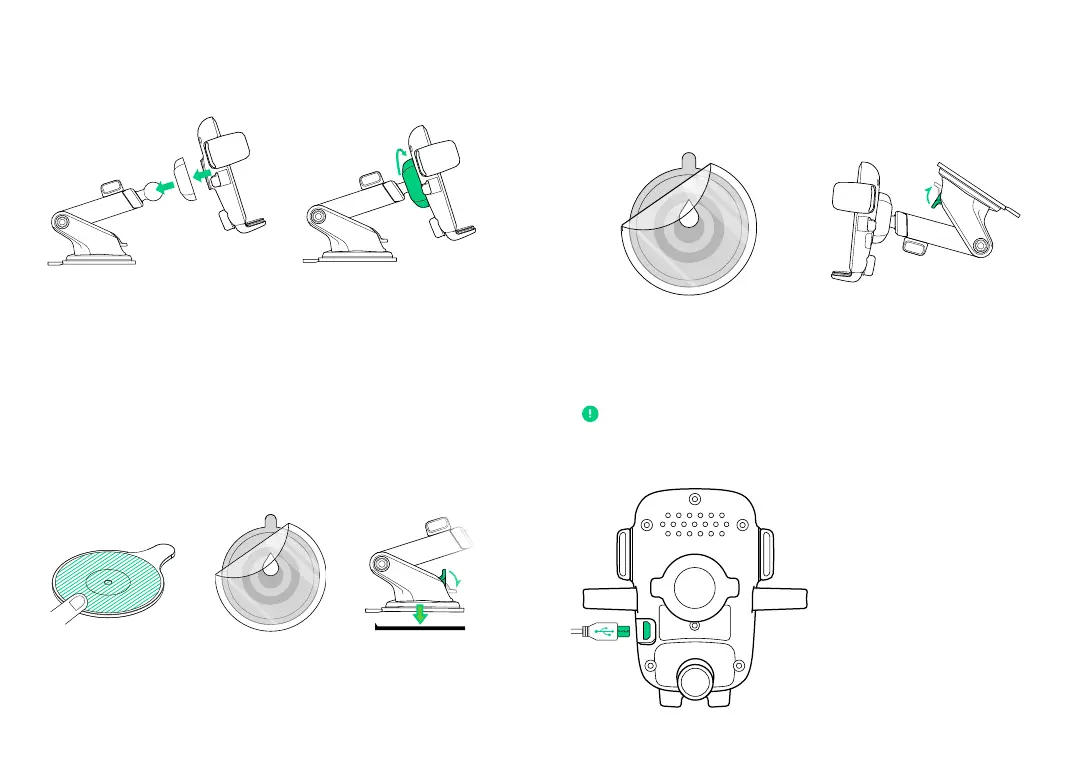
Installation
A. Connect the Mount Cradle with
the Ball Joint.
Choose an installation method: Dashboard/Flat Surface (A) or
Windshield/Curved Glass (B).
B. Then, tighten the Cradle Knob.
2. Selecting a Location
1. Assembling the Mount
2. Peel o the protective
film on the Suction Cup
and press mount firmly
onto the dashboard pad.
3. Push Locking Lever
down to engage
suction.
1. Peel o the film
on the dashboard
pad & stick on the
desired installation
location.
1. Peel o the protective film on the
Suction Cup and press firmly onto
the windshield.
Choose a location on the windshield and wipe any dust
or debris from the surface.
2. Push Locking Lever down to
engage suction.
Option B
Windshield Installation or Curved Glass Installation
Connecting Power
Option
A
Dashbo
ard or Flat S
urface Installa
tion
The Easy O
ne Touch Wireless
is powered via a mic
ro-USB cable. Ther
e is no
on/o swit
ch on the device.
Choose a
n area on
a flat su
rface
and wipe
any dust
or debr
is from th
e surface
.


 To Next Page