Using the Easy One Touch Mechanism
The Easy One Touch lock and release mechanism makes it simple to
mount & retrieve smartphones in seconds.
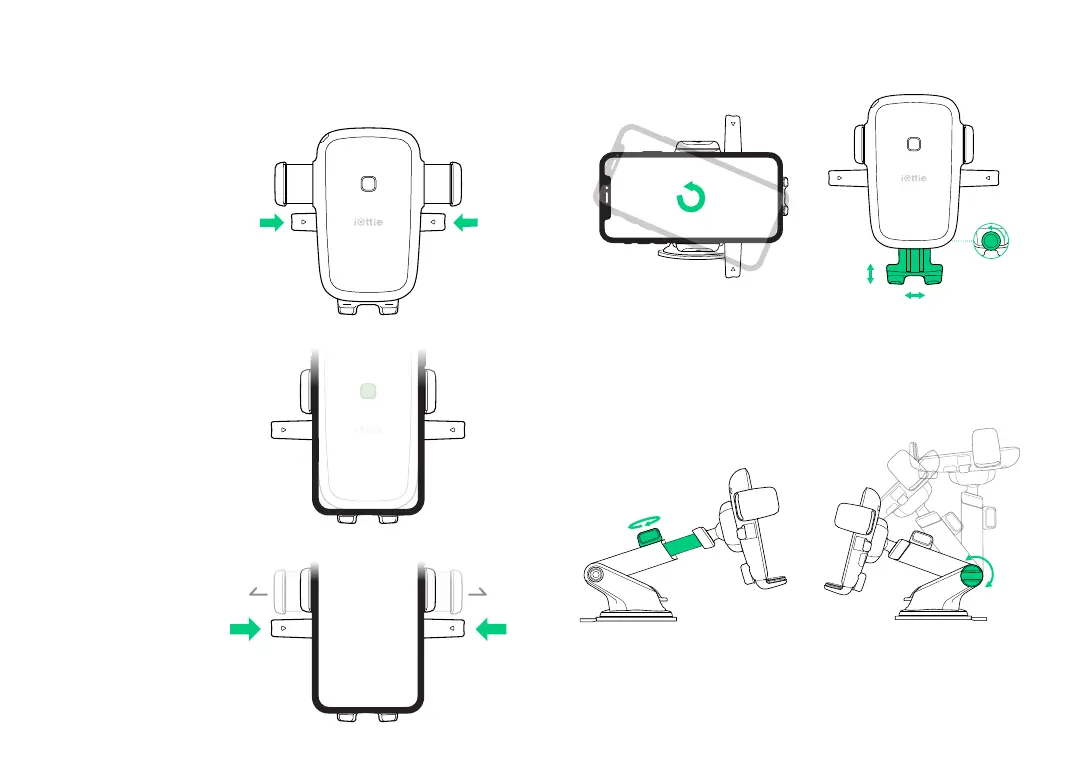
Mounting
Releasing
1. Press the locking side
arms in.
Press the locking side
arms with one hand and
retrieve the device.
2. Press your device against
the Easy One Touch trigger
button. The mount’s arms
will automatically close on
contact and hold the device
during the driving journey.
Adjusting the Mount
1. Cradle Knob
When mounting in landscape mode,
loosen to rotate the Cradle. Tighten
to lock in desired position.
3. Telescopic Knob
Located on top of Telescopic Arm,
loosen to extend the arm, and
tighten to secure distance.
2. Foot Knob
Located on the lower back of
Cradle. Loosen to re-position
mount’s foot. The Foot can be
adjusted up & down or side-to-
side.
4. Pivot Knob
Located on the side of the Mount
Base, turning allows you to pivot
telescopic arm. Tighten to secure
position.


 To Next Page