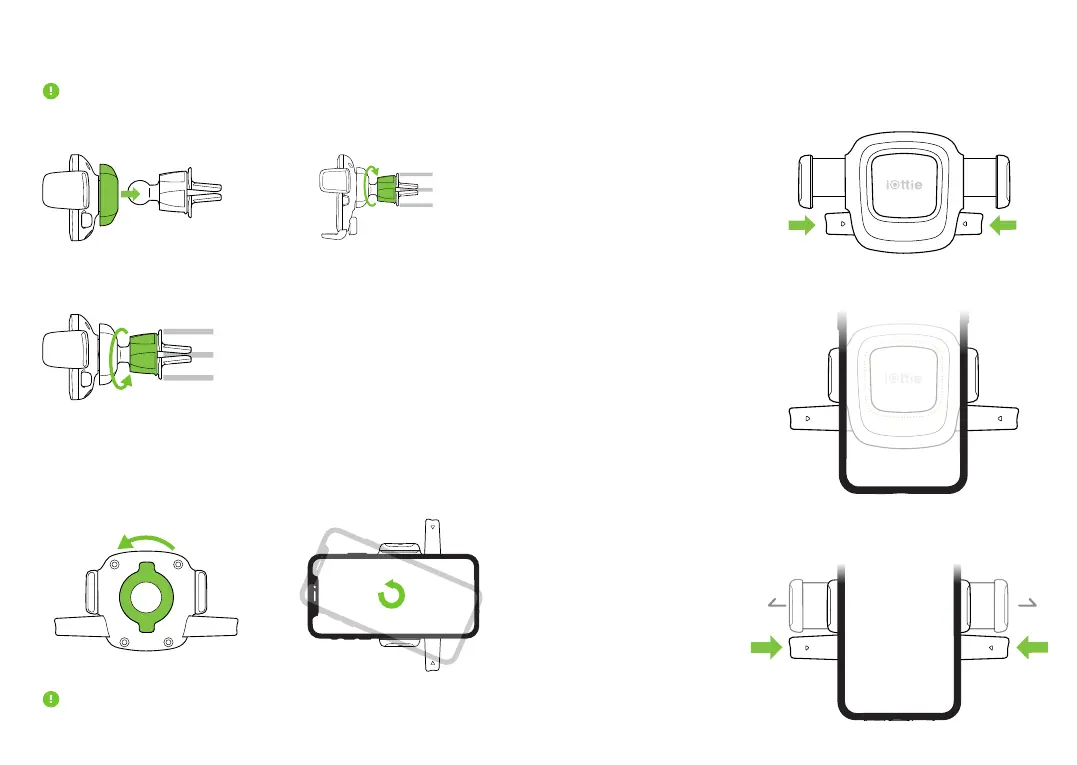
Installation
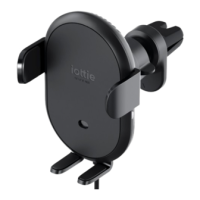
Adjusting the Mount
Cradle Knob: When mounting in landscape mode, loosen to rotate the
Cradle. Tighten to lock in desired position.
1. Press vent mount & cradle
together, tighten Cradle Knob.
Using the Easy One Touch Mechanism
The Easy One Touch lock and release mechanism makes it simple to
mount & retrieve smartphones in seconds.
Mounting
Releasing
1. Press the locking side
arms in.
Press the locking side
arms with one hand and
retrieve the device.
2. Press your device against
the Easy One Touch trigger
button. The mount’s arms
will automatically close on
contact and hold the device
during the driving journey.
Please use caution when adjusting the Twist Lock on air vent blade. Do
not apply excessive pressure to Twist Lock as this may damage the blades.
iOttie is not liable for damages due to product misuse.
2. Loosen Twist Lock, and position
mount on vent blade.
3. Support air vent, and slowly
tighten Twist Lock.


 To Next Page