Mount Smart. Drive Smarter!
Customer Support
Telephone – 201-580-2688
E-mail – cs@iottie.com
Website – www.iOttie.com
One Year Limited Warranty - Satisfaction Guaranteed.
iOttie has you covered. Should anything go wrong with your mount within
the warranty period, iOttie will provide you with a hassle-free replacement.
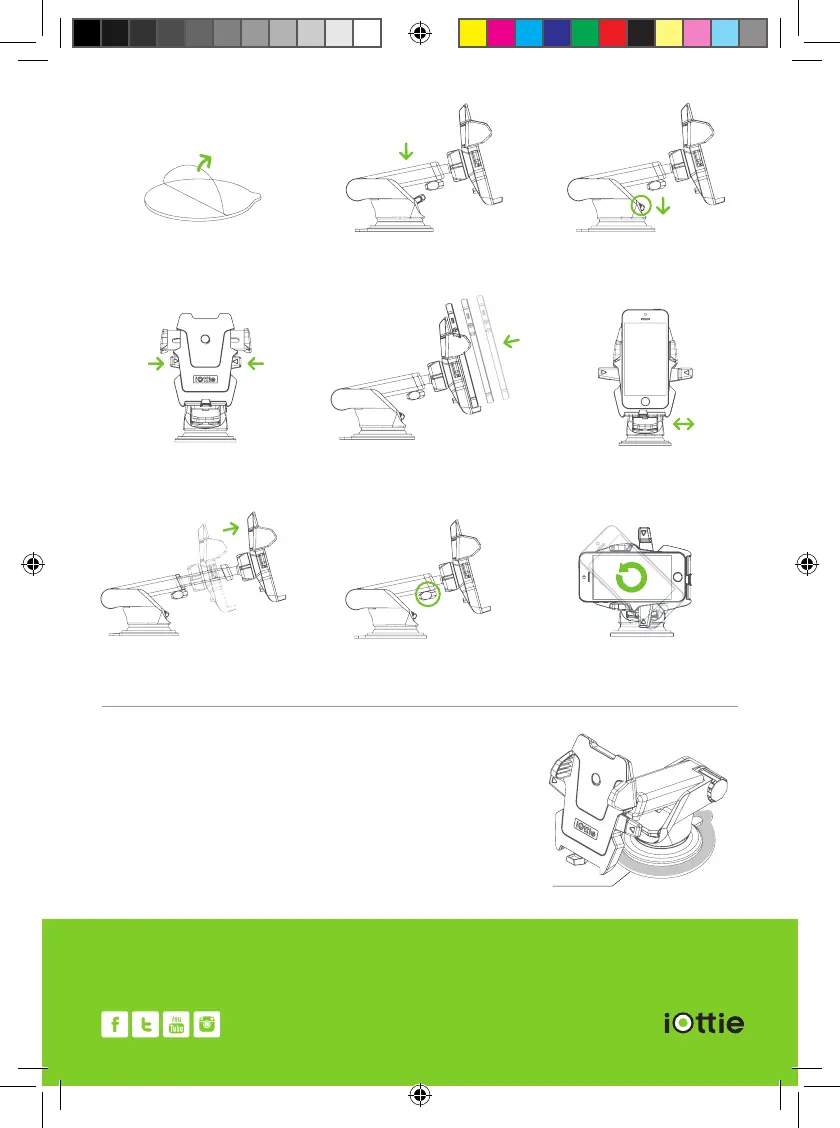
1. Unpeel dashboard pad cover and place
sticky side on desired dashboard location
*Dashboard pad for dashboard use only
6. Adjust bottom foot to locate proper
position.
9. Adjust cradle in any angle with ball
pivot joint.
5. Place your device inside the mount
rmly to activate the one touch
locking system.
8. Tighten knob to fasten in place.
4. Press side buttons into locking position.
7. Loosen knob to extend telescopic
arm to desired length.
3. Pull down the lever to secure the mount.
a) Pull down once for smooth surfaces.
b) Pull down twice for textured surfaces.
2. Unpeel sticky gel pad cover, place
onto dashboard cover and press down
INSTALLATION INSTRUCTIONS
DASHBOARD PAD INSTRUCTIONS
1. Unpeel dashboard pad cover
2. Place on desired location
3. Mount your device
Dashboard Pad
* iOttie recommends to use included dashboard pad for all dashboard
mounting, this will help mounting on curved and textured surfaces as well
as prevent any potential dashboard damage. Use of the dashboard pad is
not required on the windshield.



 To Previous Page