- 3 -
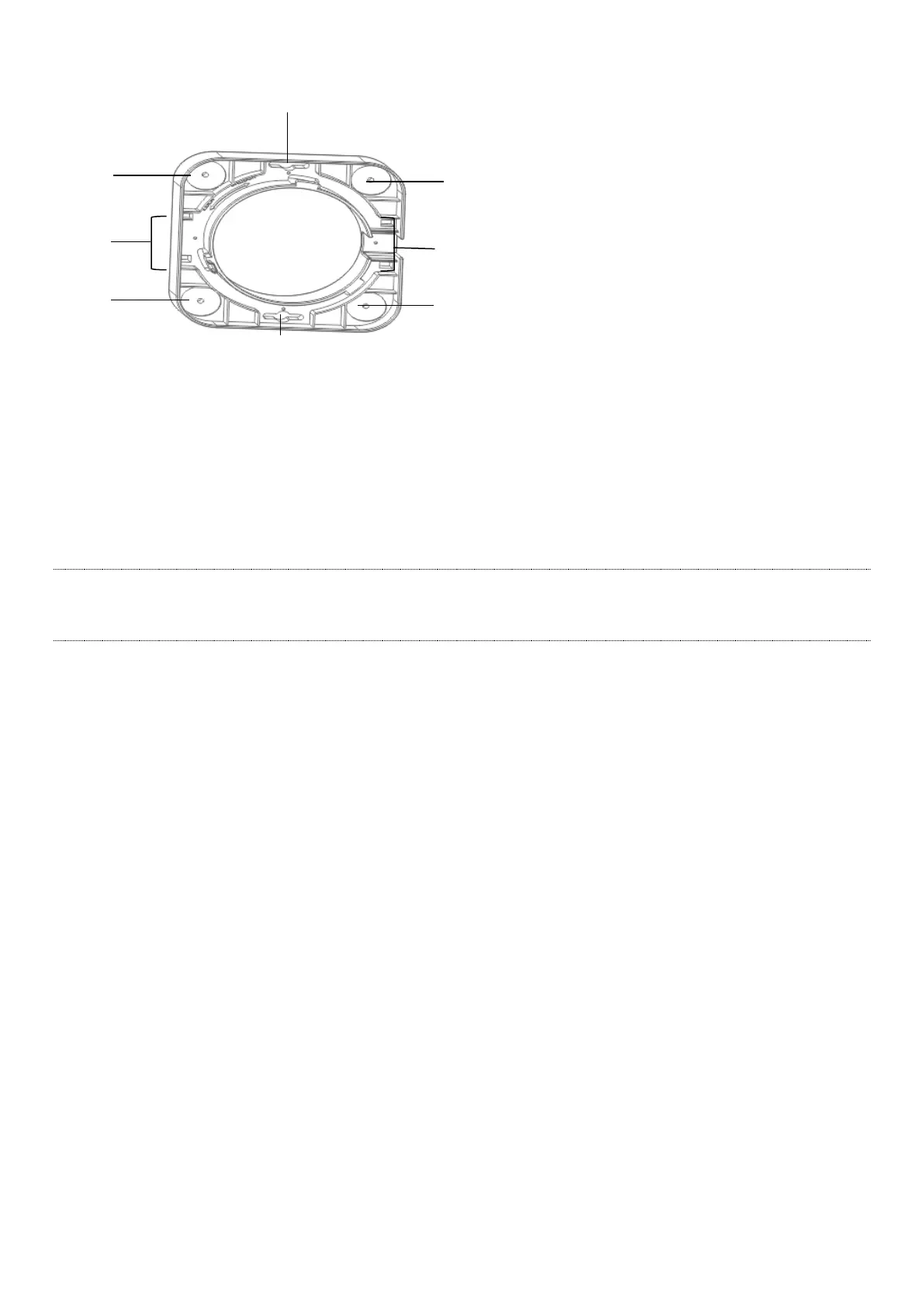
Bracket
The bracket is used to install the device onto ceilings, walls or poles. See II Install the device for details.
❶ Screw holes for ceiling installation
❷ Plastic strap holes for pole installation
❸ Slots for wall installation.
I. Set up the device
Tips
EW12 supports management through the web UI, IMS cloud and App. This part instructs how to manage
the device through the web UI. For more management types, please refer to relevant documents.
Please choose Scenario 1 or Scenario 2 to perform your configuration depending on your networking
requirement. PoE power supply is used for illustration.
Scenario 1: Serve as a router
1. Use an Ethernet cable to connect the PoE WAN/LAN1 port of EW12 to the PoE port of the PoE injector.
2. Use an Ethernet cable to connect the LAN port of the PoE injector to the internet.
3. Use the included power adapter to connect the PoE injector to a power source.
4. Connect a computer or a WiFi-enabled device (for example: a smart phone) to EW12.
For a computer
Use an Ethernet cable to connect the computer to the LAN2 port of EW12.
For a smart phone
Connect the smart phone to the WiFi network of EW12. The default SSID can be found on the label
at the bottom of the device.



 To Next Page