ENGLISH
TECHNICAL MENU CT51 - 71
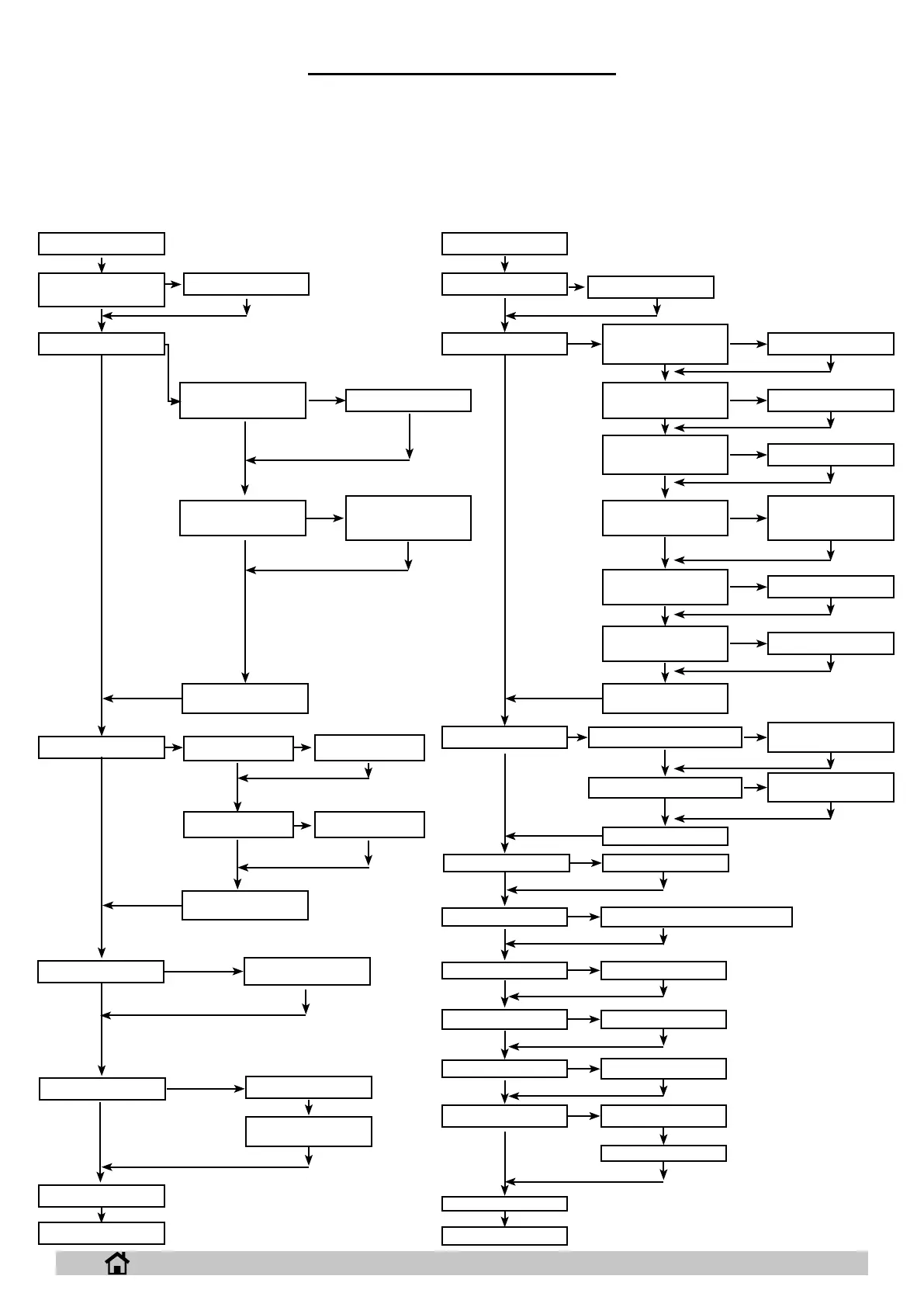
Access the menu by turning the operation selector to OFF and pressing “SET” twice, then press the “+” and “-” buttons together.
The “+” button increases the selected parameter or the variable relating to the selected parameter.
The “-” button decreases the selected parameter or the variable relating to the selected parameter.
The “SET” button selects the parameter to be set and conrms the entered variable.
WORK AREA
LANGUAGE
IT, GB, ES.......
SUCTION STOP DEL.
GEL-AGM / LEAD-ACID
(GEL-AGM)
EXIT
POWER OFF
AUTO PROGRAM
BATTERY TYPE
WORK AREA
LANGUAGE
1/5/2
1/5/3
0.....100% (100%)
10.....100% (100%)
70.....100% (100%)
OFF - 0.2 - 0.3 - ...7%
(OFF)
OFF - 1 - 2 - ...30
seconds (3)
OFF - 1 - 2 - ...30
seconds (3)
GEL-AGM - ACID (GEL-AGM)
“+” ; “-”
40 - 100% (70%)
0 - 40% (10%)
PASSWORD
BRUSH PRESSURE
(version with actuator
only)
WATER FLOW-RATE
SPEED REDUCTION
DETERGENT FLOW-
RATE
BRUSH PWM
SUCTION PWM
EXIT
EXIT
POWER OFF BRUSH STOP DELAY
SUCTION STOP DELAY
EXIT
AUTO PROGRAM
BATTERY TYPE
CHANGE HEAD
MAX SPEED
MIN SPEED
SERVICE
EXIT
WORK AREA
IT, GB, ES.......
EXIT
WORK AREA
PASSWORD
SERVICE
EXIT
0/5/3WATER FLOW-RATE
OFF - 0.2 - 0.3 - ...7%
(OFF)
DETERGENT FLOW-
RATE
OFF- 0 -15 sec (7)
BRUSH STOP DEL.
OFF- 0 -15 sec (2)
EXIT
10 - 100% (50%)REVERSE SPEED
B BT-XP
23


 To Next Page