Android Game Center
Use of Android Device
‘Majority of the games in Android system supports HID mode. (When using it in a PC, the usage methods are the
same with Android. Those games that are downloaded from related mobile phone game centers or emulators are
also supported.
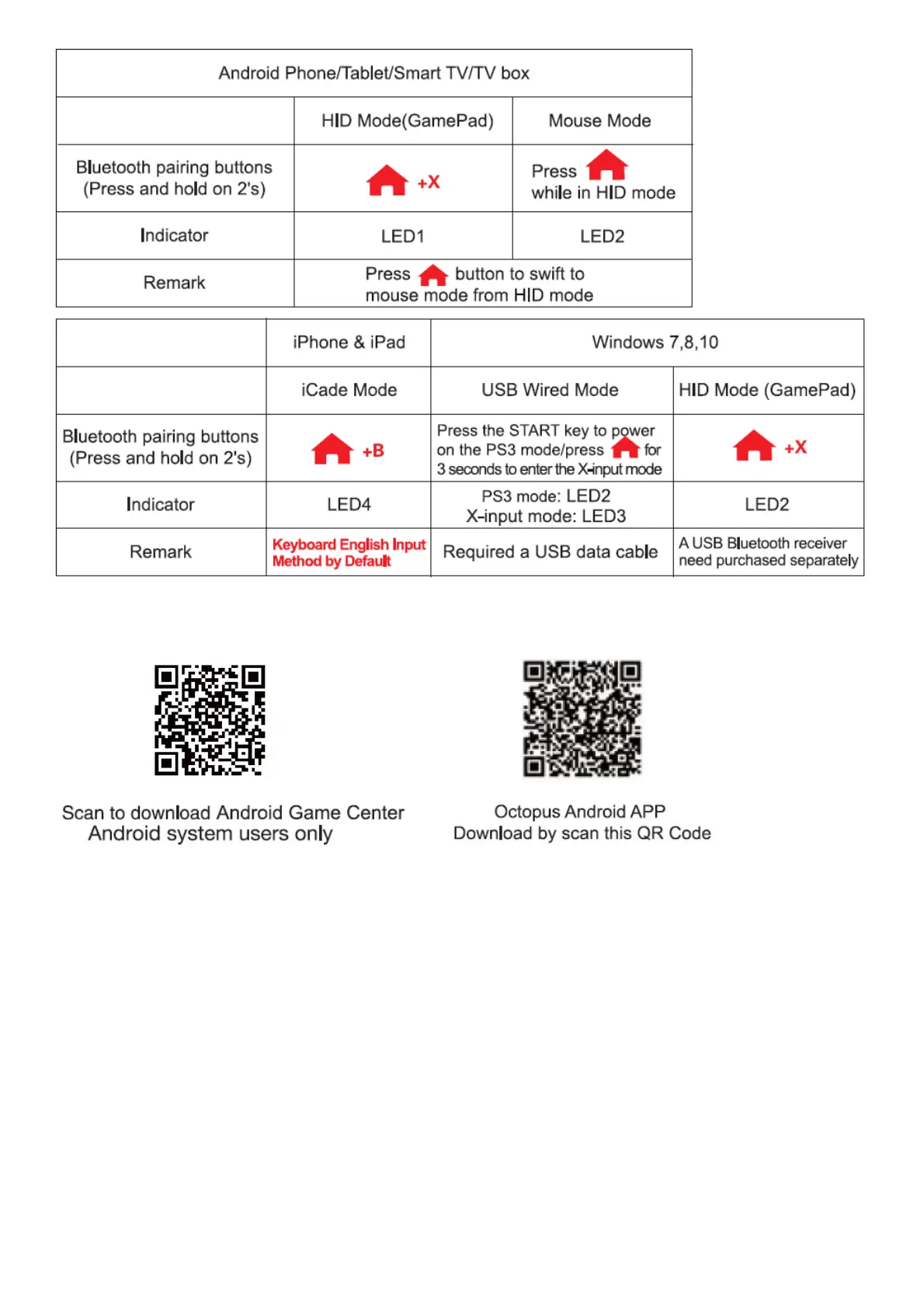
1. Press and hold X button and-Abutton for 2 seconds at the same time, 4 LED indicator lights will blink
simultaneously in a rapid manner at this moment.(Picl)
2. Open the Bluetooth on Android device, click searching.(Pic2)
3. Find and select “PG-9087” for Bluetooth pairing.(Pic2)
4. LED1 lit on after Bluetooth connected.(Pic3)
5. Enter the game.(You can directly play the games which downloads from the Android game centers or
emulators)
6. Or you can also download the Gamepad enabled games from Google Playstore. Below are the recommend
games for reference:
Implosion / Dead Trigger / Dead Effect / CS Portable / The dungeon hunter 4 glory palace / SHADOWGUN:
DeadZone / SoulCraft -Action RPG



 To Next Page