4
Setting Up Your iZiggi-HD
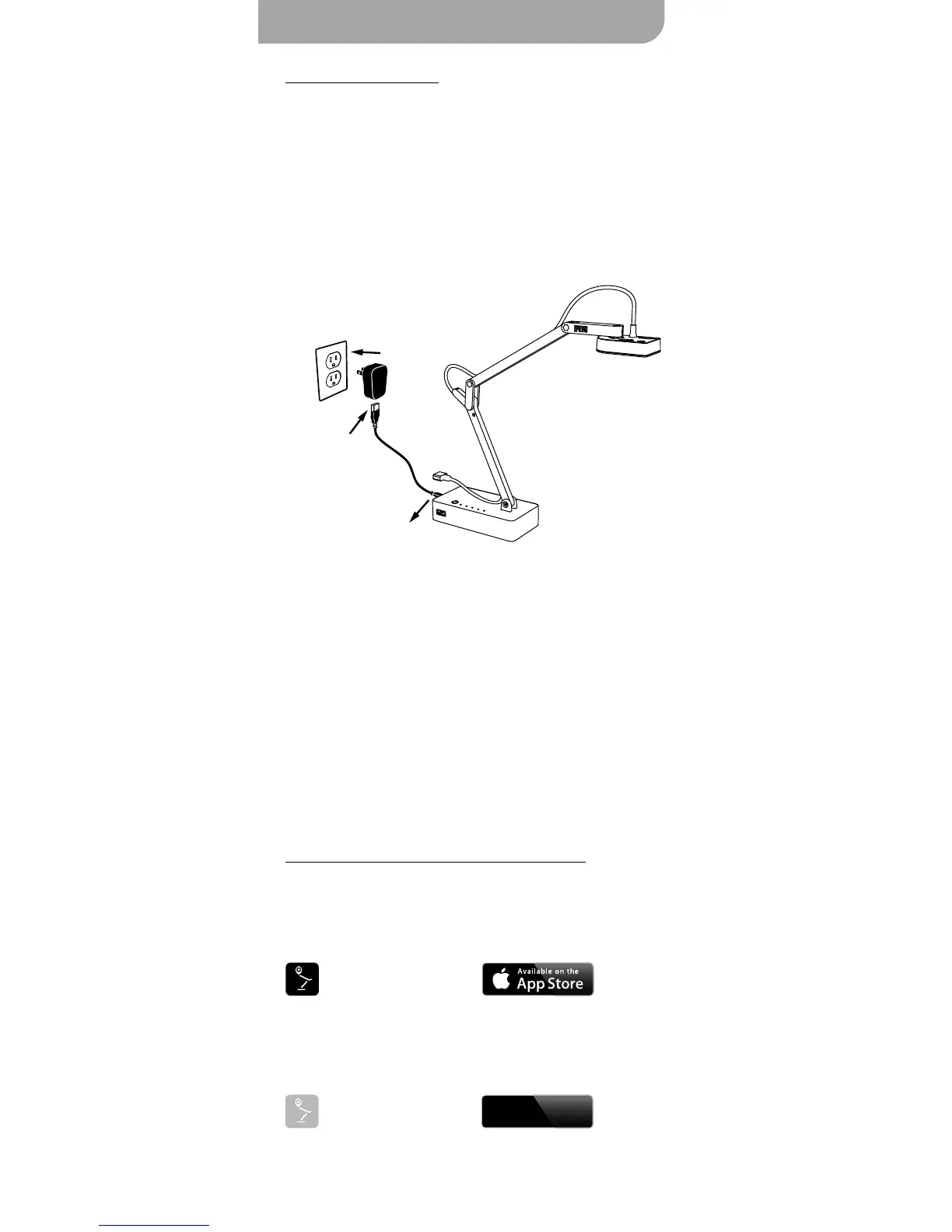
A. Charge iZiggi-HD
B. Download and install apps/software
Please charge iZiggi-HD and make sure sufficient battery power is available
before using the camera or performing other setup steps.
With free IPEVO apps and software, iZiggi-HD can be used on iPad, Mac or
PC. Please find the download location for your desired platform below:
1. Connect the Micro-USB cable to the power adapter and plug the power
adapter into an outlet. Connect the other end of the Micro-USB cable to
the Micro-USB port on iZiggi-HD.
2. When iZiggi-HD is charging, the “PWR” LED will turn red. This light will
go off once iZiggi-HD is fully charged by performing step 1. Note that
iZiggi-HD is ready for use when power adapter is connected, regardless
of the battery power status.
Battery Tips:
• It takes approximately 3 hours to fully recharge iZiggi-HD on an empty
battery. This assumes iZiggi-HD is powered off during recharge.
• It will take significantly longer to fully recharge if iZiggi-HD is in use
while charging.
• iZiggi-HD can be used on battery power for about 3 hours when fully
charged.
• When the "PWR" LED blinks orange, iZiggi-HD is low on battery and
needs to be charged.
• iZiggi-HD can also be charged using a standard USB port on your
computer. Please note that it will take significantly longer to charge via
this method, since a USB port provides less power output.



 To Next Page