EasyManua.ls Logo

iPort xPRESS - User Manual

iPort xPRESS
2 pages
Print Icon
To Next Page IconTo Next Page
Loading...
WiFi
Battery
Powered
Decora
®
Compatibiable
The xPress Audio Keypad is an entirely
new way to control Sonos anywhere you
are around the house. xPress is WiFi,
battery-powered and magnetic allowing
you to install it anywhere. Pair a keypad
with any Sonos device and control your
entire Sonos home sound system when
grouped in party mode.
xPress is an ocial Endorsed
Partner Integration with Sonos.
The Audio Keypad for Sonos
®
.

Other manuals for iPort xPRESS

Question and Answer IconNeed help?

Do you have a question about the iPort xPRESS and is the answer not in the manual?

Summary

XPRESS Audio Keypad Overview

Key Features and Connectivity

Highlights WiFi, battery-powered, and Decora compatible features for flexible installation and control.

XPRESS Audio Keypad Specifications

Physical Dimensions and Weight

Details on the keypad's physical size (height, width, depth) and weight.

Package Contents

List of items included in the xPress Audio Keypad package.

xPRESS Keypad Buttons

Play;Pause Button Functionality

Start music with a touch, no phone needed. Offers convenient playback control.

Track Forward Button

Skip to the next song easily. Allows seamless song selection without using your phone.

Favorites Button for Sonos

Direct access to Sonos favorites like Spotify and Pandora. Toggle stations with a button press.

Volume Control Buttons

Quickly adjust audio volume. Ideal for answering calls or changing party ambiance.

Setting Up Your xPress

Add Keypad to Network

Connect your xPress keypad to your home network using the iPort Connect iOS App.

Assign Keypad to Sonos Device

Link your xPress keypad to a specific Sonos device for control.

Choose Installation Spot

Select an ideal location for your keypad for convenient access and functionality.

Overview

The iPort xPress Audio Keypad for Sonos is a battery-powered, WiFi-enabled, and magnetic keypad designed to provide an entirely new way to control your Sonos home sound system. It offers convenient control of Sonos devices anywhere around the house without needing to use a smartphone or tablet.

Function Description:

The xPress Audio Keypad allows users to control their Sonos system with physical buttons. It can be paired with any Sonos device and is capable of controlling the entire Sonos home sound system when grouped in party mode. This device is an official Endorsed Partner Integration with Sonos, ensuring seamless compatibility and functionality.

Important Technical Specifications:

  • Dimensions:
    • Height: 2 5/8" (66mm)
    • Width: 1 5/16" (33mm)
    • Depth: 7/16" (11mm)
  • Weight: 0.1 lbs
  • Power Source: Battery Powered
  • Connectivity: WiFi
  • Compatibility: Decora® Compatible (with included wall-plate adapter)
  • Model Number: #70800

Usage Features:

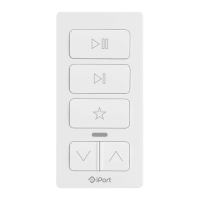
The keypad features five distinct buttons, each with a specific function:

  • Play / Pause: Initiates or pauses music playback with a single touch, eliminating the need to access a phone.
  • Track Forward: Skips to the next song, providing quick control over the music queue.
  • Favorites (Star Button): Provides direct access to Sonos favorites, allowing users to toggle between music stations from services like Spotify and Pandora with a touch.
  • Volume Up: Increases the audio volume.
  • Volume Down: Decreases the audio volume, useful for quickly lowering sound for conversations or phone calls.

The magnetic design allows for flexible installation anywhere in the home, such as on refrigerators, magnetic strips, or within a Decora® wall-plate.

Setting Up xPress:

The setup process is streamlined using the iPort Connect iOS App:

  1. Add Your Keypad to Your Network: Configure the keypad to join your home's WiFi network.
  2. Assign Your Keypad to a Sonos Device: Link the keypad to a specific Sonos device or group.
  3. Choose a Great Spot to Install Your Keypad: Place the keypad in a convenient location within your home.

The setup requires no complex programming or additional hubs.

What's in the Box:

  • xPress Keypad
  • Micro USB to USB Cable (for charging)
  • 1G Decora Wall-plate adapter & hardware (for in-wall installation)
  • Quick Start Guide

Maintenance Features:

  • Battery Powered: The device is battery-powered, offering portability and flexibility in placement. Charging is done via the included Micro USB to USB cable.
  • Decora® Compatibility: The included Decora® wall-plate adapter allows for a clean, integrated look when installed in a standard electrical box, making it blend seamlessly with existing home decor.

The iPort xPress Audio Keypad provides a simple, intuitive, and accessible way to control your Sonos system, enhancing the user experience by offering physical controls that are always within reach.
iPort xPRESS Specifications

General IconGeneral
BrandiPort
ModelxPRESS
CategoryKeypad
LanguageEnglish

Related product manuals