DIGITAL TIME CLOCK - Code 8092271
When the selector is in the “AUTO” position, boiler
functioning is autom atically controlled on the basis of
the tem perature levels and tim e periods set. The second
selector m ust be in the “ RUN” position to start. The
program ming procedure is described below:
- Setting the time
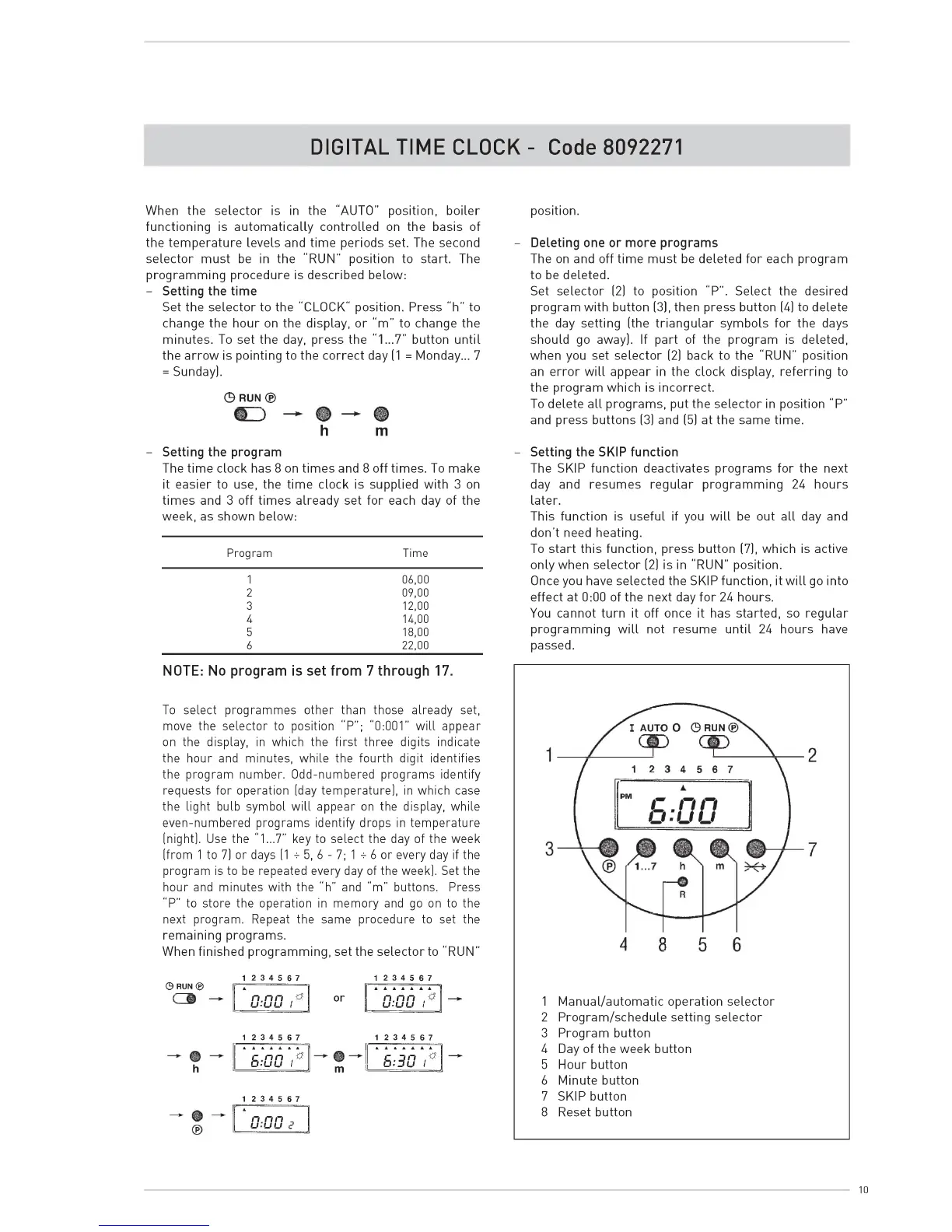
Set the selector to the “ CLOCK" position. Press “h” to
change the hour on the display, or “m ” to change the
minutes. To set the day, press the "1 ^ 7 ” button until
the arrow is pointing to the correct day (1 = M onday^ 7
= Sunday).
© RUN ®
h m
- Setting the program
The tim e do c k has 8 on tim es and 8 off tim es. To make
it easier to use, the tim e d o ck is supplied w ith 3 on
tim es and 3 off tim es already set fo r each day of the
week, as shown below:
Program Time
1
06,00
2 09,00
3 12,00
4 14,00
5 18,00
6 22,00
NOTE: No program is set from 7 through 17.
To select programmes other than those already set,
move the selector to position “ P” ; “ 0:001” w ill appear
on the display, in which the first three digits indicate
the hour and minutes, while the fourth digit identifies
the program number. Odd-numbered programs identify
requests for operation (day temperature), in which case
the light bulb symbol w ill appear on the display, while
even-numbered programs identify drops in temperature
(night). Use the "1 ^ 7 ” key to select the day of the week
(from 1 to 7) or days (1 k 5, 6 - 7; 1 k 6 or every day if the
program is to be repeated every day of the week). Set the
hour and minutes with the “ h” and “m ” buttons. Press
“ P” to store the operation in memory and go on to the
next program. Repeat the same procedure to set the
remaining programs.
When finished program m ing, set the selector to “ RUN”
position.
Deleting one or more programs
The on and off tim e m ust be deleted fo r each program
to be deleted.
Set selector (2) to position “ P” . Select the desired
program w ith button (3), then press button (4) to delete
the day setting (the triangu lar sym bols for the days
should go away). If part of the program is deleted,
when you set selector (2) back to the “ RUN” position
an erro r w ill appear in the do ck display, referring to
the program which is incorrect.
To delete all program s, put the selector in position “ P”
and press buttons (3) and (5) at the same time.
Setting the SKIP function
The SKIP function deactivates program s for the next
day and resum es re g ular program m ing 24 hours
later.
This function is useful if you w ill be out all day and
don't need heating.
To start this function, press button (7), which is active
only when selector (2) is in “RUN” position.
Once you have selected the SKIP function, it w ill go into
effect at 0:00 of the next day fo r 24 hours.
You cannot turn it off once it has started, so regular
program ming w ill not resume until 24 hours have
passed.
© RUN ®
1 2 3 4 5 6 7 1 2 3 4 5 6 7
n.nn
u-uu 1
or
A A A A A A t
n.nn
u-uu I
1
M anual/autom atic operation selector
1 2 3 4 5 6 7 1 2 3 4 5 6 7
2
3
Program /schedule setting selector
Program button
' f i . ' o o T
m
‘ s . ' i o T
—
4
5
Day of the week button
Hour button
6 Minute button
1 2 3 4 5 6 7
7 SKIP button
0 :0 0 e
8 Reset button
10


 To Next Page