InfiRay Outdoor • MATE Series • User Manual www.infirayouordoor.com
All rights reserved and shall not be copied and distributed in any form without written permission
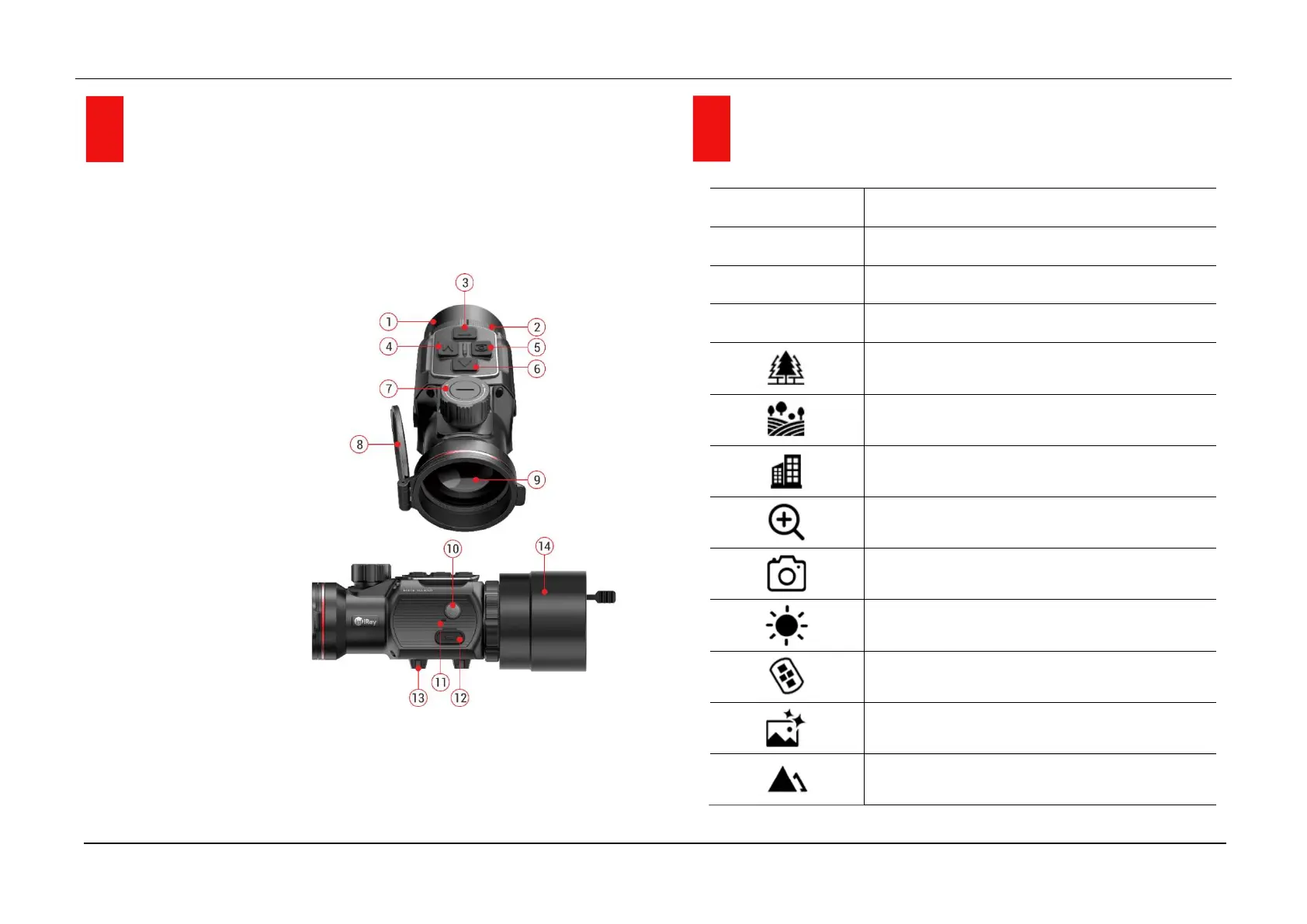
4 Components and Controls
1. Eyepiece
2. Eyepiece bayonet-type ring
3. Down button
4. Menu (M) button
5. Camera button
6. Up button
7. Lens focus knob
8. Lens cover
9. Objective lens
10. Power button
11. Microphone
12. Type-C port
13. Bottom picatinny rail
14. Clip-on universal adapter
5 Menu / Status Bar Icons
W
Image mode White hot
B
Image mode Black hot
R
Image mode Red hot
C
Image mode Color
Scene mode Forest
Scene mode Flatland
Scene mode City
E-zoom (only for Monocular: x1, x2, x3, x4)
Take a photo
Display brightness
Remote control
Scene mode
Image sharpness



 To Next Page