1514
2).Massage position adjustment
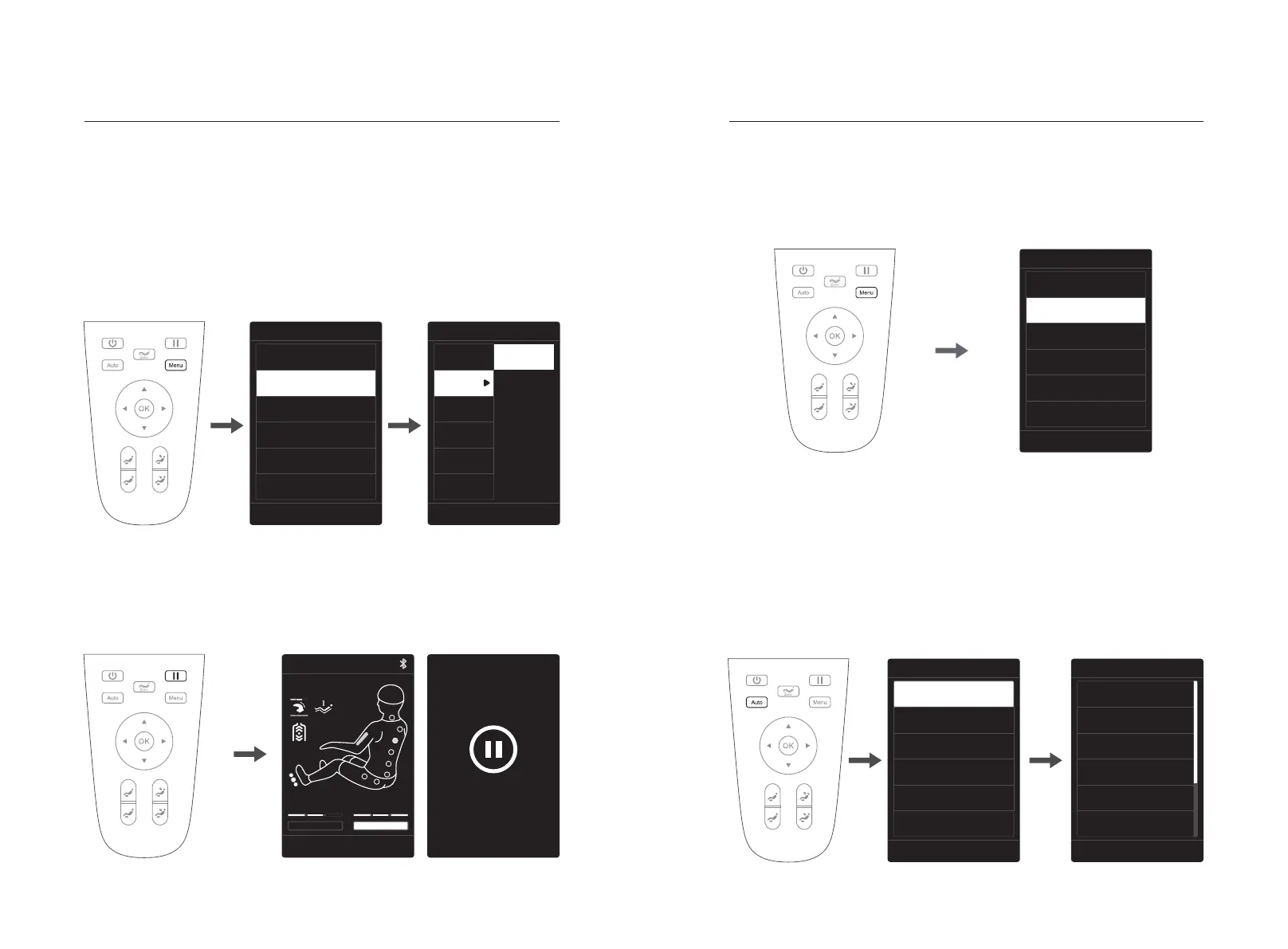
·After entering the massage program, if it is necessary to adjust the massage position,
press the "Menu" key on the manual controller to select the manual program to enter,
select the manual program, and then press the "Left" key to return to the information
interface (the information interface is changed to the manual program interface).
·From the manual program interface, if the massage position displays fixed points or
local, you can directly press the "Up" or "Down" key to move the manipulator up and
down.
·From the manual program interface, if the massage position is not fixed point or local,
you need to select massage adjustment to enter, then select the massage part, select
fixed point or local, then press the "Left" key to return to the information interface, and
then press the "Up" or "Down" key to move and adjust the manipulator up and down.
Method of UsageMethod of Usage
Note: In auto mode, the manipulator cannot be moved up and down through the "up
key" or "down key".
3.Pause key
·When the massage function is running, press the "Pause" key to temporarily stop
all massage functions; press the "Pause" key again to continue the massage
function before the pause. If the pause lasts for more than 20 minutes, all massage
functions will be automatically turned off.
4.Menu key
1).Automatic program (menu - automatic program, or you can also enter the
automatic program interface through the "Automatic" key)
·Press the "Menu" key to enter the menu massage function selection interface,
including automatic program, manual program, air compression massage, auxiliary
function, memory storage, setting function, etc.
·After entering the menu interface, press the "Up" or "Down" key to select the
desired massage function, select any function, and then press the "OK" key to
confirm. Press the "Left" key to return to the previous menu interface.
·Press the "Menu" key to enter the menu interface, press the "Up" or "Down" key to
select the automatic function, and press the "OK" key (or directly press the "Automatic"
key in the information interface) to enter the selection of the automatic function.
·Automatic functions include 15 automatic massage modes, i.e. Comfort massage, Relax
massage, Stretch Massage, Neck&shoulder Massage, Back&Waist Massage, Full body
Massage, Ancient Beauty Care, Leg&hip Care, Sedentary Release, Spine Care,
President Cosy, Relieve Soreness, Good-night Sleep,Sport Recovery, and Meridian
Treatment.
·Enter the automatic function interface, press the "Up" or "Down" key to select any
automatic function massage program, and then press the "OK" key to confirm. It will
automatically return to the information interface, and the information interface will be
displayed as an information interface with automatic functions.
16:00
Menu
Auto Mode
Manual Mode
Air Massage
OtherFunc
Customise
Setting
Please use “up” or “down” key to select and press OK
暂停中
再次点击暂停按键
恢复使⽤
Pause!
Click pause button
to restore use
Manual Mode
Wise
Area
Width
Speed
Spot
Partial
Upper
Lower
Full
Please use “navigation” key to select and press OK
16:00
16:00
Comfort massage
Roll Str Air Str
Massage Adj
Shoulder Adj
Select the object with“left” or “right” key and press OK
16:00
Menu
Auto Mode
Manual Mode
Air Massage
OtherFunc
Customise
Setting
Please use “up” or “down” key to select and press OK
16:00
Auto Mode
Comfort Massage
Relax Massage
Stretch Massage
Neck&shoulder Massage
Back&Waist Massage
Full body Massage
Please use “up” or “down” key to select and press OK
16:00
Menu
Auto Mode
Manual Mode
Air Massage
OtherFunc
Customise
Setting
Please use “up” or “down” key to select and press OK



 To Next Page