0908
Method of usage Method of usage
Note: The specific displays refer to the actual object of this product!
1
2
3
4
5
6
7
8
9
10
11
12
13
14
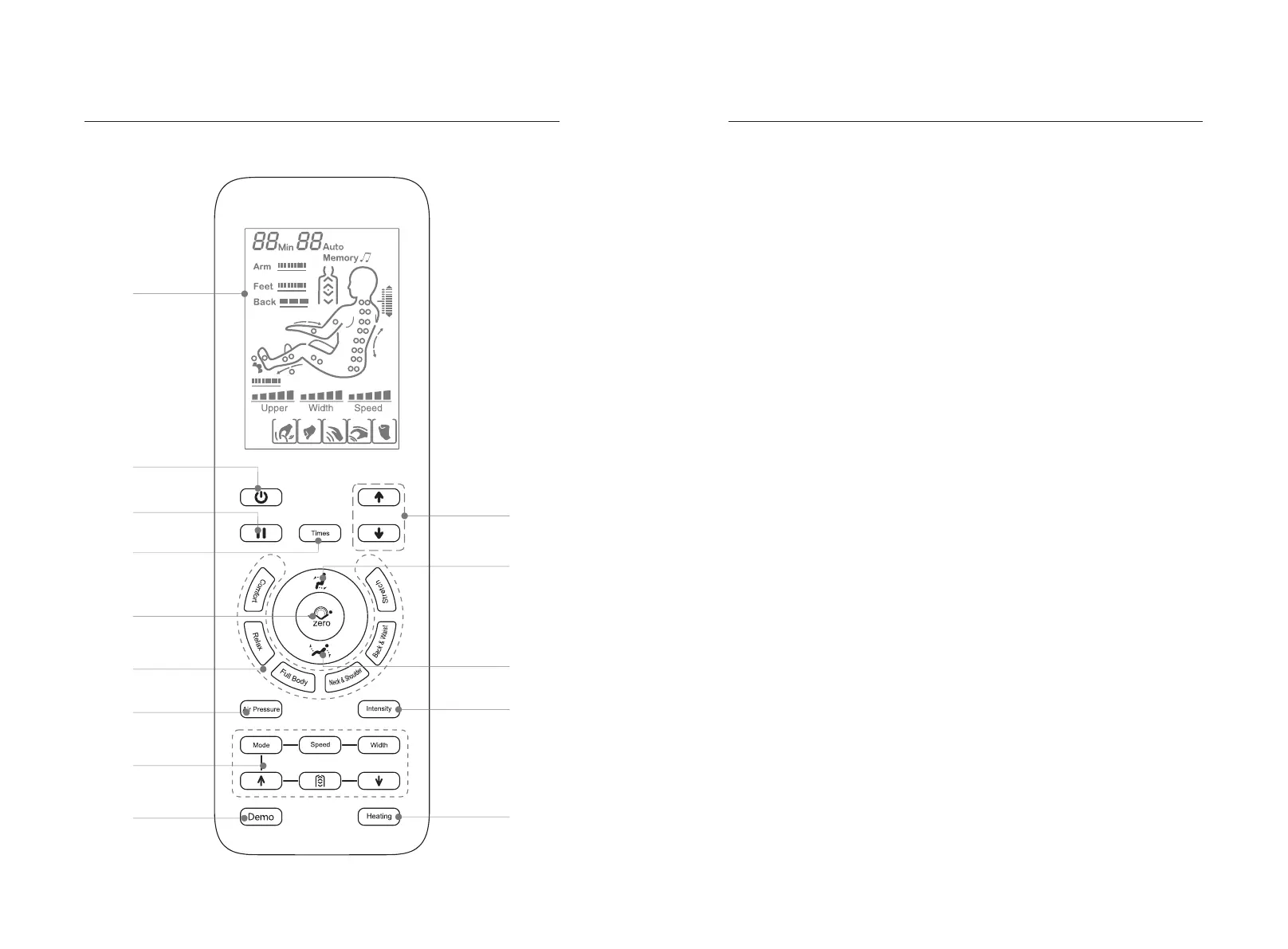
1.LCD display:
·Display all massage functions
2.Power switch:
·Turn on or Turn off all massage functions.
3.Pause button:
·Stop or start all massage functions..
4.Timing button
·Time setting
5.Auto lying Button
·There are three automatic lying position, choose your favorite one.
6.Auto massage Button
·Please refer to page 10 of this manual for details.
7.Air pressure mode Button
·Turn on/off the air pressure massage function (refer to page 11 of this manual for
details).
8.Manual massage button
·Please refer to page 10 of this manual for details.
9.Demo button
·Fast to experience all the massage effect.
10.Shoulder adjust button
·Make the adjustment on shoulder acupressure points.
11.Lifting button
·Rise up the backrest and lower down the footrest.
12.Lying button
·Lower down the backrest and rise up the footrest.
13.Air pressure intensity button
·Make the adjustment on air pressure intensity.
14.Heating
·Turn on/off heating massage function


 To Next Page