14
15
AUTO
Zero
1
2
3
4
5
Method of usageMethod of usage
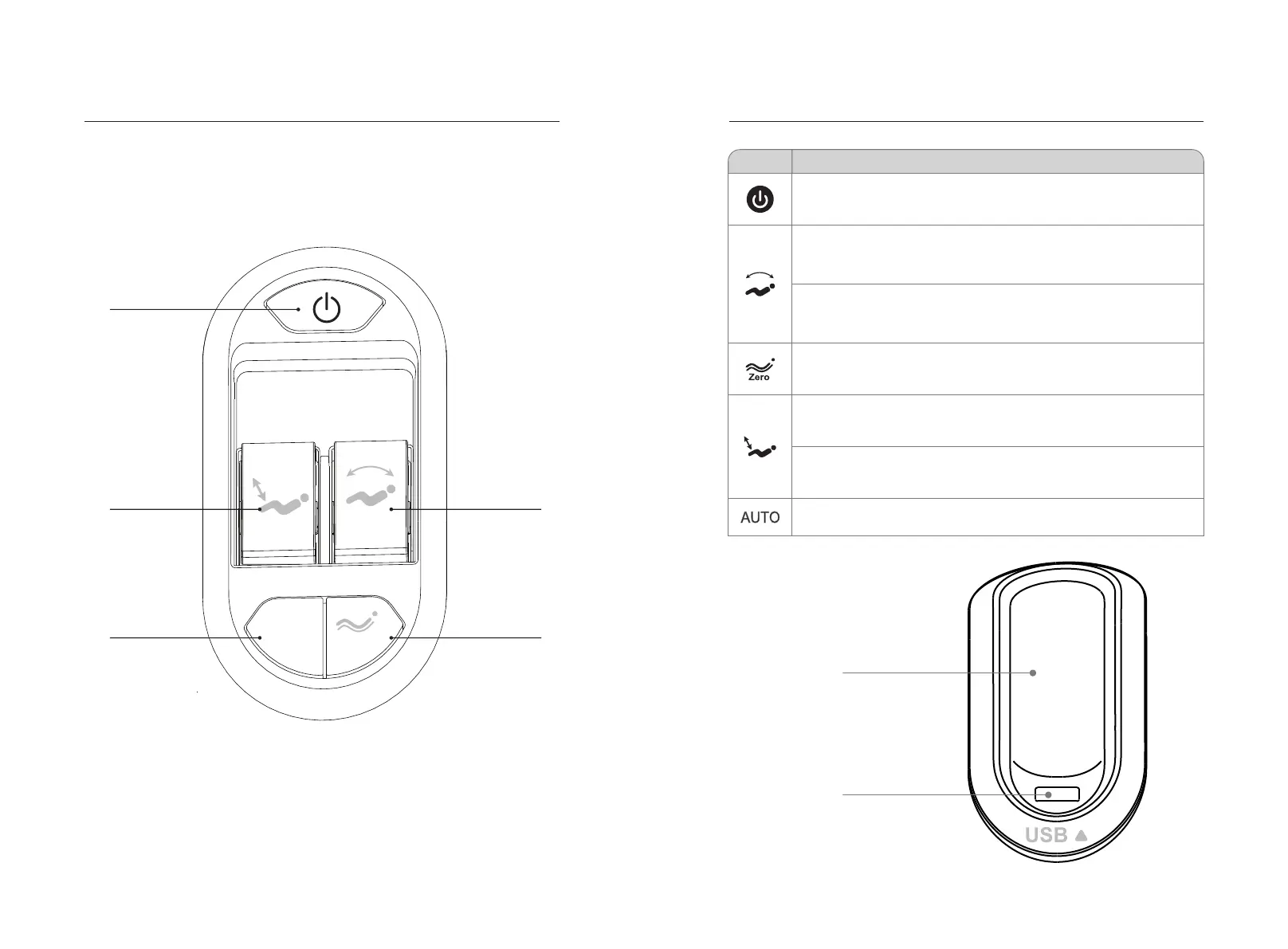
3.Introduction of handrail shortcut keys
The left arm
1. Turn on the key: open the massage chair.
2. calf lift key: adjust the calf up or down.
3. Automatic key: enable automatic massage function.
4. linkage adjustment key: linkage adjustment backrest frame lifting adjustment.
5. Zero-gravity key: adjust to the zero-gravity Angle of the massage chair.
Function
Description
Power button: press this button to turn on or off all massage functions.
calf up key: lift the key up calf slowly, release will stop calf up.
Calf frame down key: press the key down calf frame slowly down,
release will stop calf frame down.
Automatic mode key: press each time, automatic massage function
switch.
Right arm
Manual controller
or cell phone placement slot
USB charging port
Move the backrest and footrest up: Press the button, backrest up and
footrest down slowly, it will stop once release the button.
Zero gravity key: every time you press the key, automatically adjust the
position of calf frame and backrest frame to zero gravity position. There
are three kinds of zero-gravity lying mode, which can be rotated.
Move the backrest and footrest down: Lift up the button, backrest down
and footrest up slowly, it will stop once release the button.


 To Next Page