Note: you can't adjust the massage position when it is in auto program.
MainMenu
Auto program
30:00
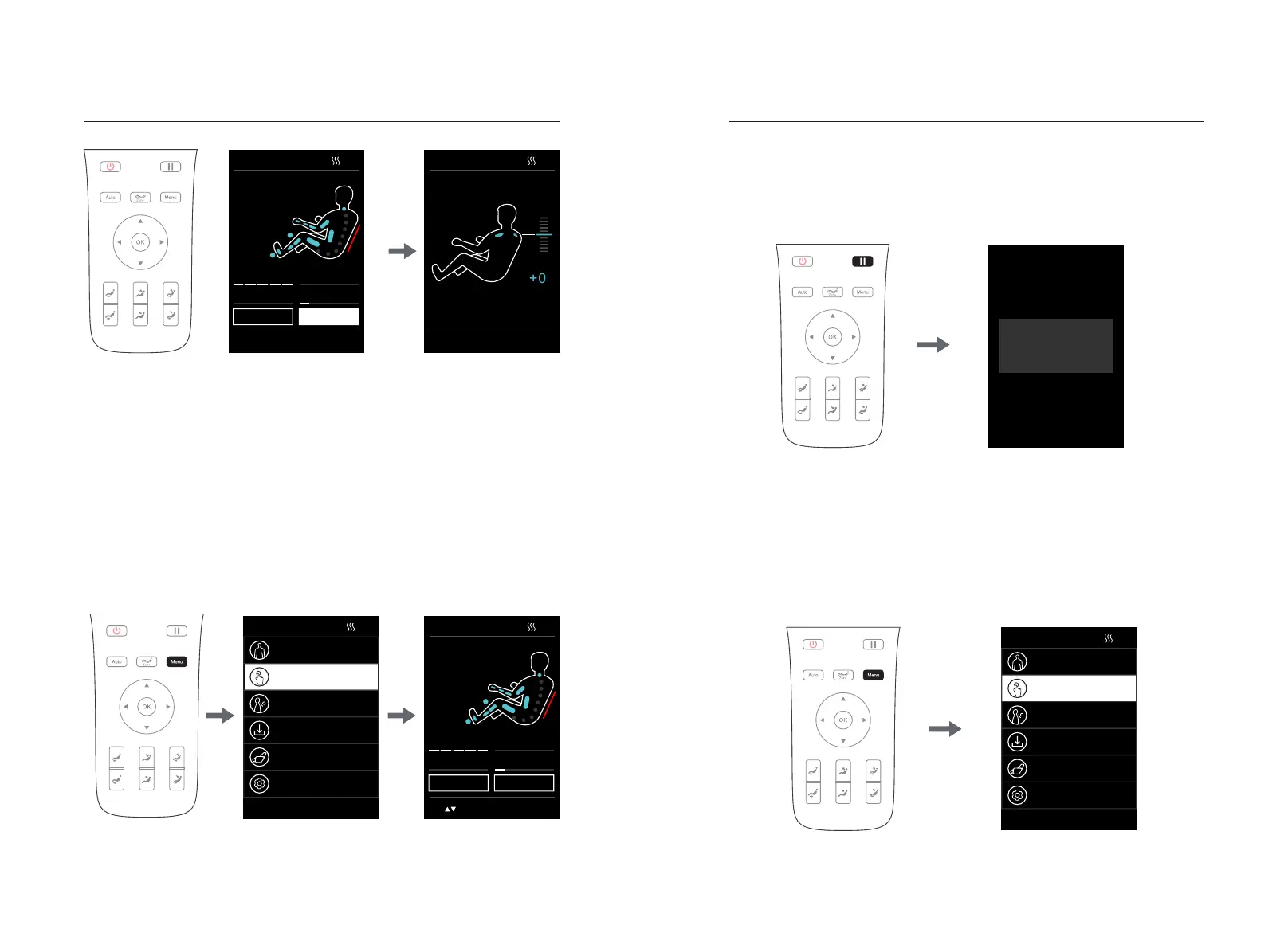
·After entering the massage program, if you need to adjust the massage position,
you can press the "Menu" button on the remote controller to select "Manual
Function" to enter; you can select any one of the manual functions, and then press
"Left Button" to return to the information interface (i.e. The information interface will
switch to the manual function interface)
·In the manual function interface, if the massage range shows a fixed point or local
area, you can directly press "Up Key" or "Down Key" to adjust the manipulator
upward and downward
·In the manual function interface, if the massage range displays neither fixed point
nor local area, you need to select "Massage Adjustment" to enter, and then select
"Massage area", and a fixed point or local area, and press "Left Button" to return to
the information interface. Next, you need to press "Up Key" or "Down Key" to
adjust the manipulator upward and downward
3.Pause button
·While the massage function is in service, press "Pause" button to temporarily stop
all the massage functions; press "Pause" button again to continue the massage
function before pause. If the pause time exceeds 20 minutes, all the massage
functions will be automatically turned off.
Massage position adjustment
4.Menu button
·Press "Menu Button" to enter the massage function selection interface of the main
menu, including automatic, manual, and other functions, intelligent storage, angle
adjustment, settings and other function interfaces.
·Enter the menu interface. Press "Up Key" or "Down Key" to select the function.
Confirm via "OK" to enter the next level of selection; press "Left Button" to return to
the previous menu interface.
Method of UsageMethod of Usage
30:00
Shoulder position
Please use ▲▼ to adjust the shoulder position and press OK
Manual Mode
Other functions
Customise
Angleadjustment
Setting
Select the object with ▲▼ and press OK
Pause
Pressthepausebuttonagain
toresumeusing
1514
MainMenu
Auto program
30:00
Manual Mode
Other functions
Customise
Angleadjustment
Setting
Select the object with ▲▼ and press OK
30:00
00:00
Auto program
Easy massage>
Mode:Tap
Width:Middle
Back speed
Massage width
Air intensity Roller speed
Adjustment
Shoulder
Select the object with ◀▶ and press OK
30:00
00:00
Manual Mode
Mode:Tap
Area:Spot
Width:Middle
Back speed
Massage width
Air intensity Roller speed
Adjustment
Shoulder
ues to adjust the massage posit


 To Next Page