Method of Usage
I. Turn on the power supply of this product
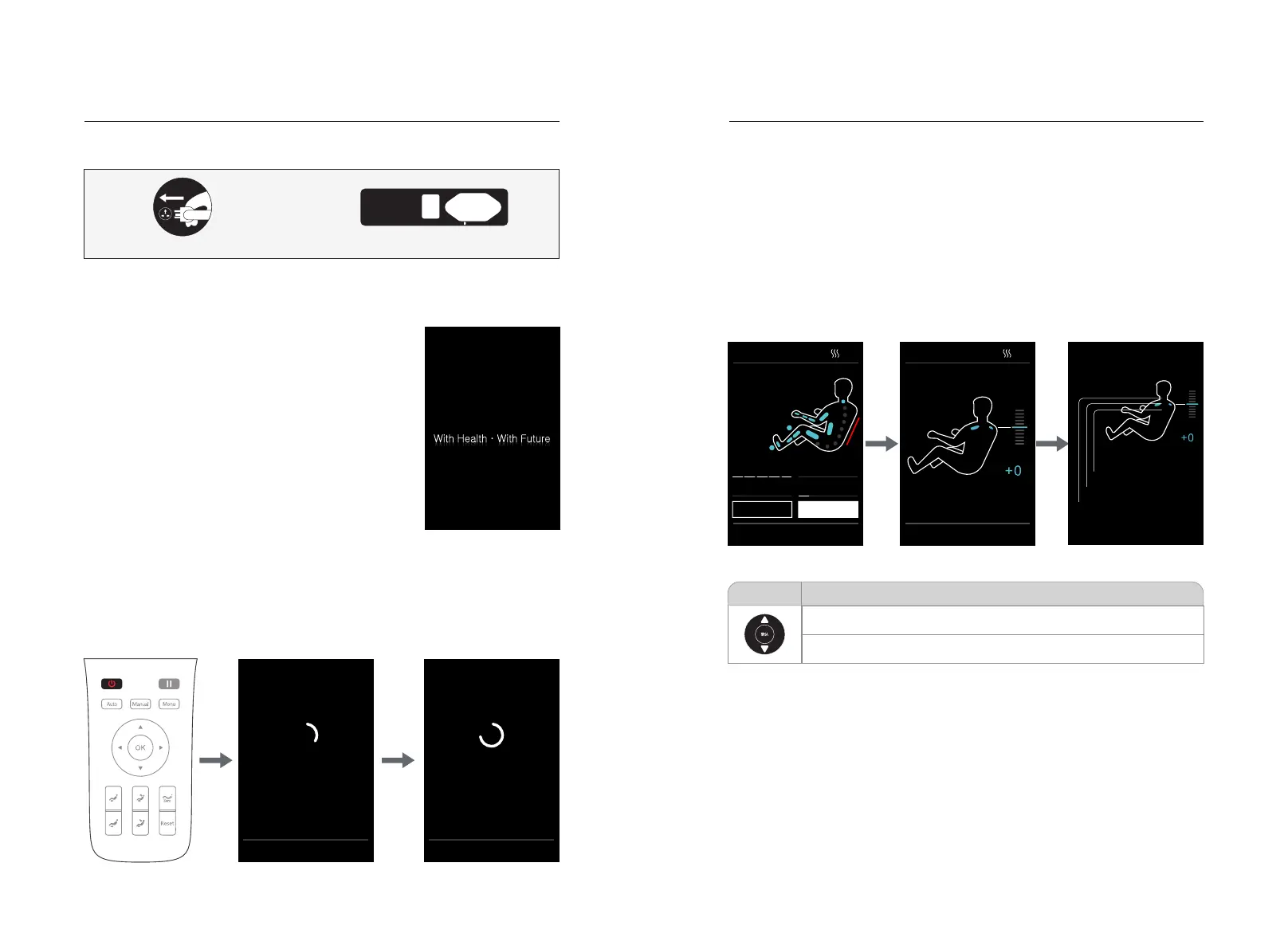
Power-on diagram
Switch position diagram of power supply
Method of Usage
Shoulder position adjustment
·After detecting the shoulder position, the buzzer will beep. If there is any difference
from the actual shoulder position, adjust it to the appropriate position by pressing
the "UP" or "DOWN" key. The shoulder position has 11 adjustable levels. If there is
no shoulder position adjustment within 10 seconds, the massage function will start
automatically. Press "OK" directly to start massage immediately. If no shoulder
position can be detected, massage will be started according to the shoulder height
by default. Note: During massage, under the information interface, you can press
"Right Button" to select the "Shoulder Adjustment" menu, and press "OK" to enter
the shoulder adjustment interface. You can also use "Up Key" or "Down Key" to
adjust the shoulder position.
30:00
Shoulder position
Please use ▲▼ to adjust the shoulder position and press OK
·High shoulder position
·Suitable shoulder position
·Low shoulder position
30:00
00:00
Auto program
Easy massage>
Mode:Tap
Width:Middle
Back speed
Massage width
Air intensity Roller speed
Adjustment
Shoulder
Select the object with ◀▶ and press OK
1312
2.Start to massage (power switch)
·Press “Power” button to start massage, enter the boot screen, backrest maintains
the default position.
·After automatically lying down to the default position, massage chair will
automatically detect the shoulder position and body (note: fast mode only detect
shoulder position, other modes detect whole body and shoulder position), waiting
the detection finish. Or you can press “confirm” button, the massage chair will
directly start to massage in default without shoulder position and body sensing.
Auto lying down
Attention! Ensure that there
are no objects around the
massage chair
Press OK to skip
Body sensing
Just a moment......
Press OK to skip
·If you need to adjust the shoulder position after the massage program is started,
you can directly select "Shoulder Position Adjustment" to enter the shoulder
position adjustment interface; you can press "Up Key" or "Down Key" to adjust the
shoulder position height; you can press "Left Button" to return to the previous
menu, or wait for 10 seconds to automatically return to the information interface
Button
Description
Move the massage balls upward to a suitable shoulder position
Move the massage balls downward to a suitable shoulder position
II. Massage function control operation
1.Standby
·After the massage chair is powered on and turned off,
the remote controller is blank in the standby state (i.e.
the LED lamp is off) and cannot perform any operation
(except the key switch).
POWER INPUT
ON/ OFF


 To Next Page