Iridium GO! exec Quick Start Guide 98 Iridium GO! exec Quick Start Guide
4. SOS
You must congure the SOS button in order to initiate an SOS call to a
designated Call Recipient. Failure to congure the SOS button will result
in no call when the SOS button is pressed. This could prevent or delay an
emergency response and result in serious injury or death.
WARNING
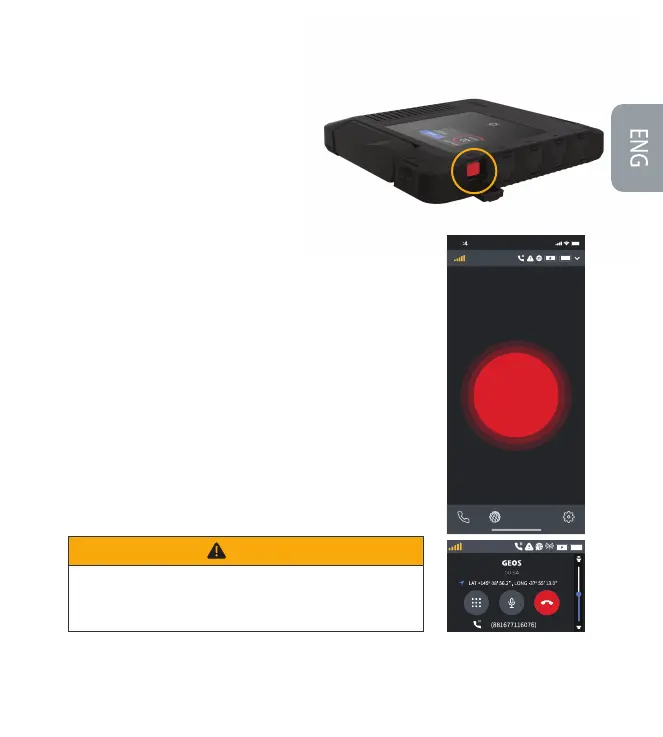
How to use SOS:
From SOS button on the device:
Press the SOS button on the device for a few seconds.
You have 10 seconds to cancel the SOS option if initiated by error.
When SOS call is initiated via the device, you should use the speaker
on the device to communicate and relay your GPS location by reading
it from the device screen.
From device touchscreen or the Iridium GO! exec App interface:
Select the SOS option from the home screen.
Long press the SOS button on the touchscreen to initiate SOS call.
You have 10 seconds to cancel the SOS option if initiated by error.
When SOS call is initiated via the device, use the speaker to
communicate and relay your GPS location by reading it from the
device screen.
When SOS call is initiated via the App, use the mobile phone to
communicate and relay your GPS location by reading it from the
mobile phone or device screen.
Iridium GO! exec is equipped with an SOS feature.
Note: For more information on how to set up
SOS and the SOS test procedure, refer to the
User Manual.
1.
2.
3.
1.
2.
3.
4.
5.
9 1
Activating the SOS now will
take the following action:
Call GEOS
Long press to activate SOS
SOS
SOS
Iridium
SOS
SOS
Iridium


 To Next Page
 Loading...


