Iridium GO! exec Quick Start Guide 76 Iridium GO! exec Quick Start Guide
1
6
7
2
3
4
5
Select Icon to Get Started
00
Contacts
Search...
A
Aaron Cooper
Albert Flores
Albert Robertson
B
Bob Edwards
Brian Henry
Jerome Bell
Bessie Cooper
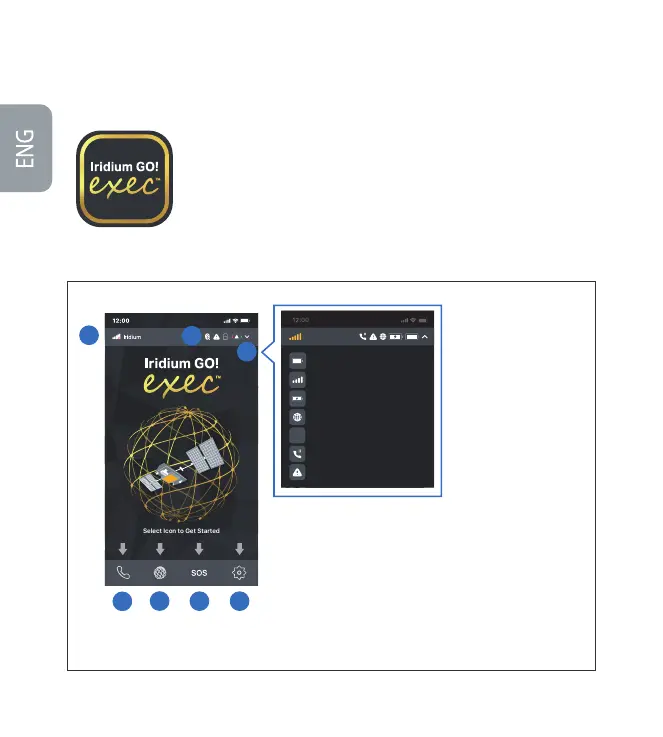
Device Battery
Iridium Network Status
Smart Device Charging Status
Internet Status
SOS StatusSOS
Active Call
Error Notification
Iridium
SOS
Using the Iridium GO! exec
Iridium GO! exec requires connection to the Iridium satellite network. For optimal
performance, make sure the swivel antenna is vertical to the ground and has a clear,
unobstructed view of the sky.
IMPORTANT: Before you start using the app, refer to the Connection Manager
section for the best data user experience.
Note: Ensure you’re connected to the device’s Wi-Fi, open the app, accept all terms
and conditions, and allow permissions. Select the desired option to get started.
1. Satellite Signal Strength
2. Call
3. Internet
4. SOS
5. Settings
6. Status Icons
• Bluetooth®
• Error Notication
• Smart Device Charging Status
• Device Battery Status
7. Device Status Details



 To Next Page